Miscellaneous Property Types
- 7 minutes to read
This topic describes Property Editors shipped with XAF’s built-in modules.
ASP.NET Core Blazor Property Editors
In ASP.NET Core Blazor, BlazorPropertyEditorBase.ComponentModel returns an IComponentModel descendant that wraps properties and events of a corresponding ASP.NET Core Blazor Editor.
RichTextPropertyEditor
Data type: byte[] or String
Component: DxRichEdit
Namespace: DevExpress.ExpressApp.Office.Blazor.Editors
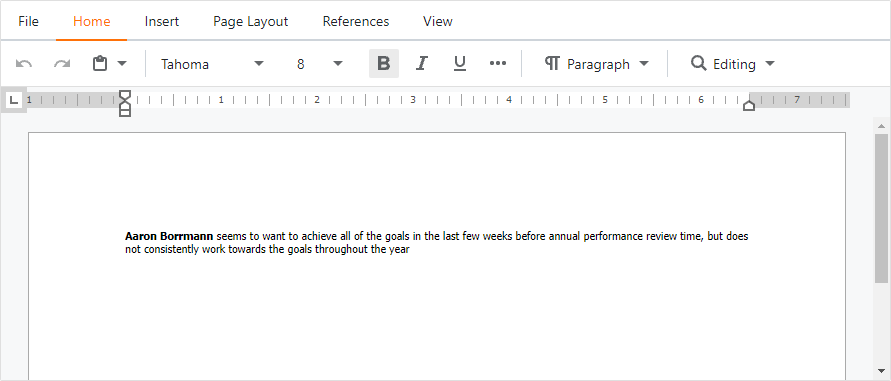
RichTextPropertyEditor ships with the Office Module. You can use it in List and Detail Views. Use RichTextPropertyEditor to edit rich text documents and create Mail Merge templates. For more information about this Property Editor, refer to the following topic: Use Rich Text Documents in Business Objects.
SchedulerLabelPropertyEditor
Data type: IEvent.Label
Component: DxComboBox<TData, TValue>
Namespace: DevExpress.ExpressApp.Scheduler.Blazor.Editors
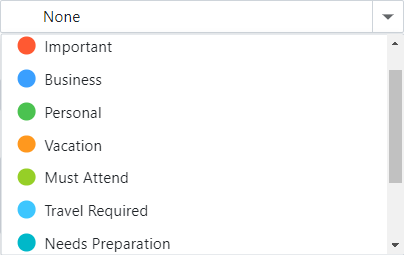
SchedulerLabelPropertyEditor displays the Label property of a business class that implements the built-in DevExpress.Persistent.Base.General.IEvent interface. For more information about Scheduler-specific properties and Property Editors, refer to the following topic: Scheduler Module Overview.
SchedulerLabelPropertyEditor ships with the Scheduler Module. Its control is an image combo box. Items in the combo box are DxSchedulerAppointmentLabelItem objects.
For information on how to customize the Label property, refer to the following topic: How to: Customize Status and Label Properties.
SchedulerStatusPropertyEditor
Data type: IEvent.Status
Component: DxComboBox<TData, TValue>
Namespace: DevExpress.ExpressApp.Scheduler.Blazor.Editors
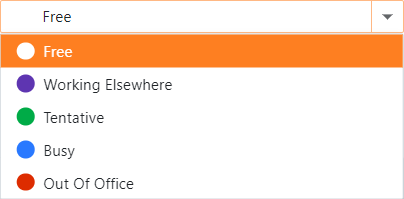
SchedulerStatusPropertyEditor displays the Status property of a business class that implements the built-in DevExpress.Persistent.Base.General.IEvent interface. For more information about Scheduler-specific properties and Property Editors, refer to the following topic: Scheduler Module Overview.
SchedulerStatusPropertyEditor ships with the Scheduler Module. Its control is an image combo box populated by DxSchedulerAppointmentStatusItem objects.
For information on how to customize the Status property, refer to the following topic: How to: Customize Status and Label Properties.
SchedulerRecurrenceInfoPropertyEditor
Data type: IRecurrentEvent.RecurrenceInfoXml
Component: DxComboBox<TData, TValue>
Namespace: DevExpress.ExpressApp.Scheduler.Blazor.Editors
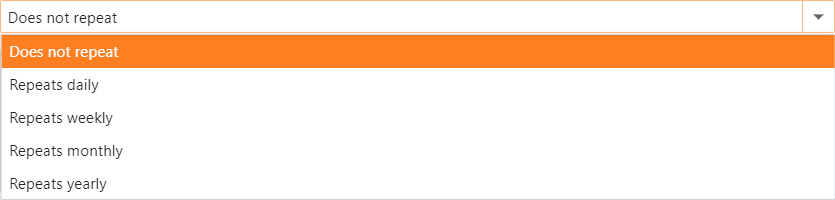
SchedulerRecurrenceInfoPropertyEditor displays the RecurrenceInfoXml property of a business class that implements the built-in IRecurrentEvent interface. For more information about recurrent events in Scheduler, refer to the following topic: Recurring Events.
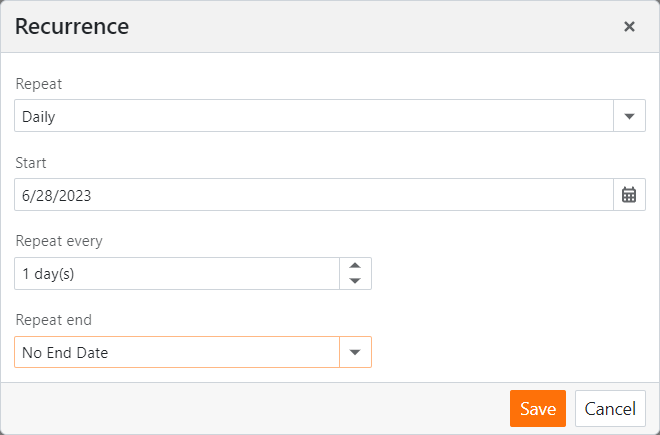
SchedulerRecurrenceInfoPropertyEditor ships with the Scheduler Module. Select a value in the drop-down list of this Property Editor to invoke a form where you can specify the current event’s recurrence options.
DefaultPropertyEditor

Important
DefaultPropertyEditor has a number of limitations and we do not recommend that you use it intentionally in your applications. For instance, this Property Editor does not support Conditional Appearance functionality.
Data type: Any data type
Component: DxTextBox
Namespace: DevExpress.ExpressApp.Blazor.Editors
Used as a default editor for unsupported data types. Displays the property’s value in read-only mode.
ProtectedContentPropertyEditor
Data type: Any data type.
Namespace: DevExpress.ExpressApp.Blazor.Editors
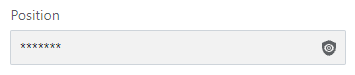
ProtectedContentPropertyEditor displays properties that the current user has no permission to view. This Property Editor is always read-only.
To specify custom text instead of the protected data, use the IModelApplication.ProtectedContentText property of the Application Model‘s Application node.
For more information about user permissions, refer to the following topic: Security (Access Control & Authentication) and the SecurityDemo XAF application. This demo application is available in the %PUBLIC%\Documents\DevExpress Demos 23.1\Components\XAF\SecurityDemo.NETFramework.XPO folder.
Windows Forms Property Editors
Each Windows Forms Property Editor is available in two forms:
- A standalone control (displays property value in a Detail View)
- A repository item (displays property value in a List Editor that supports in-place editing)
RichTextPropertyEditor
Data type: byte[]
Control: RichEditorContainer wrapper for the RichEditControl, part of the DevExpress WinForms Subscription.
Repository Item: RepositoryItemRichTextEdit.
Intended for byte array properties and can be used in List and Detail Views. This Property Editor is supplied with the Office Module.
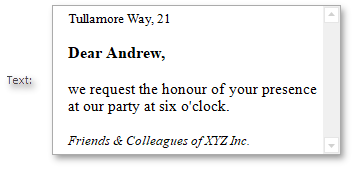
This Property Editor allows you to edit rich text documents stored in the DOCX format and create Mail Merge templates. Refer to the Use Rich Text Documents in Business Objects topic for more information about the RichTextPropertyEditor.
SpreadsheetPropertyEditor
Data type: byte[]
Control: SpreadsheetContainer wrapper for SpreadsheetControl, part of the DevExpress WinForms Subscription.
Repository Item: No repository item available. You cannot use this Property Editor in List Views.
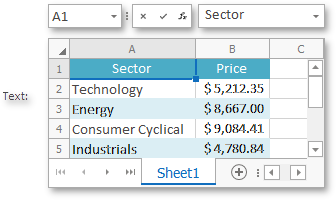
SpreadsheetPropertyEditor ships with the Office Module. Use this Property Editor to edit spreadsheet documents.
ChartPropertyEditor
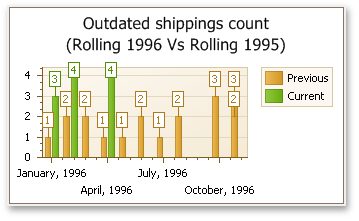
Data type: IChartDataSourceProvider
Control: ChartControl
Repository Item: No repository item available. List Views display a textual representation of an IChartDataSourceProvider object.
SchedulerLabelPropertyEditor
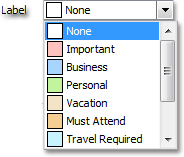
Data type: IEvent.Label
Control: AppointmentLabelEdit editor, part of the DevExpress WinForms Subscription.
Repository Item: No repository item available. The Scheduler control displays the Event.Label property in a custom manner.
SchedulerLabelPropertyEditor displays the Label property of a business class that implements the built-in DevExpress.Persistent.Base.General.IEvent interface. For more information about Scheduler-specific properties and Property Editors, refer to the following topic: Scheduler Module Overview.
SchedulerLabelPropertyEditor ships with the Scheduler Module. Its control is an image combo box populated by the AppointmentLabel objects. These objects are stored in the control’s SchedulerStorage. To access them, use the AppointmentStorage.Labels collection returned by the SchedulerStorage.Appointments property.
To expand the editor’s drop-down window, use Alt + Down Arrow.
SchedulerStatusPropertyEditor
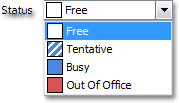
Data type: IEvent.Status
Control: AppointmentStatusEdit editor, part of the DevExpress WinForms Subscription.
Repository Item: No repository item available. The Scheduler control displays the Event.Label property in a custom manner.
SchedulerStatusPropertyEditor displays the Status property of a business class that implements the built-in DevExpress.Persistent.Base.General.IEvent interface. For more information about Scheduler-specific properties and Property Editors, refer to the following topic: Scheduler Module Overview.
SchedulerStatusPropertyEditor ships with the Scheduler Module. Its control is an image combo box populated by the AppointmentStatus objects. These objects are contained in the control’s SchedulerStorage. To access them, use the AppointmentStorage.Statuses collection returned by the SchedulerStorage.Appointments property.
SchedulerRecurrenceInfoPropertyEditor
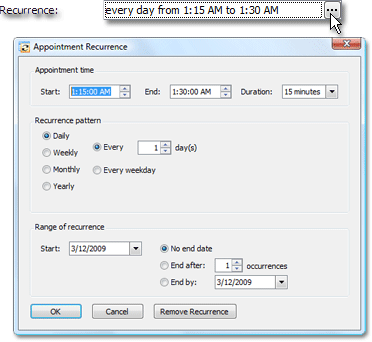
Data type: SupportRecurrences.RecurrenceInfoXml
Control: ButtonEdit editor, part of the DevExpress WinForms Subscription.
Repository Item: No repository item available. The Scheduler control displays the IRecurrentEvent.RecurrenceInfoXml property in a custom manner.
SchedulerRecurrenceInfoPropertyEditor displays the RecurrenceInfoXml property of a business class that implements the built-in IRecurrentEvent interface. For more information about recurring events in Scheduler, refer to the following topic: Recurring Events.
SchedulerRecurrenceInfoPropertyEditor ships with the Scheduler Module. Click or double-click the editor’s ellipsis button to invoke a form where you can specify the current event’s recurrence options or cancel recurrence.
RichTextPropertyEditor

Data type: String
Control: RichTextBoxWithBinding that is a descendant of the System.Windows.Forms.RichTextBox editor.
Repository Item: RepositoryItemRtfEditEx that is a descendant of the RepositoryItemBlobBaseEdit repository item.
To use RichTextPropertyEditor, specify it in the PropertyEditorType property of the required BOModel | <Class> | OwnMembers | <Member> or Views | <DetailView> | Items | <PropertyEditor> node.
The control’s height is a product of the RowCount property value and default row height. If the value of the RowCount property is not specified, it is set to 10. If it is set to 0, the application assumes that 15 rows fit in the control.
The RepositoryItemRtfEditEx repository item is displayed by the RtfEditEx editor that is the descendant of the BlobBaseEdit editor. This editor displays the PopupRtfEditExForm form as a pop-up form.
DefaultPropertyEditor
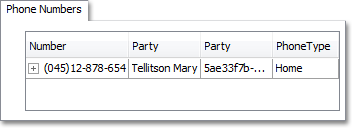

Data type: Any data type.
Control: GridControl or StringEdit used by the StringPropertyEditor.
Repository Item: No repository item available.
Important
DefaultPropertyEditor has a number of limitations and we do not recommend that you use it intentionally in your applications. For instance, this Property Editor does not support Conditional Appearance functionality.
DefaultPropertyEditor is used when there is no default Property Editor for the current property’s data type and the PropertyEditorType property of the corresponding IModelMember node is not specified.
GridControl displays data if the property type is IEnumerable or ITypedList.
StringEdit is used for all other property types. It displays the property value’s textual representation.
Both GridControl and StringEdit display data in read-only mode by default.
ProtectedContentPropertyEditor

Data type: Any data type.
Control: ProtectedContentEdit
Repository Item: RepositoryItemProtectedContentTextEdit that is a descendant of the RepositoryItemTextEdit repository item.
ProtectedContentPropertyEditor displays properties that the current user has no permission to view. This Property Editor is always read-only.
To specify custom text instead of the protected data, use the IModelApplication.ProtectedContentText property of the Application Model‘s Application node.
For more information about user permissions, refer to the following topic: Security (Access Control & Authentication) and the SecurityDemo XAF application. This demo application is available in the %PUBLIC%\Documents\DevExpress Demos 23.1\Components\XAF\SecurityDemo.NETFramework.XPO folder.