Window Status Messages in XAF WinForms Applications
- 2 minutes to read
A Window in an XAF WinForms application displays status messages in the status bar. This help topic describes how to access and customize the collection of displayed messages.
If your application uses the Security System, the status bar displays the current user name in every application window.
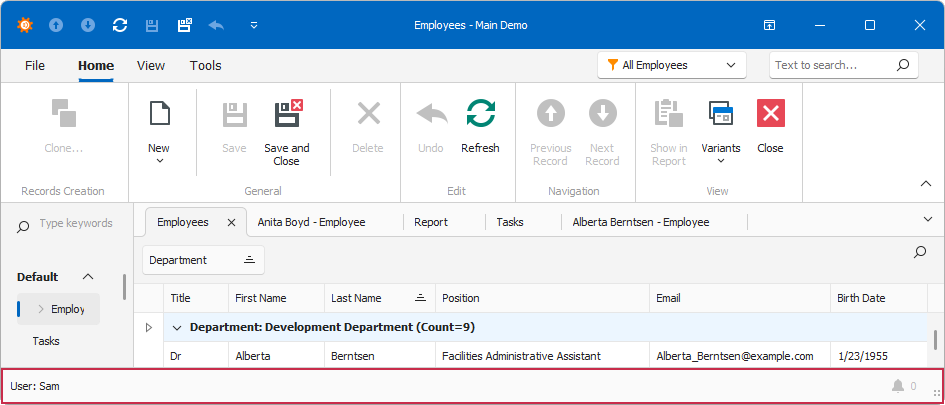
Customize Status Messages
An XAF application activates a WindowTemplateController in every application window. This controller manages window status messages and exposes the CustomizeWindowStatusMessages event for customization.
- In a Controller, get a WindowTemplateController instance.
- Subscribe to the CustomizeWindowStatusMessages event in the
OnActivatedmethod and unsubscribe from it in theOnDeactivatedmethod. - Use the StatusMessages property to access the collection of status messages:
- Call the
Addmethod to add a new status message to the status bar. - Call the
Clearmethod before adding custom messages to replace the current collection of messages with your custom collection. - Use the IsMain property in a condition to add a message only to the main window or only to a child window.
- Call the
The following code sample adds a status message that contains the number of selected objects. When the selection changes, the UpdateWindowStatusMessage() method refreshes the status bar messages.
using DevExpress.ExpressApp;
using DevExpress.ExpressApp.SystemModule;

public class UpdateWindowStatusMessagesController : ViewController<DevExpress.ExpressApp.ListView> {
    private WindowTemplateController wtController;
    public UpdateWindowStatusMessagesController() { }
    protected override void OnActivated() {
        base.OnActivated();
        wtController = Frame.GetController<WindowTemplateController>();
        wtController?.CustomizeWindowStatusMessages += wtController_CustomizeWindowStatusMessages;
    }
    protected override void OnViewControlsCreated() {
        base.OnViewControlsCreated();
        View.Editor.SelectionChanged += Editor_SelectionChanged;
    }
    protected override void OnViewControlsDestroying() {
        View.Editor.SelectionChanged -= Editor_SelectionChanged;
        base.OnViewControlsDestroying();
    }
    protected override void OnDeactivated() {
        wtController?.CustomizeWindowStatusMessages -= wtController_CustomizeWindowStatusMessages;
        wtController?.UpdateWindowStatusMessage();
        base.OnDeactivated();
    }
    void wtController_CustomizeWindowStatusMessages(object sender, CustomizeWindowStatusMessagesEventArgs e) {
        e.StatusMessages.Add(String.Format("Selected objects count: {0}", View.SelectedObjects.Count));
    }
    void Editor_SelectionChanged(object sender, EventArgs e) {
        wtController.UpdateWindowStatusMessage();
    }
}
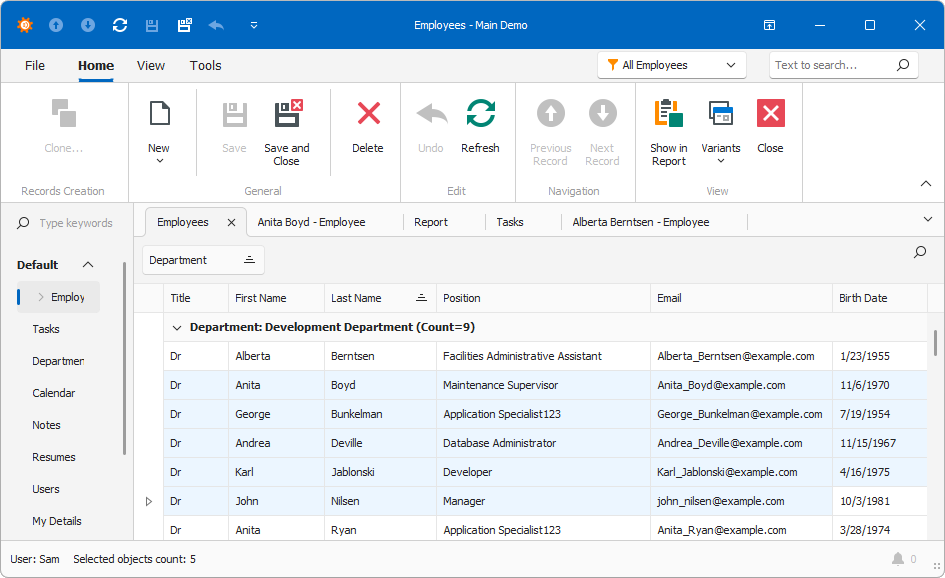
Status Messages in the TabbedMDI UI
When the UIType property is set to TabbedMDI, an XAF application displays status messages from all tabbed windows in the main window’s status bar. Note that the WindowTemplateController optimizes the displayed status messages. If different windows contain the same status messages, the controller removes duplicate entries.
Customize the Status Bar
Create a custom window template, or subscribe to the WindowTemplateController.CustomizeStatusBar event and access the bar directly, to place anything besides text messages in the Status Bar. Refer to the following help topics for additional information: