How to Customize Window Captions in XAF Applications
- 2 minutes to read
Window captions in an XAF application contain information about the current View, such as the current object caption, class caption, and application title. This help topic describes how to customize the default window caption.
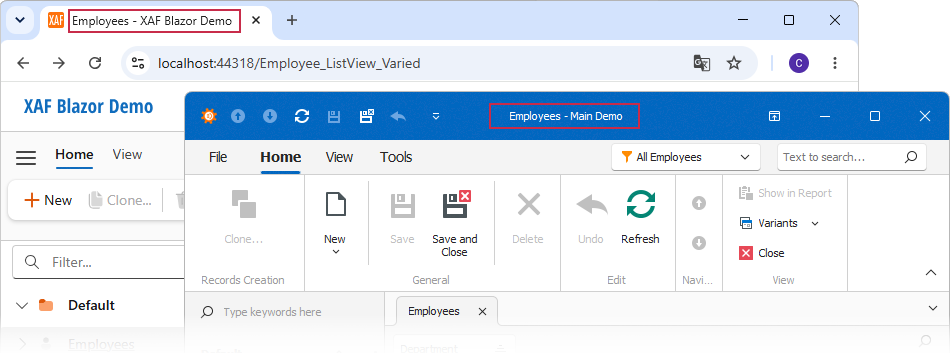
An XAF application activates a WindowTemplateController in every application window. This controler manages window captions and exposes the CustomizeWindowCaption event for customization.
- In a Window Controller, get a WindowTemplateController instance.
For Winforms applications with theUITypeproperty set toTabbedMDIorStandardMDI, use the WinWindowTemplateController instead. - (Optional) Set TargetWindowType in the controller constructor to control which windows the controller affects. Set it to
WindowType.Mainfor main windows only, or omit it to target all windows. - Subscribe to the CustomizeWindowCaption event in the
OnActivatedmethod and unsubscribe from the event in theOnDeactivatedmethod. Use the WindowCaption event property to customize a window caption. XAF concatenates the following strings to generate the caption:
If FirstPart or SecondPart is empty or undefined, XAF omits the Separator.
You can use the WindowCaption.Text property to specify the complete caption. When Text is specified, XAF ignores FirstPart, Separator, and SecondPart.
Note
This approach is not supported in Blazor applications with the UIType property set to TabbedMDI.
using DevExpress.ExpressApp;
using DevExpress.ExpressApp.SystemModule;

public class CustomizeWindowCaptionViewController : WindowController {
    private WindowTemplateController captionController;

    protected override void OnActivated() {
        base.OnActivated();
        captionController = Frame.GetController<WindowTemplateController>();
        captionController?.CustomizeWindowCaption += captionController_CustomizeWindowCaption;
    }

    private void captionController_CustomizeWindowCaption(object sender, CustomizeWindowCaptionEventArgs e) {
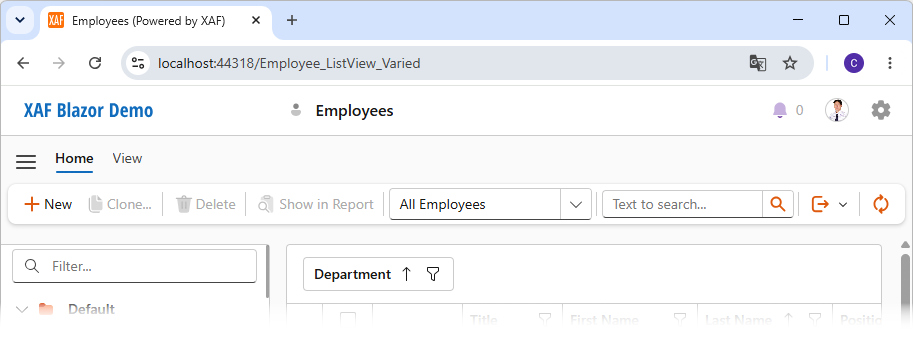
        e.WindowCaption.Separator = " ";
        e.WindowCaption.SecondPart = " (Powered by XAF)";
    }

    protected override void OnDeactivated() {
        captionController?.CustomizeWindowCaption -= captionController_CustomizeWindowCaption;
        base.OnDeactivated();
    }
}
Refresh Window Caption Programmatically
XAF updates a window caption when a user interacts with an editor or when the current view’s IObjectSpace is committed. Call the UpdateWindowCaption method to manually refresh a window caption at any time. The following code sample updates a window caption when a user clicks the CompleteTask action:
using DevExpress.ExpressApp;
using DevExpress.ExpressApp.Actions;
using DevExpress.ExpressApp.SystemModule;
using MySolution.Module.BusinessObjects;

namespace MySolution.Module.Controllers {
    public class CompleteTaskController : ObjectViewController<DetailView, DemoTask> {
        public CompleteTaskController() {
            var completeAction = new SimpleAction(this, "CompleteTask", PredefinedCategory.Edit);
            completeAction.Execute += CompleteAction_Execute;
        }

        private void CompleteAction_Execute(object sender, SimpleActionExecuteEventArgs e) {
            ViewCurrentObject.Status = TaskStatus.Completed;
            Frame.GetController<WindowTemplateController>().UpdateWindowCaption();
        }
    }
}