registerTranslationService(name, service) Function
Registers a custom translation service that allows you to automatically translate report strings in the Localization Editor.
Declaration
export function registerTranslationService(name: string, service: ITranslationService): voidParameters
| Name | Type | Description |
|---|---|---|
| name | string | A service name. |
| service | ITranslationService | An object that exposes the ITranslationService interface. |
Returns
| Type |
|---|
| void |
Remarks
Tip
You can activate the built-in AI-powered Localization functionality in your ASP.NET Core and Blazor applications.
Refer to the following help topic for more information: Localize Reports in the Web Report Designer.
When a custom translation service is registered in the application, the Localization Editor displays a button next to the Language drop-down list. The Web Report Designer collects all the text strings displayed in the Localization Editor and sends a request to a translation service once a user clicks this button. This action translates all text strings to the selected language simultaneously.
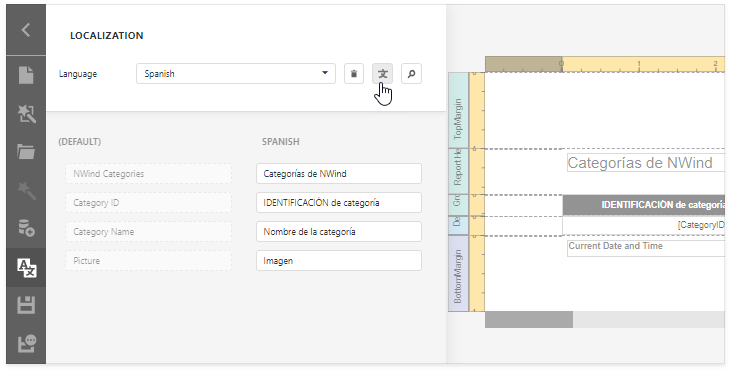
The following code snippet demonstrates how the registerTranslationService function is used:
Note
The complete sample project How to Use the Microsoft Azure Translator Text API in Report Localization is available in the DevExpress Examples repository.
function BeforeDesignerRender(s, e) {
    DevExpress.Reporting.Designer.Localization.registerTranslationService("AzureCognitiveService", {
        onRequest: (texts, language) => {
            var data = { 'Texts': texts.map(text => ({ 'Text': text })), 'Language': language };
            return {
                type: "POST",
                url: '/Home/GetAzureTranslationService',
                dataType: "json",
                contentType: "application/json; charset=utf-8",
                processData: true,
                data: JSON.stringify(data),
                error: function (xhr) {
                    DevExpress.ui.notify(xhr.statusText, "error", 500);
                }
            };
        },
        onResponse: (data) => {
            if (data.error && data.error.message) {
                DevExpress.ui.notify(data.error.message, "warning", 500);
                return [];
            }
            return data.map(function (item) {
                return item.translations[0].text
            });
        }
    });
}