Redaction Annotations
- 4 minutes to read
Redaction annotations permanently remove sensitive information from a PDF document. You can redact text, images, and other page content before you distribute the document.
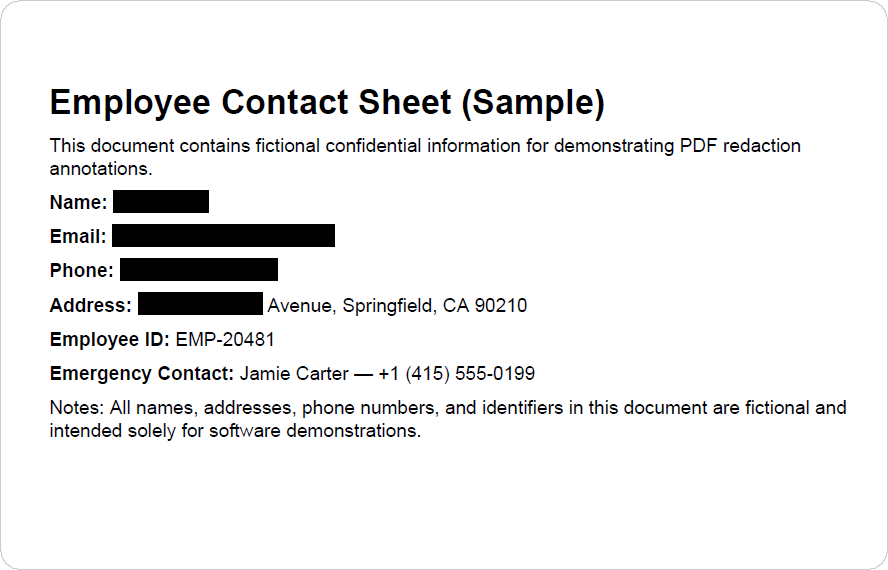
A typical redaction workflow includes the following steps:
- Create one or more redaction annotations.
- Review or modify annotations if necessary.
- Apply annotations to permanently remove the underlying content.
Important
A redaction annotation only marks content for removal. The original content remains in the document until you apply the annotation. Once applied, the content cannot be recovered.
Create Redaction Annotations
Create a RedactionAnnotation object, customize annotation settings, and add the annotation to the page.
The following code snippet searches for confidential information in a PDF document and creates redaction annotations over all matches:
package pdf;

import com.devexpress.docs.pdf.*;
import com.devexpress.system.drawing.*;

import java.nio.channels.*;
import java.nio.file.*;
import java.util.*;

public class Main {
    public static void main(String[] args) throws Exception {
        try (FileChannel fileChannel = FileChannel.open(Path.of("Confidential.pdf"));
             PdfDocument pdfDocument = new PdfDocument(fileChannel)) {

            Page page = pdfDocument.getPages().getFirst();

            createRedactionAnnotation(pdfDocument);

            // Save the document.
            try (WritableByteChannel channel =
                         FileChannel.open(Path.of("Result.pdf"),
                                 StandardOpenOption.CREATE,
                                 StandardOpenOption.WRITE,
                                 StandardOpenOption.TRUNCATE_EXISTING)) {

                pdfDocument.save(channel);
            }
        }
    }

    static void createRedactionAnnotation(PdfDocument pdfDocument) {
        // Text strings to locate and redact.
        String[] searchTerms = {
                "Alex Carter",
                "+1 (415) 555-0187",
                "alex.carter@example.com",
                "742 Evergreen",
        };

        // Search text case-insensitively and match only whole words.
        TextSearchOptions searchOptions = new TextSearchOptions(false, true);

        // Search for each text string.
        for (String searchTerm : searchTerms) {

            // Find all occurrences of the current search string.
            Iterable<TextSearchInfo> results = pdfDocument.findText(searchTerm, searchOptions);

            // Process each search result.
            for (TextSearchInfo result : results) {

                // Get the page that contains the matched text.
                Page page = pdfDocument.getPages().get(result.getPageIndex());

                // Store the bounding boxes for all matched text fragments.
                List<RectangleF> areas = new ArrayList<>();

                // Process each text match.
                for (TextMatchInfo match : result.getMatches()) {

                    // A match can consist of multiple text fragments.
                    for (TextMatchFragment fragment : match.getMatchFragments()) {

                        // Add the fragment's bounding box to the list.
                        areas.add(fragment.getRectangle().getBoundingBox());
                    }
                }

                // Create a redaction annotation for each text fragment.
                for(RectangleF rectangle : areas) {

                    RedactionAnnotation annotation = new RedactionAnnotation(rectangle);

                    // Specify the annotation border color before the redaction is applied.
                    annotation.setColor(PdfColor.getRed());

                    // Specify the fill color after the redaction is applied.
                    annotation.setFillColor(PdfColor.getBlack());

                    // Specify the overlay text appearance.
                    annotation.setTextAppearance(new TextAppearance() {{
                        setFill(new SolidFill(PdfColor.getWhite()));
                        setFontSize(5);
                    }});

                    // Specify the overlay text.
                    annotation.setOverlayText("CONFIDENTIAL");

                    // Center the overlay text horizontally.
                    annotation.setTextJustification(TextJustification.CENTERED);

                    // Display the overlay text only once.
                    annotation.setRepeatText(false);

                    // Add the annotation to the page.
                    page.getAnnotations().add(annotation);
                }
            }
        }
    }
}
Review Redaction Annotations
Access the page’s annotation collection, locate the required redaction annotations, and update their properties or review status before you apply them.
You can do the following:
- Add comments with addReply()
- Add review statuses with addReview()
- Retrieve the review history with getReviewHistory()
- Remove all reviews with clearReviews()
The following code snippet loads a PDF document that contains redaction annotations and adds a Rejected review by Nancy Bolton to each redaction annotation created by authors other than Brian Smith.
for (BaseAnnotation annotation : page.getAnnotations()) {

    if (annotation instanceof RedactionAnnotation redaction &&
            !"Brian Smith".equals(redaction.getTitle())) {

        redaction.addReview(
                page,
                "Nancy Bolton",
                ReviewStatus.REJECTED);
    }
}
Remove Redaction Annotations
You can remove individual annotations from the page or clear the entire annotation collection.
The following code snippet removes all redaction annotations from the first page:
Page page = pdfDocument.getPages().getFirst();

page.getAnnotations().removeIf(annotation -> annotation instanceof RedactionAnnotation);
To remove all annotations from a page, use the clear() method:
page.getAnnotations().clear();
Apply Redaction Annotations
Call the PdfDocument.applyRedaction() method to apply redaction annotations. Once applied, the redacted content is removed and cannot be recovered or viewed by unauthorized users.
The following code snippet applies all redaction annotations on the first page:
Page page = pdfDocument.getPages().getFirst();

List<RedactionAnnotation> redactions = new ArrayList<>();

for (BaseAnnotation annotation : page.getAnnotations()) {

    if (annotation instanceof RedactionAnnotation redaction) {
        redactions.add(redaction);
    }
}

pdfDocument.applyRedaction(0, redactions.toArray(new RedactionAnnotation[0]));
Customize Redaction Appearance
Use the following methods to customize the appearance of a redaction annotation before you apply it:
| Method | Description |
|---|---|
| setFillColor() | Specifies the fill color. |
| setColor() | Specifies the border color. |
| setOverlayText() | Specifies the text displayed over the redacted area. |
| setTextJustification() | Specifies the overlay text alignment. |
| setRepeatText() | Repeats the overlay text across the redacted area. |