Free Text Annotations
- 2 minutes to read
A free text annotation displays text directly on a PDF page. Use free text annotations to add comments, labels, or instructions.
To create a free text annotation, do the following:
- Create a FreeTextAnnotation object and specify annotation bounds.
- Use the setContent(String value) method to specify the annotation text.
- Configure the text appearance. For example, specify text justification and a default style.
- (Optional) Configure additional properties, such as the annotation intent, border style, callout line, or markup annotation properties.
- Add the annotation to the page’s annotation collection.
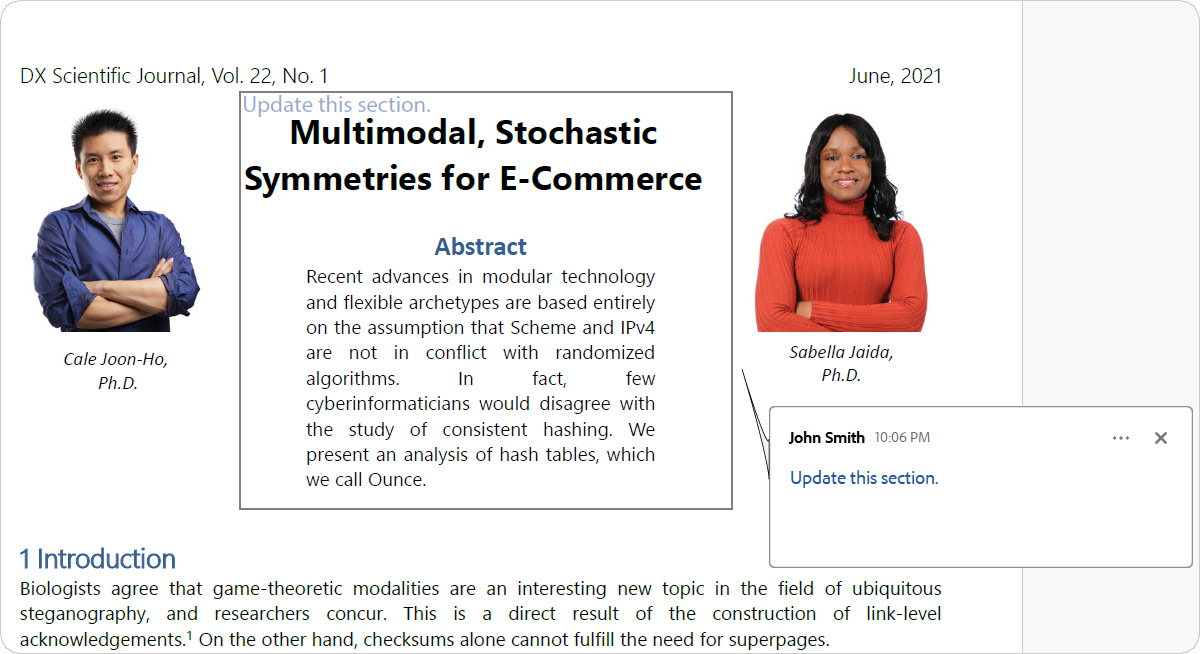
The following code snippet creates a free text annotation, specifies its author, content, and text appearance, and adds the annotation to a page:
package pdf;

import com.devexpress.docs.pdf.*;
import com.devexpress.system.drawing.*;

import java.nio.channels.*;
import java.nio.file.*;

public class Main {
    public static void main(String[] args) throws Exception {
        try (FileChannel fileChannel = FileChannel.open(Path.of("Document.pdf"));
             PdfDocument pdfDocument = new PdfDocument(fileChannel)) {

            Page page = pdfDocument.getPages().getFirst();

            createFreeTextAnnotation(page);

            // Save the document.
            try (WritableByteChannel channel =
                         FileChannel.open(Path.of("Result.pdf"),
                                 StandardOpenOption.CREATE,
                                 StandardOpenOption.WRITE,
                                 StandardOpenOption.TRUNCATE_EXISTING)) {

                pdfDocument.save(channel);
            }
        }
    }

    static void createFreeTextAnnotation(Page page) {
        FreeTextAnnotation annotation =
                new FreeTextAnnotation(
                        new RectangleF(200, 520, 260, 220));

        annotation.setTitle("John Smith");
        annotation.setSubject("Editorial Review");
        annotation.setContent("Update this section.");
        annotation.setTextJustification(TextJustification.LEFT_JUSTIFIED);
        annotation.setDefaultStyle("font: Times-Roman 12pt; color: #2B579A;");
        annotation.setOpacity(0.5);

        annotation.getPopup().setOpen(true);

        page.getAnnotations().add(annotation);
    }
}
The following screenshot illustrates the result:
See Also