Work with Annotations
- 5 minutes to read
Create Annotations
Use annotations to add comments, highlights, drawings, links, watermarks, and other interactive elements to a PDF document.
To create an annotation, do the following:
- Load or create a PDF document.
- Get the target page.
- Create an annotation.
- Add the annotation to the page’s annotation collection.
- Save the document.
Add an Annotation to a Page
Call the Page.getAnnotations().add() method to add an annotation to a page.
The following code snippet creates a text annotation, displays a comment icon, and opens the annotation when the document is loaded:
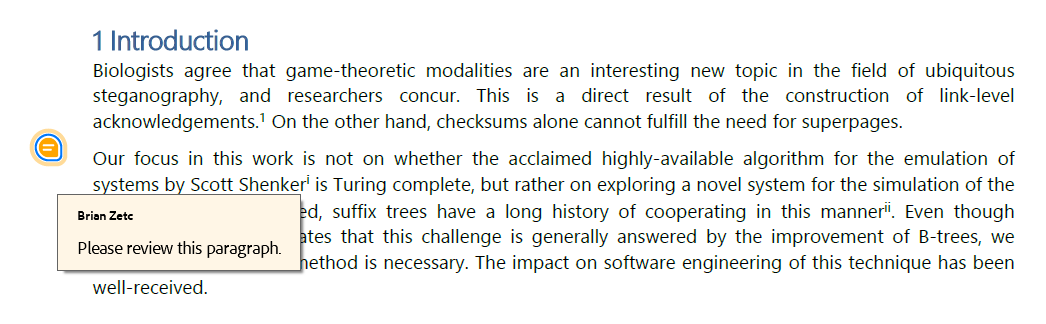
TextAnnotation annotation = new TextAnnotation(new RectangleF(50, 450, 24, 36));

annotation.setTitle("Brian Zetc");
annotation.setContent("Please review this paragraph.");
annotation.setColor(PdfColor.getOrange());
annotation.setIconName(TextAnnotationIconName.COMMENT);
annotation.setIsOpened(true);

page.getAnnotations().add(annotation);
The following code snippet marks the annotation as accepted in the Review state model:
annotation.setStateModel(TextAnnotationStateModel.REVIEW);
annotation.setState(TextAnnotationState.ACCEPTED);
Add Multiple Annotations
The following code snippet adds a text annotation and a free text annotation to a page:
// Create a text annotation.
TextAnnotation note = new TextAnnotation(new RectangleF(80, 700, 24, 24));

note.setTitle("John Smith");
note.setContent("Review this paragraph.");
page.getAnnotations().add(note);

// Create a free text annotation.
FreeTextAnnotation comment = new FreeTextAnnotation(new RectangleF(140, 650, 220, 60));

comment.setContent("Update this section before publication.");
comment.setColor(PdfColor.getLightBlue());

page.getAnnotations().add(comment);
Add Annotations to Different Pages
Each page maintains its own annotation collection.
The following code snippet adds a text annotation to the first page and a free text annotation to the second page:
Page firstPage = pdfDocument.getPages().getFirst();
Page secondPage = pdfDocument.getPages().get(1);

firstPage.getAnnotations().add(new TextAnnotation(new RectangleF(80, 700, 24, 24)));
secondPage.getAnnotations().add(new FreeTextAnnotation(new RectangleF(120, 650, 240, 60)));
Access Annotations
Use the Page.getAnnotations() method to access a page’s annotations. Iterate through the collection, identify annotations by type or properties, and update their content, metadata, or visual settings.
The following code snippet iterates through all annotations on the first page and prints their types:
// Iterate through all annotations on the first page.
for (BaseAnnotation annotation : pdfDocument.getPages().getFirst().getAnnotations()) {
    System.out.println(annotation.getClass().getSimpleName());
}
Access Annotations of a Specific Type
The following code snippet processes only text annotations on the first page:
// Process only text annotations.
for (BaseAnnotation annotation : pdfDocument.getPages().get(0).getAnnotations()) {
    if (annotation instanceof TextAnnotation textAnnotation) {
        System.out.println(textAnnotation.getTitle());
        System.out.println(textAnnotation.getContent());
    }
}
Find Annotations
The following code snippet finds all text annotations with the specified title:
List<TextAnnotation> annotations = new ArrayList<>();

for (Page page : pdfDocument.getPages()) {
    for (BaseAnnotation annotation : page.getAnnotations()) {
        if (annotation instanceof TextAnnotation textAnnotation &&
                "John Smith".equals(textAnnotation.getTitle())) {
            annotations.add(textAnnotation);
        }
    }
}

System.out.println("Found " + annotations.size() + " annotation(s).");
Modify Annotations
The following code snippet modifies the content and color of a text annotation:
Page page = pdfDocument.getPages().getFirst();

for (BaseAnnotation annotation : page.getAnnotations()) {
    if (annotation instanceof TextAnnotation textAnnotation &&
            "John Smith".equals(textAnnotation.getTitle())) {

        // Update the annotation.
        textAnnotation.setContent("Issue resolved.");
        textAnnotation.setColor(PdfColor.getGreen());

        break;
    }
}
Update Common Annotation Properties
Most annotation types inherit common properties from the BaseAnnotation or MarkupAnnotation base classes.
Use the following methods to update annotation metadata:
| Method | Description |
|---|---|
| setContent() | Changes the annotation text. |
| setTitle() | Changes the author name. |
| setSubject() | Changes the annotation subject. |
| setColor() | Changes the annotation color. |
| setModified() | Sets the last modification date. |
| setCreationDate() | Sets the creation date. |
Remove Annotations
Call the methods of the IAnnotationCollection interface to remove individual annotations or clear all annotations from a page.
Note
Markup annotations may include replies. The PDF Document API automatically removes replies when you remove the parent annotation.
Remove an Annotation
Call the IAnnotationCollection.remove() method to remove a specific annotation.
The following code snippet removes all text annotations from the first page:
Page page = pdfDocument.getPages().getFirst();

// Collect text annotations.
List<Annotation> annotationsToRemove = new ArrayList<>();

for (Annotation annotation : page.getAnnotations()) {
    if (annotation instanceof TextAnnotation) {
        annotationsToRemove.add(annotation);
    }
}

// Remove text annotations.
for (Annotation annotation : annotationsToRemove) {
    page.getAnnotations().remove(annotation);
}
Remove an Annotation by Index
Call the IAnnotationCollection.remove(int index) method to remove an annotation at a specific position in the collection.
The following code snippet removes the first annotation on the first page:
Page page = pdfDocument.getPages().getFirst();

if (!page.getAnnotations().isEmpty()) {
    page.getAnnotations().remove(0);
}
Remove All Annotations
Call the IAnnotationCollection.clear() method to remove all annotations from a page.
The following code snippet removes all annotations from the first page:
Page page = pdfDocument.getPages().getFirst();

// Remove all annotations.
page.getAnnotations().clear();
Customize Annotation Appearance
You can modify colors, borders, opacity, and other visual settings before you save the document.
Different annotation types support different appearance settings. Refer to the corresponding annotation topic for annotation-specific settings.
Note
Annotation style objects are automatically cloned when annotations are copied within a document or between documents.
Change Annotation Color
Call the setColor(PdfColor value) method to change an annotation’s color.
The following code snippet changes the color of a text annotation:
Page page = pdfDocument.getPages().getFirst();

for (BaseAnnotation annotation : page.getAnnotations()) {
    if (annotation instanceof TextAnnotation textAnnotation) {
        textAnnotation.setColor(PdfColor.getYellow());
        break;
    }
}
Customize Annotation Borders
Create an AnnotationBorder object and assign it to the annotation.
The following code snippet creates a free text annotation with a custom border:
FreeTextAnnotation annotation = new FreeTextAnnotation(new RectangleF(80, 650, 220, 60));

annotation.setContent("Review this section.");

AnnotationBorder border = new AnnotationBorder();
border.setWidth(2);
border.setHorizontalCornerRadius(6);
border.setVerticalCornerRadius(6);

annotation.setBorder(border);

page.getAnnotations().add(annotation);
Apply a Border Effect
Create an AnnotationBorderEffect object and assign it to the annotation.
The following code snippet applies a cloudy border effect to a free text annotation:
FreeTextAnnotation annotation = new FreeTextAnnotation(new RectangleF(80, 650, 220, 60));

annotation.setContent("Review this section.");

AnnotationBorderEffect effect = new AnnotationBorderEffect();

effect.setStyle(AnnotationBorderEffectStyle.CLOUDY_EFFECT);
effect.setIntensity(1);

annotation.setBorderEffect(effect);

page.getAnnotations().add(annotation);
Change Fill Colors
The following code snippet changes the outline and fill colors of a free text annotation:
FreeTextAnnotation annotation = new FreeTextAnnotation(new RectangleF(80, 650, 220, 60));

annotation.setContent("Review this section.");

annotation.setColor(PdfColor.getLightBlue());
annotation.setOutlineFill(new SolidFill(PdfColor.getLightSalmon()));

page.getAnnotations().add(annotation);