DevExpress Presentation API Library: Presentation Document Model
- 2 minutes to read
In DevExpress Presentation API library, a Presentation object is the root container for all presentation elements and settings.
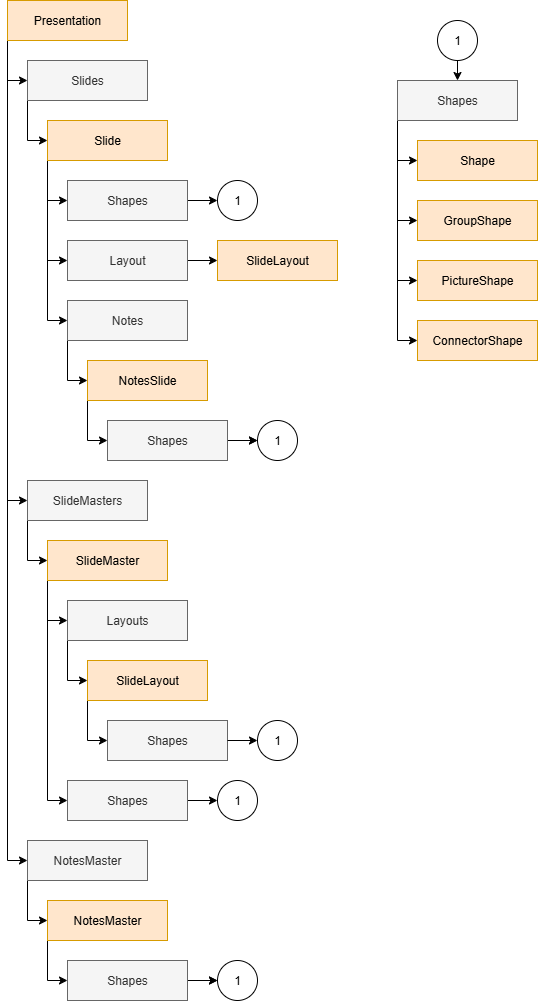
The following hierarchical diagram shows how elements are organized within the presentation and how to access them:
- Presentation
- A storage for all presentation elements and settings. You can create a new presentation and load an existing presentation from a source. Each separate presentation is a Presentation instance.
- Slide
- The presentation stores its slides in the Presentation.Slides collection. Each individual slide is a Slide instance. You can use a slide master to create slides and populate your presentation. You can also reorder, duplicate, and remove existing slides. To fill slides, you can set various backgrounds. To populate slides with content, add shapes to the slide Shapes collection.
- Slide Master
- The slide master is a top-level template slide that you can use as a base for other slides. The presentation stores its associated slide masters in the Presentation.SlideMasters collection. Each slide master is a SlideMaster instance.
- Slide Layout
- Layouts arrange content on slides and belong to a single slide master. A slide master stores its associated layouts in the SlideMaster.Layouts collection. Each individual layout is a SlideLayout instance.
- Shape
- Slides, slide masters and slide layouts store their shapes in the SlideBase.Shapes collection. The following shape types are available:
- Shape (allows you to create preset form figures and custom geometry shapes)
- PictureShape
- GroupShape
- ConnectorShape
- Chart/ChartEx
- Table
- Notes Master
- A notes master is a base template for individual slide notes. The presentation’s NotesMaster instance is available through the Presentation.NotesMaster property.
- Notes
- Notes store information about a slide. Notes are visible only to the presenter. Notes are a NotesSlide instance available through the Slide.Notes property.