Data Sources
- 9 minutes to read
A data source collects underlying data and passes it to a data engine for aggregation and summarization before data analysis.
The following data source types are supported:
| Type | Description | API |
|---|---|---|
| SQL Data Source | Establishes connections to SQL databases. | DashboardSqlDataSource |
| OLAP Data Source | Establishes connections to an OLAP cube in the Microsoft Analysis Services database. | DashboardOlapDataSource |
| Microsoft Excel Workbooks/CSV Files | Retrieves data from Microsoft Excel workbooks (XLS, XLSX or XLSM), or from CSV files. | DashboardExcelDataSource |
| Entity Framework Data Source | You can connect to an Entity Framework data source defined within the current project or you can use an external assembly that contains the data context. | DashboardEFDataSource |
| Object Data Source | Retrieves data from a class in the current project. | DashboardObjectDataSource |
| Extract Data Source | A compressed snapshot of data from a regular data source. This data is contained in a local file and can be updated from the original data source at any time. You can also use an external SQL data source or Extract Data Source as an intermediate layer. | DashboardExtractDataSource |
| XPO Data Source | Allows you to obtain data that XPO (eXpress Persistent Objects) retrieves from a data source. | DashboardXpoDataSource |
| JSON Data Source | Allows you to extract JSON data from a Web-service endpoint URI, text file, or a string in JSON format. | DashboardJsonDataSource |
| Federated Data Source | Establishes relationships and combines data sources to provide uniform access. A federated data source does not support OLAP data sources. | DashboardFederationDataSource |
| MongoDB | Allows you to connect to a MongoDB instance and stores data in JSON-like documents. | DashboardMongoDBDataSource |
Note
The DevExpress Dashboard uses database servers that can be configured to use case-sensitive table/column names. For this reason, a database scheme used in dashboards is case-sensitive to prevent any problem when the product is used with such servers.
SQL Data Source
To connect to SQL databases, install the data providers on the client machine or web server. The table below lists the supported SQL databases and data providers.
| Relational Database System | Supported Version | .NET Framework Data Provider | .NET Data Provider |
|---|---|---|---|
| Amazon Redshift | n/a | Npgsql.dll | Npgsql |
| Firebird | 1.5, 2.5.7, 3.0.2, 5.0.1 | FirebirdSql.Data.FirebirdClient.dll FirebirdSql.Data.Firebird.dll |
FirebirdSql.Data.FirebirdClient |
| Google BigQuery | n/a | ODBC driver for BigQuery | ODBC driver for BigQuery |
| IBM DB2 | 9.5 or higher | IBM.Data.DB2.dll | Net.IBM.Data.Db2 |
| Microsoft Access | Access 2000 or higher Access 2007 or higher |
System.Data.dll | System.Data.OleDb |
| Microsoft SQL Server | SQL Server 2005 (with Express) SQL Server 2008 (with R2 & Express) SQL Server 2012, 2014, 2016, 2017, 2019, 2022, 2025 (with Express & LocalDB) SQL Azure™ Database Azure SQL Database |
Microsoft.Data.SqlClient.dll System.Data.dll (Included in .NET Framework) |
Microsoft.Data.SqlClient (recommended) or (deprecated) System.Data.SqlClient |
| Microsoft SQL Server CE | 3.5, 4.0 | System.Data.SqlServerCe.dll (Included in .NET Framework) | |
| MySQL | 4.1 or higher 5.5, 5.6, 5.7, 8.0, 8.3, 9.1 (for the MySqlConnector provider) |
MySqlConnector MySql.Data |
MySqlConnector MySql.Data |
| Oracle Database | 9i, 10g, 11g, 12c, 18c, 21c, 23ai | Oracle.ManagedDataAccess.dll System.Data.OracleClient.dll Oracle.DataAccess.dll |
Oracle.ManagedDataAccess |
| Pervasive PSQL | 9.x or higher | Pervasive.Data.SqlClient.dll | |
| PostgreSQL | 7 or higher | Npgsql.dll | Npgsql |
| SAP HANA | 2.0 or higher | SAP HANA Client 2.0 | SAP HANA Client 2.0 Sap.Data.Hana.Net.v8.0 |
| SAP Sybase Advantage | Advantage Database Server 9.1 or higher | Advantage.Data.Provider.dll | |
| SAP Sybase ASE | Sybase Adaptive Server 12.0 or higher | Sybase.AdoNet4.AseClient.dll | |
| SAP SQL Anywhere | 11 or higher | Sap.Data.SQLAnywhere.dll | |
| SQLite[1] | 3.x | System.Data.SQLite.dll 2.* | Microsoft.Data.SQLite 8.* and SQLitePCLRaw.bundle_e_sqlite3 |
| Teradata | 13.0 or higher | Teradata.Client.Provider.dll | Teradata.Client.Provider |
| VistaDB | 4, 5, 6 | VistaDB.4.dll 4. VistaDB.5.NET40.dll 5. VistaDB.6.dll |
|
| XML file | n/a | Built-in support | Built-in support |
You can prepare data in the Query Builder in the following ways:
- Join tables/views.
- Create additional columns using expressions.
- Pre-aggregate data.
- Filter data.
You can also use a custom SQL query (WinForms / Web).
You can add calculated fields to this data source.
Create and configure the DashboardSqlDataSource object to bind a dashboard to an SQL database.
If you use a custom connection string, specify the XpoProvider parameter as described in the following topic: Custom Connection Strings for Data Sources.
If your project in Visual Studio 2022 has to connect to Microsoft Access databases, note that Visual Studio 2022 is a 64-bit process, and Microsoft OLE DB Provider for Jet and the Jet ODBC driver are only available in 32-bit versions. It is recommended that you use the 64-bit Microsoft Access Database Engine (Access Connectivity Engine, ACE), or use an earlier version of Visual Studio (VS 2019) that supports 32-bit database providers. For more information, review the following article: Connect to data in an Access database.
Tip
Documentation:
OLAP Data Source
The Microsoft Analysis Services OLE DB and Microsoft ADOMD.NET providers should be installed on the client machine or web server. Refer to the following topic for more information: Data providers used for Analysis Services connections.
The following OLAP servers are supported:
- Microsoft SQL Server 2000 Analysis Services
- Microsoft SQL Server 2005 Analysis Services
- Microsoft SQL Server 2008 Analysis Services
- Microsoft SQL Server 2008 R2 Analysis Services
- Microsoft SQL Server 2012 Analysis Services (Multi-dimensional mode)
- Microsoft SQL Server 2014 Analysis Services (Multi-dimensional mode)
- Microsoft SQL Server 2016 Analysis Services (Multi-dimensional mode)
For .NET Dashboard, OLAP mode supports the following data providers:
You cannot filter the OLAP data source. Calculated fields are also not supported.
Create and configure the DashboardOlapDataSource object to bind a dashboard to an OLAP cube.
Tip
Documentation:
Microsoft Excel Workbooks/CSV Files
The following Microsoft Excel/text formats are supported:
- XLS
- XLSX
- XLSM
- CSV
You can filter the Excel data source and add calculated fields.
Create and configure the DashboardExcelDataSource object to bind a dashboard to an Excel workbook.
Tip
Documentation:
Entity Framework Data Source
The following Entity Framework versions are supported:
- Entity Framework 5.0 and higher.
- Entity Framework Core 1.0 and higher.
The DashboardEFDataSource should have a data provider to connect to a data source. For instance, install the System.Data.SQLite.EF6 data provider to connect to an SQLite database that uses Entity Framework 6.
You can use stored procedures to select only required data from the Entity Framework data source.
Calculated fields are also supported.
Create and configure the DashboardEFDataSource object to bind a dashboard to an Entity Framework data source.
Tip
Documentation:
Object Data Source
You can use any object that implements the IEnumerable or IListSource interface as a dashboard’s data source.
You can filter the Object data source and add calculated fields.
Create and configure the DashboardObjectDataSource object to bind a dashboard to an object data source.
Tip
Documentation:
Extract Data Source
The DevExpress Dashboard supports a compressed data snapshot from a regular data source (such as DashboardSqlDataSource, DashboardEFDataSource, and DashboardObjectDataSource). You can save a snapshot to a local file and update it from the original data source. An extracted data source can be used as a regular data source.
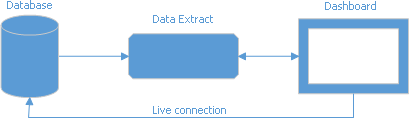
The data within the extract is optimized for data grouping and reduces the initial load time. You can use an in-memory cache (ExtractCacheOptions) to improve performance when accessing extract data.
You can add calculated fields to this data source.
Create and configure the DashboardExtractDataSource object to bind a dashboard to a data extract.
Tip
Documentation:
XPO Data Source
The XPO data source gets data from eXpress Persistent Objects.
You can filter the XPO data source and add calculated fields.
Create and configure the DashboardXpoDataSource object to bind a dashboard to eXpress Persistent Objects.
Tip
Documentation:
JSON Data Source
The JSON data source retrieves data from a Web-service endpoint, text file, or string in JSON format.
You can filter the JSON data source and add calculated fields.
Create and configure the DashboardJsonDataSource object to bind a dashboard to JSON-formatted data.
Important
The DashboardJsonDataSource object requires the System.Text.Json library. .NET projects do not require manual installation of the System.Text.Json package, as it is already included in the .NET environment. Set the DevExpress.DataAccess.Native.Json.JsonLoaderHelper.ProcessingLibrary property to NewtonsoftJson to use the Newtonsoft.Json library instead. Then, install the Newtonsoft.Json NuGet package.
Tip
Documentation:
Federated Data Source
You can create a query that combines data sources to provide uniform access. This query forms the federated data source, which operates with the source-specific query language, translates the queries, and processes the results to supply a dashboard with data. A federated data source does not support OLAP data sources.
You can filter the Federated data source and add calculated fields.
Create and configure the DashboardFederationDataSource object to bind a dashboard to a federated data source.
Tip
Documentation:
MongoDB
Create and configure a DashboardMongoDBDataSource object to bind a dashboard to MongoDB.
Install the MongoDB.Driver package in your project to supply MongoDB data at runtime.
You can use MongoDB as the original data source to create an Extract database or a federated data source.
You can filter the MongoDB data source and add calculated fields.