Measures and Dimensions
- 2 minutes to read
The main DevExpress Dashboard capabilities aggregate and summarize data obtained from the underlying data source. Dimensions and measures are key concepts used to perform these operations.
- Dimension
The dimension is used to provide discrete categorical information. These values can be of any type - string, date-time or numeric. The dashboard does not summarize dimension values, but does group identical values. You can group, sort, or display top values for dimension values.
In code, dimensions are represented by the Dimension class.
- Measure
The measure is used to summarize data against grouped dimension values. These values can be of any type - numeric, date-time, or string. The dashboard will calculate an appropriate summary function against measure values. You can also customize data format settings that affect how summary values are displayed.
In code, measures are represented by the Measure class.
Data Item
The term data item refers to both measures and dimensions. A data item is an object used to bind a dashboard item to data source fields.
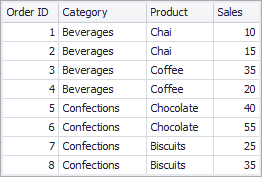
The sample underlying data source in the image below contains four fields: Order ID, Category, Product and Sales.
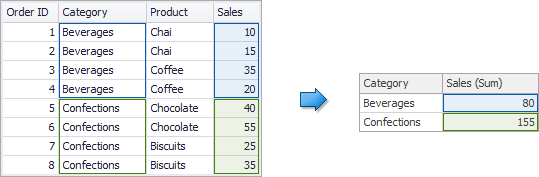
If you process the Category field as a dimension and the Sales field as a measure, the Dashboard will group identical category values (‘Beverages’ and ‘Confections’ in this case) and will summarize sales values against these categories.
Hidden Data Items
If you need data items that do not directly take part in the visual representation of data, you can use hidden data items. To get more information, see the following articles: