DxCheckBoxSettings.IndeterminateDisplayText Property
Specifies the display text string that corresponds to the checkbox editor’s indeterminate state.
Namespace: DevExpress.Blazor
Assembly: DevExpress.Blazor.v23.1.dll
NuGet Package: DevExpress.Blazor
Declaration
[DefaultValue(null)]
[Parameter]
public string IndeterminateDisplayText { get; set; }
Property Value
| Type | Default | Description |
|---|---|---|
| String | null | A text string. |
Remarks
Specify the IndeterminateDisplayText property to change the display text string that corresponds to the checkbox editor’s indeterminate state. The Grid displays this string in the following UI elements:
- Column filter menu, if the column’s FilterMode is set to
DisplayText. - Column cells, if the ShowCheckBoxInDisplayMode property is set to
falseand the Grid is in display mode.
The example below displays custom strings in the Discontinued column:
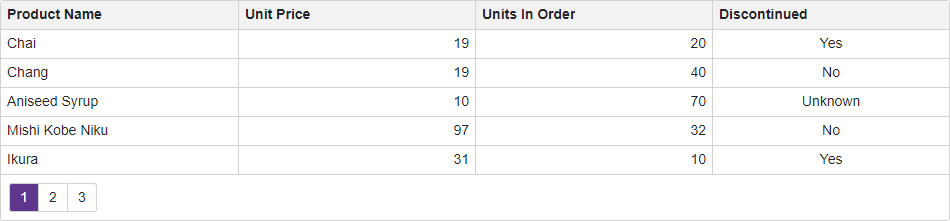
@inject ProductService ProductData

<DxGrid Data="@products">
    <Columns>
        <DxGridDataColumn FieldName="ProductName" />
        <DxGridDataColumn FieldName="UnitPrice" />
        <DxGridDataColumn FieldName="UnitsInOrder" />
        <DxGridDataColumn FieldName="Discontinued">
            <EditSettings>
                <DxCheckBoxSettings ShowCheckBoxInDisplayMode="false"
                                    CheckedDisplayText="Yes"
                                    IndeterminateDisplayText="Unknown"
                                    UncheckedDisplayText="No" />
            </EditSettings>
        </DxGridDataColumn>
    </Columns>
</DxGrid>

@code {
    private Product[]? products;
    protected override async Task OnInitializedAsync() {
        products = await ProductData.GetData();
    }
}
To change the display text string that corresponds to the indeternimate state at runtime, use the ICheckBoxSettings.IndeterminateDisplayText property.
Implements
See Also