PDF Export Options
- 2 minutes to read
Before you export a document to PDF, you can specify PDF-specific options in the Export Options panel.
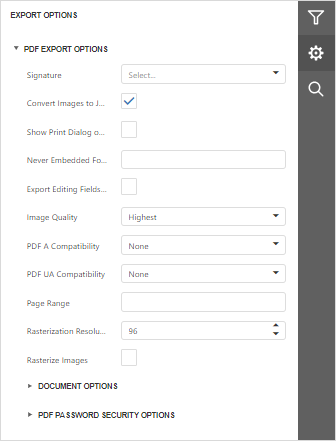
General Options
Signature
Use the drop-down list to select a certificate to sign the exported PDF document.
Expand Signature Options to review or edit the following fields before export. The fields are pre-populated from the selected certificate, and changes affect only the exported document.
- Reason — the reason for signing.
- Location — the location where the document is signed.
- Contact Info — contact information for the signer.
- Accessible Description — a description used by screen readers to identify the signature.
Convert Images to JPEG
Specifies whether to convert all bitmaps to JPEG during export.
Show Print Dialog on Open
Specifies whether to display the Print dialog when the user opens the resulting PDF file in a PDF viewer.
Never Embed Fonts
Specifies font names that should not be embedded into the resulting file. To separate fonts, use semicolons.
Export Editing Fields to AcroForms
Specifies whether to convert report editing fields to interactive forms.
Image Quality
Specifies the image quality level. The higher the quality, the bigger the file, and vice versa.
PDF/A Compatibility
Specifies document compatibility with PDF/A specification (PDF/A-1a, PDF/A-1b, PDF/A-2a, PDF/A-2b, PDF/A-3a, PDF/A-3b).
PDF/UA Compatibility
Specifies whether to conform the exported PDF document to the PDF/UA (Universal Accessibility) standard. The following values are available:
- PDF/UA-1 — based on ISO 14289-1 and PDF 1.7.
Page Range
Specifies a range of pages that will be included in the resulting file. To separate page numbers, use commas. To set page ranges, use hyphens.
Rasterization Resolution
Specifies the resolution (in DPI) used for rasterized images.
Rasterize Images
Specifies whether to rasterize vector images during export.
Document Options
The Document Options complex property contains options that specify the Document Properties of the created PDF file. Click the complex property’s header to access its nested options.
PDF Password Security Options
This complex property allows you to adjust the security options of the resulting PDF file.
Open Password
Specifies the password for opening the exported PDF document.
Encryption Level
Specifies the algorithm used to encrypt PDF content.
Permissions Password
Specifies the PDF permissions password for the document.
PDF Permissions Options
Provides access to the options that specify permissions for printing, changing, copying, and accessing the exported document.