Image Export Options
Before you export a document to an image, you can specify Image-specific options in the Export Options panel.
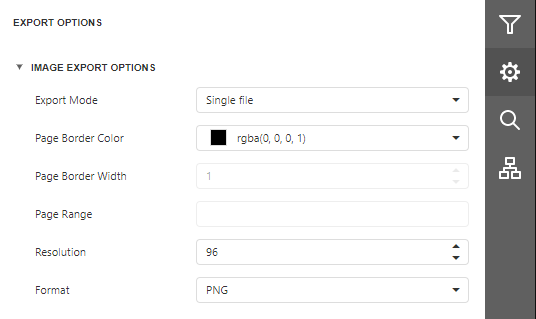
Export Mode
Specifies how a document is exported to an image. The following modes are available.
- The Single File mode allows you to export a document to a single file without preserving the page-by-page breakdown.
- The Single File PageByPage mode allows you to export a document to a single file while preserving the page-by-page breakdown. In this mode, the Page Border Color, Page Border Width, and Page Range options are available.
Page Border Color
Specifies page border color.
Page Border Width
Specifies page border width (in pixels).
Page Range
Specifies a range of pages to include in the resulting file. To separate page numbers, use commas. To set page ranges, use hyphens.
Resolution
Specifies the required image resolution (in dpi).
Format
Specifies an image format for the exported document. Available formats are BMP, GIF, JPEG, PNG, EMF, WMF, and TIFF.