CSV Export Options
Before you export a document to CSV, you can specify CSV-specific options in the Export Options panel.
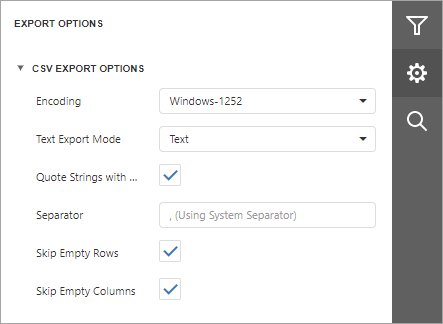
Encoding
Specifies the encoding of the exported text file.
Text Export Mode
Specifies whether to use the formatting of data fields in the bound data source for cells in the exported document. If this option is set to Text, all data fields are exported to the CSV file as strings with the corresponding formatting embedded into those strings. If the option is set to Value, all formatting is lost in the resulting document.
Quote Strings with Separators
Specifies whether to place strings with separators in quotation marks in the exported document.
Separator
Specifies a symbol used to separate text elements (the default symbol is a comma).
Skip Empty Rows
Specifies whether to include empty rows in the resulting file.
Skip Empty Columns
Specifies whether to include empty columns in the resulting file.