How to: Localize a WinForms Template
- 2 minutes to read
This topic teaches you to localize a WinForms Template using the Model Editor. You can customize custom and built-in WinForms templates. Both of these cases are considered in this topic.
Localize a Built-In WinForms Template
Export the culture-specific resources to the Application Model to translate resources in the Model Editor.
Use the XafApplication.ResourcesExportedToModel to access the collection of Resource Localizers.
File: SolutionName.Win\Program.cs
using DevExpress.ExpressApp;
using DevExpress.ExpressApp.Utils;
using DevExpress.ExpressApp.Win;
using DevExpress.Persistent.Base;
using DevExpress.XtraEditors;

namespace SolutionName.Win;

public class Program {
   public static void Main(string[] arguments) {
      SolutionNameWinApplication winApplication = new SolutionNameWinApplication();
      //...
      winApplication.ResourcesExportedToModel.Add(typeof(
         DevExpress.ExpressApp.Win.Templates.MainFormV2TemplateLocalizer));
      winApplication.Setup();
      //...
   }
}
Invoke the Model Editor for the current application project. In the Localization node, you will find child nodes corresponding to the selected resources. Localize them, as with any other XAF string.

Localize a Custom WinForms Template
It is assumed that you have created a custom template, as described in the How to: Create a Custom WinForms Ribbon Template topic. However, a similar approach is applicable to any other custom WinForms Template (for example, created in accordance with the How to: Create a Custom WinForms Standard Template ).
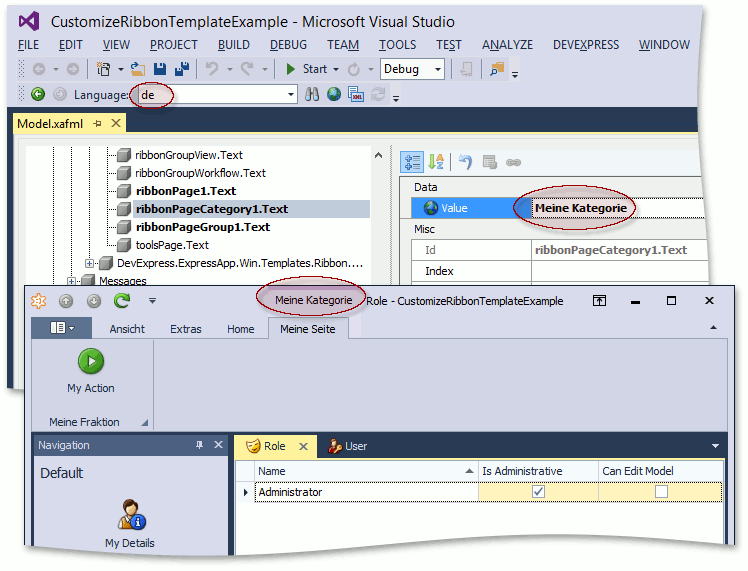
Follow the steps below to make localization items related to your custom template available in the Application Model.
Inherit the FrameTemplateLocalizer<T> class. Pass your custom template type (for example, DetailRibbonForm1) as the generic parameter.
In the WinApplication descendant’s constructor, add the MyTemplateLocalizer to the XafApplication.ResourcesExportedToModel list.
In the code-behind file of your custom template (for example, DetailRibbonForm1.Designer.cs), find the line where the resources private field is declared and initialized.
System.ComponentModel.ComponentResourceManager resources = new System.ComponentModel.ComponentResourceManager(typeof(DetailRibbonForm1));Replace the ComponentResourceManager type with XafComponentResourceManager.
Rebuild the solution and run the Model Editor. Expand the Localization | FrameTemplates | DetailRibbonForm1 node. The localization items related to your custom templates are available here.

You can localize these items using the standard approach described in the Localization Basics topic.