AIReportingConfigurationBuilder.AddTestDataSource(Action<AITestDataSourceConfigurationBuilder>) Method
Activates AI-powered Report Preview with Test Data Source functionality in the Web Report Designer.’
Namespace: DevExpress.AspNetCore.Reporting
Assembly: DevExpress.AIIntegration.AspNetCore.Reporting.v26.1.dll
NuGet Package: DevExpress.AIIntegration.AspNetCore.Reporting
Declaration
public AIReportingConfigurationBuilder AddTestDataSource(
    Action<AITestDataSourceConfigurationBuilder> configure
)Parameters
| Name | Type | Description |
|---|---|---|
| configure | Action<AITestDataSourceConfigurationBuilder> | An Action<T> delegate method that allows you to configure AI-powered Test Data Source functionality in Web Report Designer. |
Returns
| Type | Description |
|---|---|
| AIReportingConfigurationBuilder | A DevExpress.AspNetCore.Reporting.AIReportingConfigurationBuilder object that can be used to further configure the AI-powered functionality in Web Document Viewer and Web Report Designer. |
Remarks
The following code activates AI-generated Test Data functionality and specifies the number of data rows in the generated data source:
// ...
builder.Services.AddDevExpressAI(config => {
    config.AddWebReportingAIIntegration(options => {
        options.AddTestDataSource(tdsOptions =>
            tdsOptions.SetRowCount(8));
    });
});
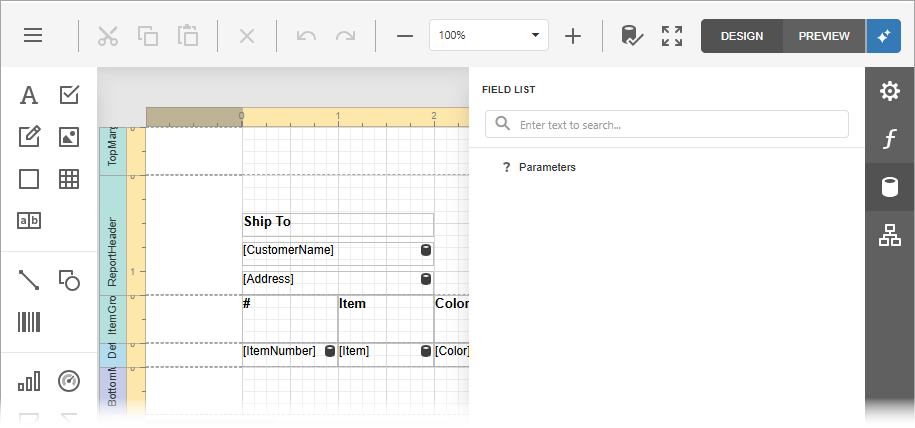
Click the Test Data button in the Report Designer Toolbar to preview report with AI-generated data:
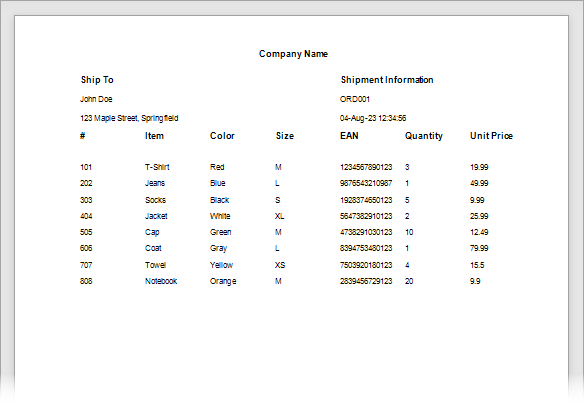
The following image shows the report preview with a test data source that contains 8 data rows:
[Note] A data source with a large number of data rows can take some time to generate.