Work with Tables — Presentation API for Java
- 7 minutes to read
The DevExpress Presentation API creates, formats, merges, splits, and reads tables in PowerPoint presentation documents.
Supported Table Operations
The Presentation API supports the following operations:
- Create and add a table to a slide
- Apply table style
- Format table cells
- Merge and split cells
- Insert and remove rows and columns
- Extract data from cells
- Clone and delete tables
Create and Add a Table to a Slide
Follow the steps below to create a table and add it to a slide:
- Create a Table object:
- Specify the number of rows and columns.
- Set table position and size. Values are measured in Document units (1/300 inch).
- Add the table to the slide’s shapes.
Use the Table.getThis(row, column) method to access cells.
The TableCell.setTextArea() method specifies cell text.
Note
Cells support only text content.
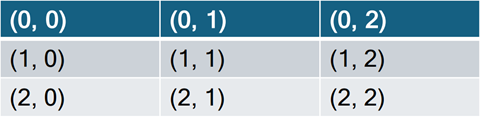
The following code snippet creates a 3x3 table:
// Create a presentation.
try(Presentation presentation = new Presentation()) {
    // Gets the first slide.
    Slide slide = presentation.getSlides().getFirst();

    // Create a 3x3 table and define its position and size.
    Table table = new Table(3, 3, 100, 100);
    table.setHasHeaderRow(false);       // Disable the header row style.
    table.setWidth(1600);               // Set the table width.

    // Populate table cells with row/column coordinates.
    for (int rowIndex = 0; rowIndex < table.getRows().size(); rowIndex++) {
        for (int colIndex = 0; colIndex < table.getColumns().size(); colIndex++) {
            table.getThis(rowIndex, colIndex)
                    .getTextArea()
                    .setText(String.format("(%d, %d)", rowIndex, colIndex));
        }
    }

    // Add the table to the slide.
    slide.getShapes().add(table);

    // Your additional implementation goes here.
}
Warning
Accessing a cell outside the valid range throws an exception.
Insert Rows and Columns
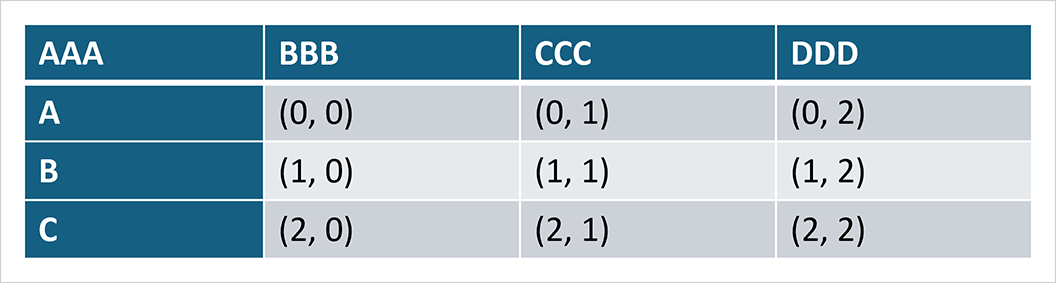
The following code snippet adds a row that displays column headers and a column that displays row headers:
// Create a 3x3 table and define its position and size.
Table table = new Table(3, 3, 100, 100);

table.setHasHeaderRow(true);
table.setHasFirstColumn(true);

// Insert a column and specify its cell content.
table.getColumns().addFirst(new TableColumn());
table.getThis(0, 0).getTextArea().setText("A");
table.getThis(1, 0).getTextArea().setText("B");
table.getThis(2, 0).getTextArea().setText("C");

// Insert a row and specify its cell content.
table.getRows().addFirst(new TableRow());
table.getThis(0, 0).getTextArea().setText("AAA");
table.getThis(0, 1).getTextArea().setText("BBB");
table.getThis(0, 2).getTextArea().setText("CCC");
table.getThis(0, 3).getTextArea().setText("DDD");
Extract Text from Cells
The following code snippet iterates through all cells and extracts text content:
String extractTextFromTable(Table table){
    var sBuilder = new StringBuilder();

    for (int rowIndex = 0; rowIndex < table.getRows().size(); rowIndex++) {
        for (int colIndex = 0; colIndex < table.getColumns().size(); colIndex++) {

            TableCell cell = table.getThis(rowIndex, colIndex);
            String cellText = cell.getTextArea() != null ? cell.getTextArea().getText() : "";

            sBuilder.append(cellText);

            if (colIndex != table.getColumns().size() - 1)
                sBuilder.append('\t');
        }
        sBuilder.append(System.lineSeparator());
    }
    return sBuilder.toString();
}
Merge Cells
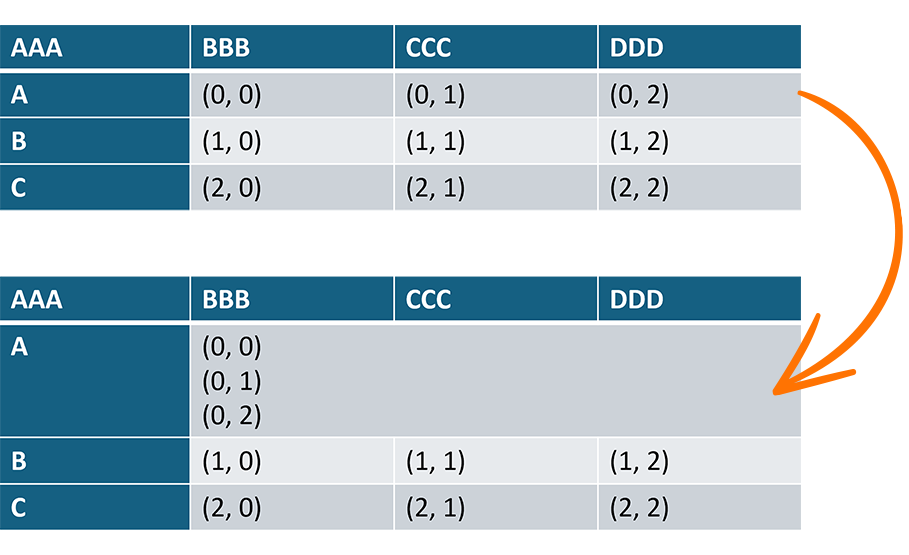
Use the mergeCells(TableCell tableCell1, TableCell tableCell2) method to merge a range of cells:
// Merge cells in row 1 from column 1 through column 3.
table.mergeCells(
        table.getThis(1, 1),    // The primary cell.
        table.getThis(1, 3)     // Merged cells.
);
After merging:
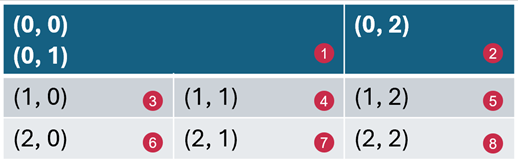
- The getRowSpan() / getColumnSpan() method of the primary cell returns the updated value.
- The text from merged cells is appended to the primary cell.
- Merged cells become logically hidden (not deleted).
TextAreaof merged cells is set tonull. - The getIsMergedVertically() / getIsMergedHorizontally() method of merged cells returns
true(depending on the position of merged cells).
Split Cells
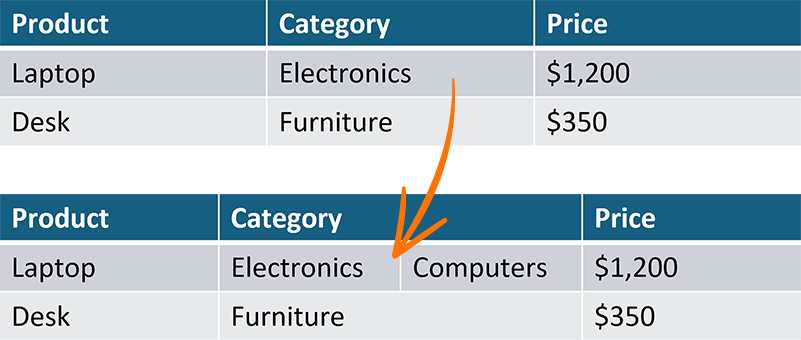
Use the split(int rowCount, int columnCount) method to split a table cell into individual cells.
// Create a 3x3 table.
Table table = new Table(3, 3);
table.setWidth(2000);

// Populate the table with sample data.
table.getThis(0, 0).getTextArea().setText("Product");
table.getThis(0, 1).getTextArea().setText("Category");
table.getThis(0, 2).getTextArea().setText("Price");

table.getThis(1, 0).getTextArea().setText("Laptop");
table.getThis(1, 1).getTextArea().setText("Electronics");
table.getThis(1, 2).getTextArea().setText("$1,200");

table.getThis(2, 0).getTextArea().setText("Desk");
table.getThis(2, 1).getTextArea().setText("Furniture");
table.getThis(2, 2).getTextArea().setText("$350");

// Split the cell at row 1, column 1 into two cells.
table.getThis(1, 1).split(1, 2);

// Add content to the newly created cell.
table.getThis(1, 2)
        .getTextArea()
        .setText("Computers");

// Add table to the slide.
slide.getShapes().add(table);
Iterate Active Cells
Tables with merged cells may contain inactive (non-visible) cells.
When cells are merged, they remain in the table structure. Only the resulting/primary cell is displayed. Merged cells are hidden and can be restored when the merged cell is split.
Use the getActiveCells method to obtain active cells.
// Iterate through active cells in the table.
Iterable<TableCell> cells =
        table.getActiveCells(TableTraversalOrder.ROW_THEN_COLUMN);
Tip
If you traverse cells manually, use TableCell.getIsMergedVertically() and TableCell.getIsMergedHorizontally() methods to identify whether the cell is active/inactive.
Find, Replace, and Remove Text
Text operations are supported at multiple levels:
- Cell level (
TextArea) - Slide level
- Presentation level
Refer to the following help topics for additional information:
- Work with Shape Text — Find Text
- Work with Shape Text — Replace Text
- Work with Shape Text — Remove Text
Apply Table Style
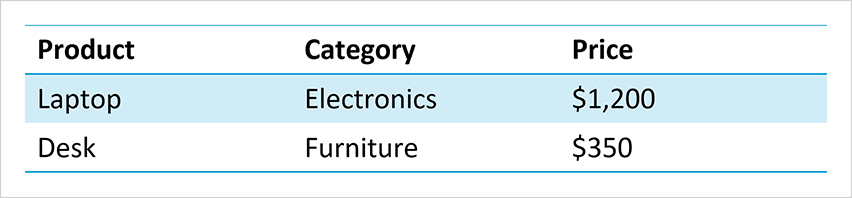
Use the Table.setStyle() method and themed styles (ThemedTableStyle) to format tables consistently with the presentation theme. Predefined styles derive colors from the presentation theme.
// Apply the 'LightStyle1Accent4' style.
table.setStyle(new ThemedTableStyle(TableStyleType.LIGHT_STYLE_1_ACCENT_4));
Note
Custom table styles are not supported in the current DevExpress Presentation API version.
Add Visual Effects
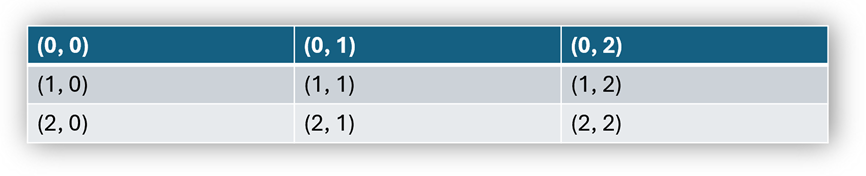
Use the setEffects(TableEffectProperties value) method to add visual effects to a table.
package presentation;

import com.devexpress.docs.office.*;
import com.devexpress.system.drawing.*;
import com.devexpress.docs.presentation.*;

// Create a presentation.
try(Presentation presentation = new Presentation()) {
    // Add a blank slide to the presentation.
    Slide slide = new Slide(SlideLayoutType.BLANK);
    presentation.getSlides().add(slide);

    // Create a 3x3 table and add it to the slide.
    Table table = new Table(3, 3);
    table.setX(100);
    table.setY(100);
    table.setWidth(1500);
    table.setHeight(800);

    // Populate table cells with text.
    for (int rowIndex = 0; rowIndex < 3; rowIndex++) {
        for (int columnIndex = 0; columnIndex < 3; columnIndex++) {
            table.getThis(rowIndex, columnIndex)
                    .getTextArea()
                    .setText(String.format("(%d, %d)", rowIndex, columnIndex));
        }
    }

    // Apply an outer shadow effect to the table.
    TableEffectProperties effectProperties = new TableEffectProperties();
    effectProperties.setOuterShadow(new OuterShadowEffect() {{
        setAngle(45);
        setColor(new OfficeColor(Color.getGray()));
        setBlurRadius(100);
        setDistance(10);
    }});

    table.setEffects(effectProperties);

    // Add the table to the slide.
    slide.getShapes().add(table);

    // Your additional implementation goes here.
}
Highlight Rows and Columns
Use the following methods to highlight specific rows and columns in a table. Visual highlighting and colors depend on the table style:
- setHasBandedColumns()
Specifies whether to highlight alternating columns.

- setHasBandedRows()
Specifies whether to highlight alternating rows.

- setHasFirstColumn()
Specifies whether to highlight the first column.

- setHasLastColumn()
Specifies whether to highlight the last column.

- setHasHeaderRow()
Specifies whether to highlight the first row.

- setHasTotalRow()
Specifies whether to highlight the last row.

// Enable table style options.
table.setHasBandedColumns(true);
table.setHasBandedRows(true);
table.setHasFirstColumn(true);
table.setHasLastColumn(true);
table.setHasTotalRow(true);
table.setHasHeaderRow(true);
Customize Individual Cells
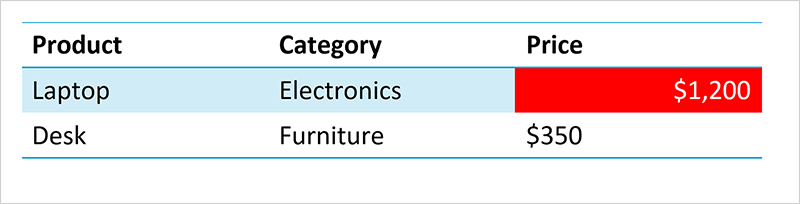
Each cell can be accessed independently to customize formatting (such as background fill, text color, and alignment).
TableCell cell = table.getThis(3, 2);

// Set background fill.
cell.setFill(new SolidFill(Color.getRed()));

// Set text color and alignment.
cell.getTextArea()
    .getLevel1ParagraphProperties()
    .getTextProperties()
    .setFill(new SolidFill(Color.getWhite()));

cell.getTextArea()
    .getLevel1ParagraphProperties()
    .setAlignment(TextParagraphAlignment.RIGHT);
Customize Cell Borders
Each border can be configured independently.
Use the following methods to customize cell borders:
Note
Border visibility depends on the presentation viewer and applied table style.
TableCell cell = table.getThis(1, 1);

LineStyle leftBorder = new LineStyle();
leftBorder.setWidth(4);
leftBorder.setFill(new SolidFill(Color.getRed()));
cell.setLeftBorder(leftBorder);

LineStyle topBorder = new LineStyle();
topBorder.setWidth(4);
topBorder.setFill(new SolidFill(Color.getBlue()));
cell.setTopBorder(topBorder);

LineStyle rightBorder = new LineStyle();
rightBorder.setWidth(4);
rightBorder.setFill(new SolidFill(Color.getGreen()));
cell.setRightBorder(rightBorder);

LineStyle bottomBorder = new LineStyle();
bottomBorder.setWidth(4);
bottomBorder.setFill(new SolidFill(Color.getOrange()));
cell.setBottomBorder(bottomBorder);

LineStyle diagonalDownBorder = new LineStyle();
diagonalDownBorder.setWidth(4);
diagonalDownBorder.setFill(new SolidFill(Color.getMagenta()));
cell.setDiagonalDownBorder(diagonalDownBorder);

LineStyle diagonalUpBorder = new LineStyle();
diagonalUpBorder.setWidth(4);
diagonalUpBorder.setFill(new SolidFill(Color.getLime()));
cell.setDiagonalUpBorder(diagonalUpBorder);
Remove Rows and Columns
The following code snippet removes specific rows and columns from the table:
// Remove the first column.
table.getColumns().removeFirst();

// Remove the specified column (by reference).
table.getColumns().remove(
    table.getColumns().get(0));

// Remove the first row.
table.getRows().removeFirst();

// Remove the specified row (by reference).
table.getRows().remove(
    table.getRows().get(0));
Delete a Table
A table is treated as a shape within the slide model. To delete a table, remove it from the slide’s shape collection:
// Remove the table by reference.
slide.getShapes().remove(table);

// Remove the table by its index in the slide's shapes collection.
slide.getShapes().remove(tableIndex);
Clone a Table
Use the table.deepClone() method to create a table copy:
// Create deep copy of the table.
Table clonedTable = table.deepClone();

// Add the cloned table to the slide.
slide.getShapes().add(clonedTable);