Use NuGet Packages to Install Office & PDF File API Components
- 4 minutes to read
This help topic describes how to obtain and install NuGet packages that contain Office & PDF File API libraries for .NET Framework 4.6.2+ and .NET 8+ applications.
For more information about system requirements, refer to the following help topic: Office & PDF File API Prerequisites.
Available Packages
| Package | Description |
|---|---|
| DevExpress.Document.Processor | Includes the following Office & PDF File API products: - Spreadsheet Document API - Word Processing Document API - PDF Document API |
| DevExpress.Docs.Pdf | Add this package to your project and use an object-oriented API model to create, load, modify, secure, and analyze PDF documents. DevExpress PDF Document API (New) and its strongly typed document object model (DOM) give you full access to the document structure: pages, content fragments (text, images, and shapes), annotations, form fields, metadata, attachments, and logical structure elements. |
| DevExpress.Drawing | Contains the basic drawing functionality for DevExpress components. This library ships with the DevExpress primitives, which serve as counterparts for the System.Drawing primitives (Font, Pen, Brush, and so on). See also: DevExpress.Drawing Graphics Library. |
| DevExpress.Drawing.Skia | Contains cross-platform drawing implementation based on the Skia Graphics Library. |
| DevExpress.RichEdit.Core | Contains runtime assemblies for the Word Processing Document API. |
| DevExpress.Printing.Core | Contains the Excel Export Library. |
| DevExpress.Docs.Presentation | Implements functionality specific to the DevExpress Presentation API Library. This non-visual library allows you to work with PowerPoint presentations in code: generate, modify, print, and export to various formats. |
| DevExpress.Docs.Barcode | Implements functionality specific to the DevExpress Barcode Generation API . This non-visual library allows you to create barcodes and then export them as images or PDFs for documents or UI workflows. |
Note: You need a license to the DevExpress Office & PDF File API Subscription or DevExpress Universal Subscription to use Office & PDF File API packages in production code.
Refer to the following topics for information on packages required for non-Windows environments:
- Use Office & PDF File API on Linux
- Use Office & PDF File API on macOS
- Dockerize an Office & PDF File API Application
Install Packages in Visual Studio
Use the NuGet Package Manager to install DevExpress packages. In the Solution Explorer, right-click the project and select Manage NuGet Packages.

Select the nuget.org feed as the package source and install required packages.
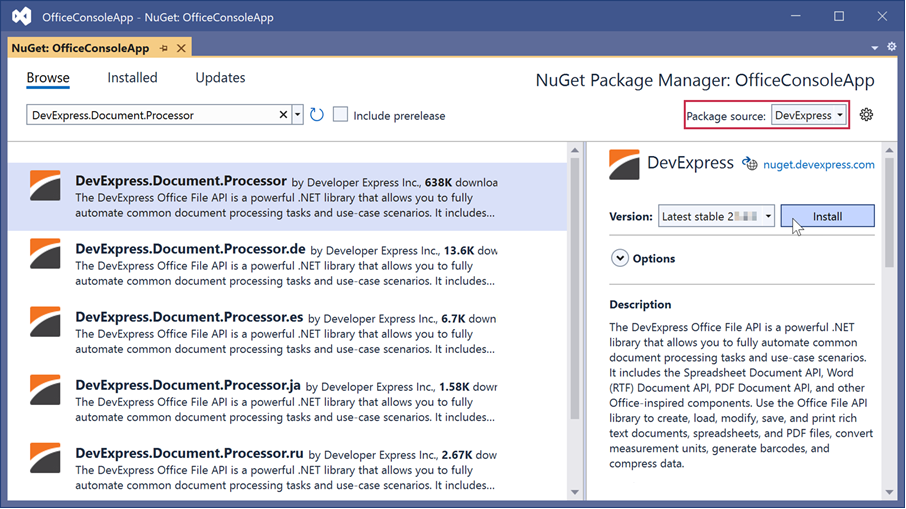
DevExpress Local Source
If you use the Unified Component Installer to install DevExpress components, you can obtain the Office & PDF File API packages from the DevExpress 26.1 Local package source. The DevExpress installer copies all NuGet packages to the C:\Program Files\DevExpress 26.1\Components\System\Components\packages directory and creates a local NuGet feed within Visual Studio.

Tip
Refer to the following articles for information on how to register and install DevExpress NuGet packages in other IDEs and CI/CDs:
Package Manager Console
You can also use the Package Manager Console to install Office & PDF File API packages. Click Tools → NuGet Package Manager → Package Manager Console to open the console. Select a feed in the Package source drop-down list (nuget.org or local) and run the Install-Package command.
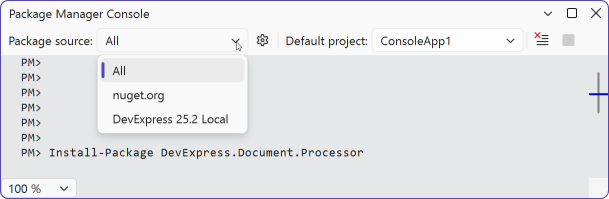
# Add DevExpress.Document.Processor to your project
PM> Install-Package DevExpress.Document.Processor -Version 26.1.5
Install Packages with .NET CLI
Use the dotnet add package command to install Office & PDF File API packages from the .NET command-line interface.
# Add DevExpress.Document.Processor to your project (from nuget.org)
dotnet add ProjectName.csproj package DevExpress.Document.Processor -v 26.1.5

# Add DevExpress.Document.Processor to your project (from the local DevExpress package source)
dotnet add ProjectName.csproj package DevExpress.Document.Processor
  --source "C:\Program Files\DevExpress 25.2\Components\System\Components\packages"
Download Packages with NuGet CLI
The install and restore NuGet CLI commands add packages to disk but do not add dependencies to projects. You can use them to download packages from a source and store them offline on a machine or a server.
# Install the package from the nuget.org feed
nuget install DevExpress.Document.Processor

# Install the package from the local DevExpress package source
nuget install DevExpress.Document.Processor -Source "DevExpress 26.1 Local"