Panel Visual Elements
A dock panel is a content placeholder, which can be moved and placed at any part of a page or can be docked to zones within a web page.
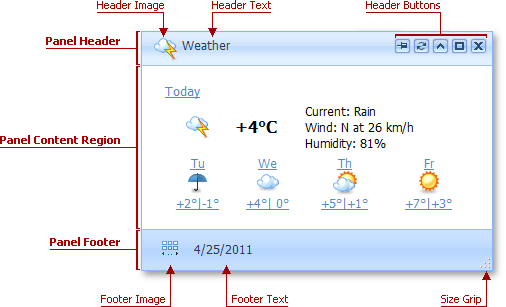
A panel may visually consist of the header, content region and footer sections.
The table below lists the main members that affect element appearance and functionality.
| Characteristics | Members |
|---|---|
| Animation | PopupControlSettingsBase.EnableCallbackAnimation (via DockPanelSettings.EnableAnimation) |
| Dragging Ability | PopupControlSettingsBase.AllowDragging (via DockPanelSettings.AllowDragging) |
| Drag Element | PopupControlSettingsBase.DragElement (via DockPanelSettings.DragElement) |
| Resizing Ability | PopupControlSettingsBase.AllowResize (via DockPanelSettings.AllowResize) |
| Size Constraints | PopupControlSettingsBase.MinHeight, PopupControlSettingsBase.MaxHeight, PopupControlSettingsBase.MinWidth, PopupControlSettingsBase.MaxWidth (via DockPanelSettings.PropertyName) |
| Scroll Bars | PopupControlSettingsBase.ScrollBars (via DockPanelSettings.ScrollBars) |
| Allowed State | DockPanelSettings.AllowedDockState |
Topics in this section:
- Panel Visual Elements
- Panel Header
- Panel Content Region
- Panel Footer
- Loading Panel
- Close Button
- Size Grip