Strongly-Typed Helpers
- 4 minutes to read
Strongly-typed helper methods help you set up DevExtreme-based controls. They allow view code validation at compile-time, provide full IntelliSense support, add client-side validation based on Data Annotations, and support display attributes.
You can use two kinds of DevExtreme strongly-typed helpers:
ControlFor- Methods with theForsuffix (CalendarFor, DateBoxFor, etc.) are used to configure standalone editors. These methods are similar to the built-in ASP.NET Core strongly-typed helpers like TextBoxFor.These methods bind controls to model properties specified by lambda expressions. This approach allows you to configure the controls without the use of string constants.
Note
To bind a control to a model property, specify a model in the
@modeldirective.The following code snippet demonstrates the
DateBoxFormethod that creates the DateBox control and binds it to theOrderViewModelmodel’sOrderDateproperty.@model OrderViewModel @(Html.DevExtreme().DateBoxFor(m => m.OrderDate))ControlFormethods can be used in partial views that have their own models. The following code snippet demonstrates a partial view that uses DevExtreme strongly-typed helpers (DateBoxFor, TextBoxFor) along with the built-in helpers (LabelFor, ValidationMessageFor).@model OrderViewModel @using (Html.BeginForm()) { @Html.LabelFor(m => m.OrderDate) @Html.DevExtreme().DateBoxFor(m => m.OrderDate) @Html.ValidationMessageFor(m => m.OrderDate) @Html.LabelFor(m => m.ShipCity) @Html.DevExtreme().TextBoxFor(m => m.ShipCity) @Html.DevExtreme().Button().Text("Save").UseSubmitBehavior(true) }Control<T>- Used to configure controls that have bindable items:- DataGrid (columns and summaries)
- Form (items)
- FilterBuilder (fields)
- PivotGrid (fields)
- TreeList (columns)
Note
To bind a control to a model, specify the model in a helper method as a type parameter. The control uses data from this model rather than the current view’s model.
The example code below adds the DataGrid that is strongly-typed to the
OrderViewModeltype. TheAddFor()method configures grid columns. This method binds a column to a model property specified by a lambda expression.@model IndexModel @* the IndexModel model is not used for the DataGrid control *@ ... @(Html.DevExtreme().DataGrid<OrderViewModel>() .Columns(columns => { columns.AddFor(m => m.OrderDate); columns.AddFor(m => m.ShipCity); }) )
More examples are available in our demos and sample applications.
Display Attributes
Controls configured with strongly-typed helper methods support the following built-in ASP.NET Core display attributes:
| Attribute | Description | Supported by |
|---|---|---|
| DisplayName | Specifies a property label. | DataGrid (columns and summaries), Form (items), FilterBuilder (fields), PivotGrid (fields), TreeList (columns) |
| Display(Name) | Specifies a property label. | DataGrid (columns and summaries), Form (items), FilterBuilder (fields), PivotGrid (fields), TreeList (columns) |
| Display(Prompt) | Specifies a prompt or a watermark. | Form simple items |
| Display(Description) | Specifies a property description. | Form simple items |
You can use these attributes instead of API methods to configure control options. For example, the following code snippet uses API methods to configure the Form control’s FullName data field (its label, description, and placeholder):
using System;

public class Person {
    [Key]
    public int ID { get; set; }
    public string FullName { get; set; }
    public DateTime BirthDate { get; set; }
}
@(Html.DevExtreme().Form<Person>()
    .Items(items =>
    {
        items.AddSimple()
            .DataField("FullName")
            .Label(l => l.Text("Full Name"))
            .HelpText("As it appears on your passport or identification")
            .Editor(e => e.TextBox().Placeholder("John Doe")
        );

        items.AddSimpleFor(m => m.BirthDate);
    })
)
As an alternative, you can use display attributes to configure the same control options. The following code snippet attaches the [Display] attribute to the Person model’s FullName property. The attribute is applied when you bind the Form control to the Person model.
using System;
using System.ComponentModel.DataAnnotations;

public class Person {
    [Key]
    public int ID { get; set; }
    [Display(
        Name = "Full Name",
        Prompt = "John Doe",
        Description = "As it appears on your passport or identification")]
    public string FullName { get; set; }
    public DateTime BirthDate { get; set; }
}
@(Html.DevExtreme().Form<Person>()
    .Items(items => {
        items.AddSimpleFor(m => m.FullName);
        items.AddSimpleFor(m => m.BirthDate);
    })
)
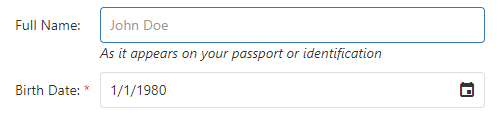
The following image shows the result: