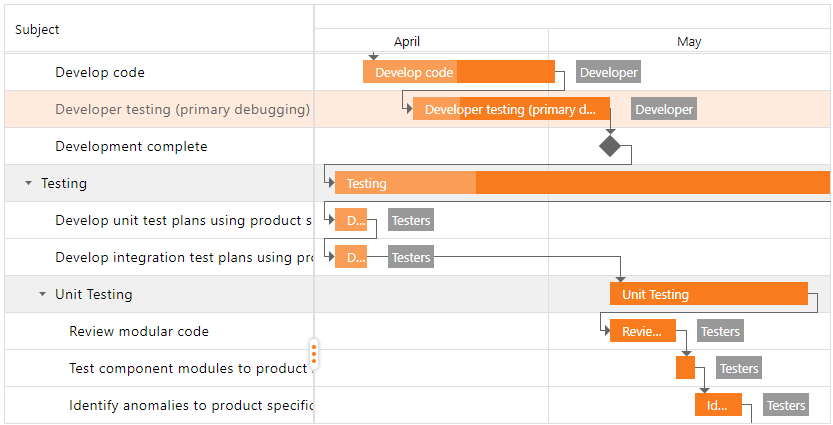
Get Started
- 3 minutes to read
This topic contains step-by-step instructions on how to use ASPxGantt and demonstrates its functionality.
Step 1. Create a new website or open an existing website in Visual Studio. Drag the ASPxGantt item from the Visual Studio toolbox onto the form or add the control in a page’s markup.
Add the following assemblies to your project’s “References” section:
- DevExpress.Web.ASPxGantt.v26.1
- DevExpress.Data.v26.1
- DevExpress.Printing.v26.1.Core
- DevExpress.Web.ASPxTreeList.v26.1
- DevExpress.Web.ASPxThemes.v26.1
- DevExpress.Web.Resources.v26.1
Register the following namespace in the web.config file:
<%@ Register Assembly="DevExpress.Web.ASPxGantt.v26.1, Version=26.1.2.0, Culture=neutral, PublicKeyToken=b88d1754d700e49a" Namespace="DevExpress.Web.ASPxGantt" Tagprefix="dx" %>
Step 2. Use the scripts from the Microsoft SQL Server topic to create a new Microsoft SQL Server database (the DevelopmentGantt database).
Step 3. Select and drop the SQLDataSource component from the Visual Studio toolbox onto your form.
<asp:SqlDataSource ID="TasksDataSource" runat="server" />Step 4. Configure the data source:
Create a new connection string for the Microsoft SQL Server Database.
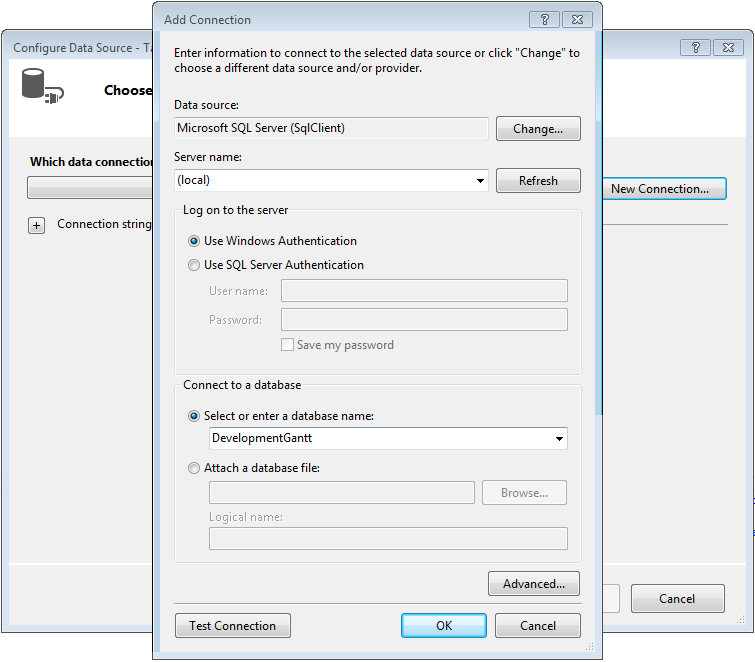
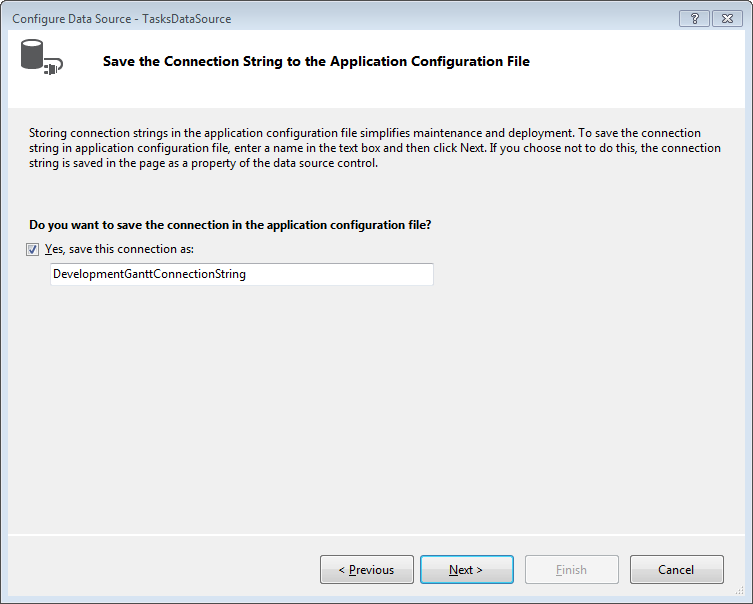
Save connection information to the web.config file.
Select the columns you want to include in the data source.
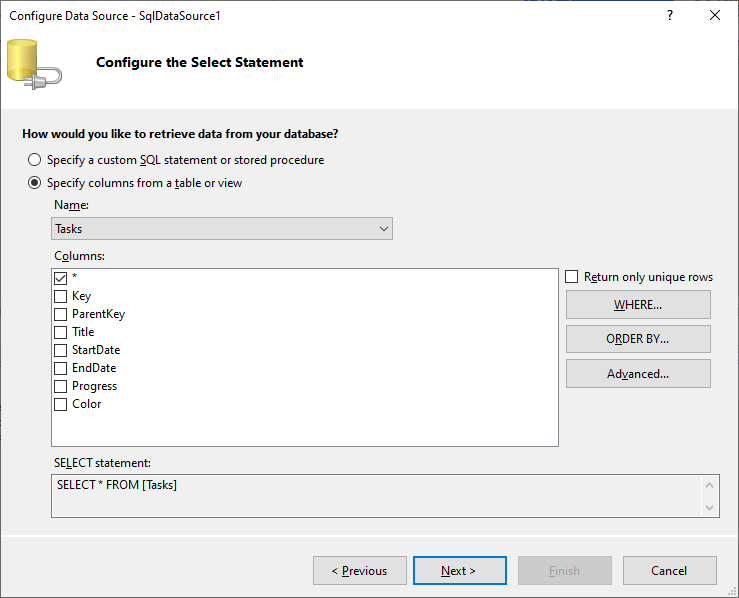
Click Finish.
<asp:SqlDataSource ID="TasksDataSource" runat="server" ConnectionString='<%$ ConnectionStrings:DevelopmentGanttConnectionString %>'
SelectCommand="SELECT * FROM [Tasks]" />
Repeat this step for each table (Dependencies, Resources, ResourceAssignments).
Step 5. Specify the TasksDataSourceID, DependenciesDataSourceID, ResourcesDataSourceID, and ResourceAssignmentsDataSourceID properties to assign the SqlDataSource instances to the Gantt control.
<dx:ASPxGantt ID="Gantt" runat="server"
    TasksDataSourceID="TasksDataSource"
    DependenciesDataSourceID="DependenciesDataSource"
    ResourcesDataSourceID="ResourcesDataSource"
    ResourceAssignmentsDataSourceID="ResourceAssignmentsDataSource">
    ...
</dx:ASPxGantt>
Step 6. Specify columns in the Gantt’s task list (SettingsTaskList).
<dx:ASPxGantt ID="Gantt" runat="server" ...>
    <SettingsTaskList Width="45%">
        <Columns>
            <dx:GanttTextColumn FieldName="Title" Width="250"></dx:GanttTextColumn>
            <dx:GanttDateTimeColumn FieldName="StartDate" Width="100">
                <PropertiesDateEdit DisplayFormatString="d"></PropertiesDateEdit>
            </dx:GanttDateTimeColumn>
            <dx:GanttDateTimeColumn FieldName="EndDate" Width="100">
                <PropertiesDateEdit DisplayFormatString="d"></PropertiesDateEdit>
            </dx:GanttDateTimeColumn>
        </Columns>
    </SettingsTaskList>
    ...
</dx:ASPxGantt>
Step 7. Specify mappings (Mappings) for the Gantt tasks (Task), dependencies (Dependency), resources (Resource), and resource assignments (ResourceAssignment).
<dx:ASPxGantt ID="Gantt" runat="server" ...>
    <Mappings>
        <Task Key="Key" Color="Color" ParentKey="ParentKey" Title="Title" Progress="Progress" End="EndDate" Start="StartDate" />
        <Resource Name="Name" Key="Key" Color="Color" />
        <Dependency Key="Key" PredecessorKey="PredecessorKey" SuccessorKey="SuccessorKey" DependencyType="Type" />
        <ResourceAssignment Key="Key" ResourceKey="ResourceKey" TaskKey="TaskKey" />
    </Mappings>
    ...
</dx:ASPxGantt>
Result code:
<dx:ASPxGantt ID="ASPxGantt1" runat="server" TasksDataSourceID="TasksDataSource"  ResourceAssignmentsDataSourceID="ResourceAssignments"
    DependenciesDataSourceID="DependenciesDataSource"  ResourcesDataSourceID="ResourcesDataSource" Height="700">
    <Mappings>
        <Task Key="Key" Color="Color" ParentKey="ParentKey" Title="Title" Progress="Progress" End="EndDate" Start="StartDate" />
        <Resource Name="Name" Key="Key" Color="Color" />
        <Dependency Key="Key" PredecessorKey="PredecessorKey" SuccessorKey="SuccessorKey" DependencyType="Type" />
        <ResourceAssignment Key="Key" ResourceKey="ResourceKey" TaskKey="TaskKey" />
    </Mappings>
    <SettingsTaskList Width="45%">
        <Columns>
            <dx:GanttTextColumn FieldName="Title" Width="250"></dx:GanttTextColumn>
            <dx:GanttDateTimeColumn FieldName="StartDate" Width="100">
                <PropertiesDateEdit DisplayFormatString="d"></PropertiesDateEdit>
            </dx:GanttDateTimeColumn>
            <dx:GanttDateTimeColumn FieldName="EndDate" Width="100">
                <PropertiesDateEdit DisplayFormatString="d"></PropertiesDateEdit>
            </dx:GanttDateTimeColumn>
        </Columns>
    </SettingsTaskList>
</dx:ASPxGantt>

<asp:SqlDataSource ID="TasksDataSource" runat="server"
ConnectionString='<%$ ConnectionStrings:DevelopmentGanttConnectionString %>'
SelectCommand="SELECT * FROM [Tasks]" />

<asp:SqlDataSource ID="DependenciesDataSource" runat="server"
ConnectionString='<%$ ConnectionStrings:DevelopmentGanttConnectionString %>'
SelectCommand="SELECT * FROM [Dependencies]" />

<asp:SqlDataSource ID="ResourcesDataSource" runat="server"
ConnectionString='<%$ ConnectionStrings:DevelopmentGanttConnectionString %>'
SelectCommand="SELECT * FROM [Resources]" />

<asp:SqlDataSource ID="ResourceAssignmentsDataSource" runat="server"
ConnectionString='<%$ ConnectionStrings:DevelopmentGanttConnectionString %>'
SelectCommand="SELECT * FROM [ResourceAssignments]" />
Step 9. Run the project.