Color Properties
XAF displays the Color and Nullable<Color> properties using a combo box (ASP.NET Core Blazor) or a drop-down window with a color table / color picker (Windows Forms).
Examples
ASP.NET Core Blazor
XAF’s ASP.NET Core Blazor UI implements ColorPropertyEditor to display Color properties.
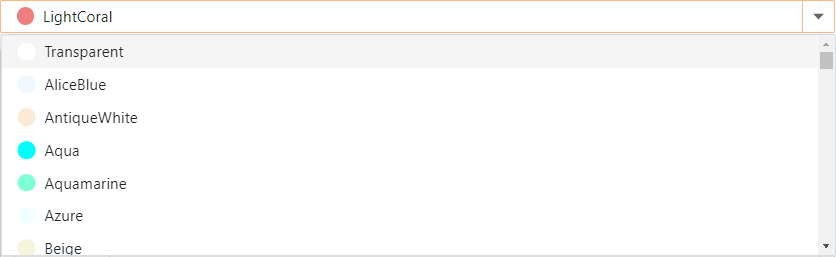
In ASP.NET Core Blazor, BlazorPropertyEditorBase.ComponentModel returns an IComponentModel descendant that wraps properties and events of a corresponding ASP.NET Core Blazor Editor.
The following code snippet applies a custom CSS class to all ColorPropertyEditor controls in the application.
using DevExpress.ExpressApp;
using DevExpress.ExpressApp.Blazor.Editors;
using DevExpress.ExpressApp.Blazor.Utils;

namespace YourSolutionName.Blazor.Server.Controllers;
public class CustomizeColorPropertiesController : ViewController {
    protected override void OnActivated() {
        base.OnActivated();
        View.CustomizeViewItemControl<ColorPropertyEditor>(this, editor => {
            editor.ComponentModel.CssClass = "myCustomCss";
        });
    }
}
Windows Forms
XAF’s Windows Forms UI implements ColorPropertyEditor to display Color properties.
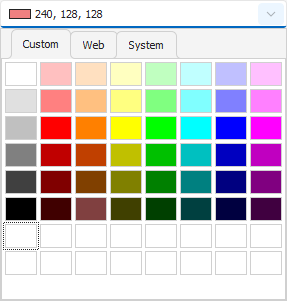
Each Windows Forms Property Editor is available in two forms:
- A standalone control (displays property value in a Detail View)
- A repository item (displays property value in a List Editor that supports in-place editing)
Control | Repository Item | Description |
|---|---|---|
Displays Color properties. Use Alt + Down Arrow to expand the editor’s drop-down window. |