AIReportingConfigurationBuilder.AddPromptToExpressionConverter() Method
Activates AI-powered Prompt-to-Expression functionality in the Web Report Designer.
Namespace: DevExpress.AspNetCore.Reporting
Assembly: DevExpress.AIIntegration.AspNetCore.Reporting.v26.1.dll
NuGet Package: DevExpress.AIIntegration.AspNetCore.Reporting
Declaration
Returns
| Type | Description |
|---|---|
| AIReportingConfigurationBuilder | A DevExpress.AspNetCore.Reporting.AIReportingConfigurationBuilder object that can be used to further configure the AI-powered functionality in Web Document Viewer and Web Report Designer. |
Remarks
The following code activates the Prompt-to-Expression functionality in an ASP.NET Core application:
// ...
builder.Services.AddSingleton(chatClient);
builder.Services.AddDevExpressAI((config) => {
    config.AddWebReportingAIIntegration(options =>
        options.AddPromptToExpressionConverter());
});
Filter Editor and Expression Editor now display the Prompt-to-Expression field. Specify a prompt in natural language and click the Send button to generate an expression:
- Expression Editor
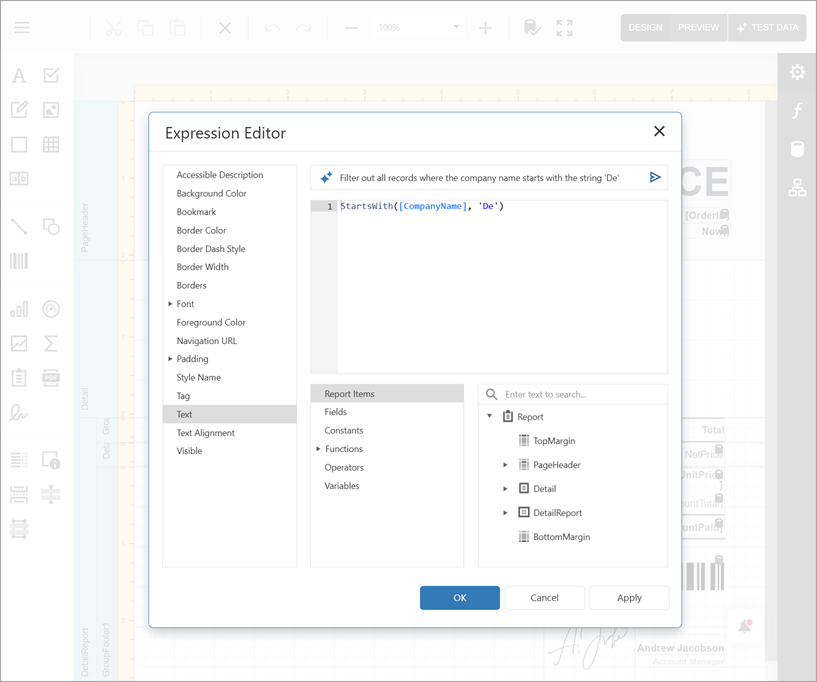
- Filter Editor
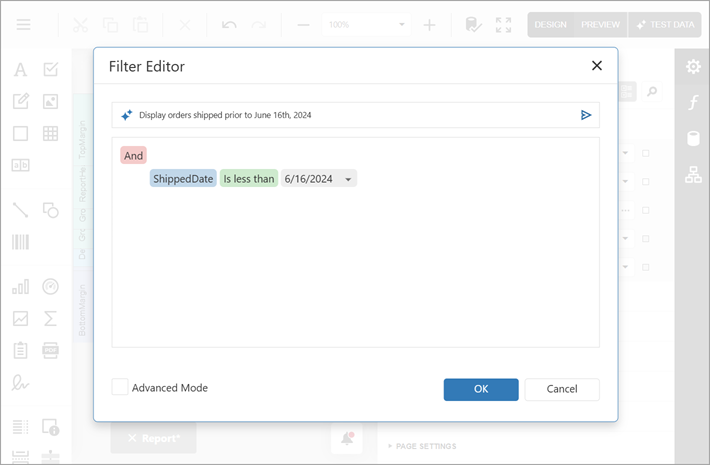
The AI model generates expressions based on the report-specific expression syntax. The model has access to the data source schema, report layout, and any custom functions registered in your application. You can refer to these elements in your prompts. Detailed prompts increase output quality.
Limitations
- This functionality is not available in the Query Builder.