ThemeBase Class
The base class for presentation themes.
Declaration
public abstract class ThemeBase extends PresentationObjectRemarks
A theme consists of three main components:
- Color Scheme
- Defines theme colors.
- Font Scheme
- Defines fonts for titles and body text.
- Format Scheme
- Defines fills, line styles, and visual effects.
Refer to the following help topic for additional information: Presentation Themes.
Inherited Members
Inheritance
Methods
deepClone() Method
Clones the current ThemeBase instance.
Declaration
public ThemeBase deepClone()Returns
| Type | Description |
|---|---|
ThemeBase |
The cloned |
getColorScheme() Method
Returns the theme’s color scheme.
Declaration
public ThemeColorScheme getColorScheme()Returns
| Type | Description |
|---|---|
| ThemeColorScheme | The theme’s color scheme. |
getFontScheme() Method
Returns the theme’s font scheme.
Declaration
public ThemeFontScheme getFontScheme()Returns
| Type | Description |
|---|---|
| ThemeFontScheme | The theme’s font scheme. |
getFormatScheme() Method
Returns the theme’s format scheme.
Declaration
public ThemeFormatScheme getFormatScheme()Returns
| Type | Description |
|---|---|
| ThemeFormatScheme | The theme’s format scheme. |
setColorScheme(ThemeColorScheme value) Method
Updates the theme’s color scheme.
Declaration
public void setColorScheme(ThemeColorScheme value)Parameters
| Name | Type | Description |
|---|---|---|
| value | ThemeColorScheme | The theme’s color scheme. |
Remarks
The following code snippet modifies theme colors:
// Access the first slide master in the presentation.
SlideMaster slideMaster = presentation.getSlideMasters().get(0);

// Access the theme.
Theme theme = slideMaster.getTheme();

// Customize theme colors.
theme.getColorScheme().setAccent1(
        new OfficeColor(Color.getOrange()));
theme.getColorScheme().setAccent2(
        new OfficeColor(Color.getDarkOrange()));
theme.getColorScheme().setAccent3(
        new OfficeColor(Color.getIndianRed()));
theme.getColorScheme().setDark2(
        new OfficeColor(Color.getRed()));
Refer to the following help topic for additional information: Color Scheme.
setFontScheme(ThemeFontScheme value) Method
Sets the theme’s font scheme.
Declaration
public void setFontScheme(ThemeFontScheme value)Parameters
| Name | Type | Description |
|---|---|---|
| value | ThemeFontScheme | The theme’s font scheme. |
Remarks
The font scheme contains two font groups:
- Major font for titles and headings
- Use getMajorFont() and setMajorFont(ThemeFont value) methods to obtain and specify the major font.
- Minor font for body text
- Use getMinorFont() and setMinorFont(ThemeFont value) methods to obtain and specify the minor font.
The following code snippet customizes theme fonts:
// Access the theme.
Theme theme = slideMaster.getTheme();

// Customize major and minor fonts.
theme.getFontScheme().setMajorFont(new ThemeFont("Tahoma"));
theme.getFontScheme().setMinorFont(new ThemeFont("Calibri", "Calibri Light"));
Refer to the following help topic for additional information: Font Scheme.
setFormatScheme(ThemeFormatScheme value) Method
Sets the theme’s format scheme.
Declaration
public void setFormatScheme(ThemeFormatScheme value)Parameters
| Name | Type | Description |
|---|---|---|
| value | ThemeFormatScheme | The theme’s format scheme. |
Remarks
The format scheme contains the following collections:
- Fills
- getFills() — Fill styles for shapes and text boxes
- Background Fills
- getBackgroundFills() — Fill styles for slide backgrounds
- Line Styles
- getLineStyles() — Outline and connector styles
- Effects
- getEffects() — Visual effects (such as glow, blur, and shadows)
Note
According to PowerPoint requirements, each format scheme collection must contain at least three elements.
The following code snippet replaces theme format scheme collections with custom values.
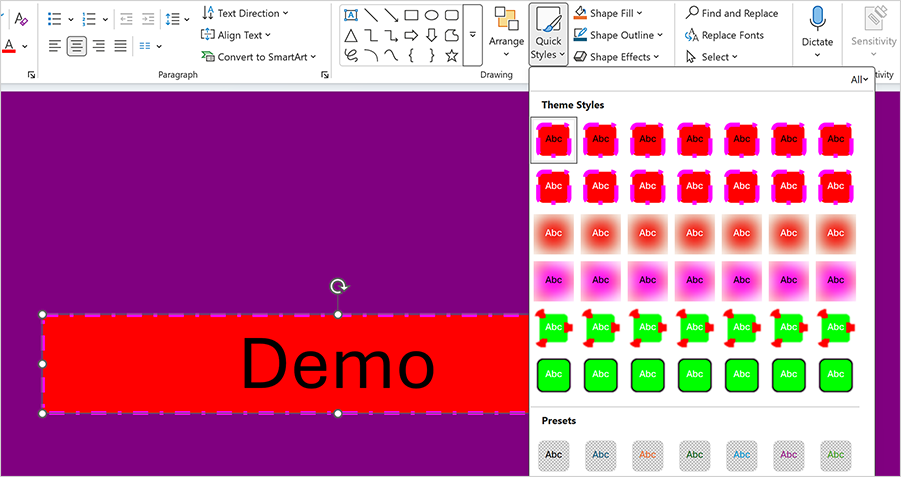
try(Presentation presentation = new Presentation(
        Files.readAllBytes(Path.of("presentation.pptx")))) {

    // Access the theme.
    Theme theme = presentation
            .getSlideMasters()
            .get(0)
            .getTheme();

    // Create background fills.
    List<Fill> backgroundFills = new ArrayList<>();
    backgroundFills.add(new SolidFill(Color.getPurple()));
    backgroundFills.add(new SolidFill(Color.getYellow()));
    backgroundFills.add(new SolidFill(Color.getDarkGoldenrod()));

    theme.getFormatScheme()
            .getBackgroundFills()
            .resetTo(backgroundFills);

    // Create shape fills.
    List<Fill> fills = new ArrayList<>();
    fills.add(new SolidFill(Color.getRed()));
    fills.add(new SolidFill(Color.getMagenta()));
    fills.add(new SolidFill(Color.getLime()));

    theme.getFormatScheme()
            .getFills()
            .resetTo(fills);

    // Create outline styles.
    List<LineStyle> lineStyles = new ArrayList<>();

    LineStyle line1 = new LineStyle();
    line1.setWidth(50f);
    line1.setDashType(LineDashType.DOT);
    line1.setFill(new SolidFill(Color.getRed()));
    lineStyles.add(line1);

    LineStyle line2 = new LineStyle();
    line2.setWidth(20f);
    line2.setDashType(LineDashType.DASH_DOT);
    line2.setFill(new SolidFill(Color.getMagenta()));
    lineStyles.add(line2);

    LineStyle line3 = new LineStyle();
    line3.setWidth(5f);
    line3.setDashType(LineDashType.SOLID);
    line3.setFill(new SolidFill(Color.getLime()));
    lineStyles.add(line3);

    theme.getFormatScheme()
            .getLineStyles()
            .resetTo(lineStyles);

    // Create visual effects.
    List<ShapeEffectProperties> effects = new ArrayList<>();

    ShapeEffectProperties blurEffect = new ShapeEffectProperties();
    blurEffect.setBlur(new BlurEffect(100f, true));
    effects.add(blurEffect);

    ShapeEffectProperties softEdgeEffect = new ShapeEffectProperties();
    softEdgeEffect.setSoftEdge(new SoftEdgeEffect(8f));
    effects.add(softEdgeEffect);

    ShapeEffectProperties glowEffect = new ShapeEffectProperties();
    glowEffect.setGlow(new GlowEffect(15f));
    effects.add(glowEffect);

    theme.getFormatScheme()
            .getEffects()
            .resetTo(effects);

    // Perform additional presentation processing logic.
}
Refer to the following help topic for additional information: Format Scheme.