Customize Data Source Wizard Pages
- 5 minutes to read
Important
Customization options described in this help topic are available to owners of DevExpress WinForms, DXperience, and Universal subscriptions (subscriptions that include DevExpress WinForms UI Controls). The DevExpress Reporting Subscription does not support UI customization in Report Viewer or End-User Report Designer. You can use ReportPrintTool and ReportDesignTool classes to display Print Preview and End-User Report Designer in their default configurations.
Refer to the following help topic for information on subscription options: Installation - Subscriptions that Include Reporting Components.
This example customizes Data Source Wizard pages. When a user clicks “Add Data Source” in the Report Designer, the invoked Data Source Wizard does the following:
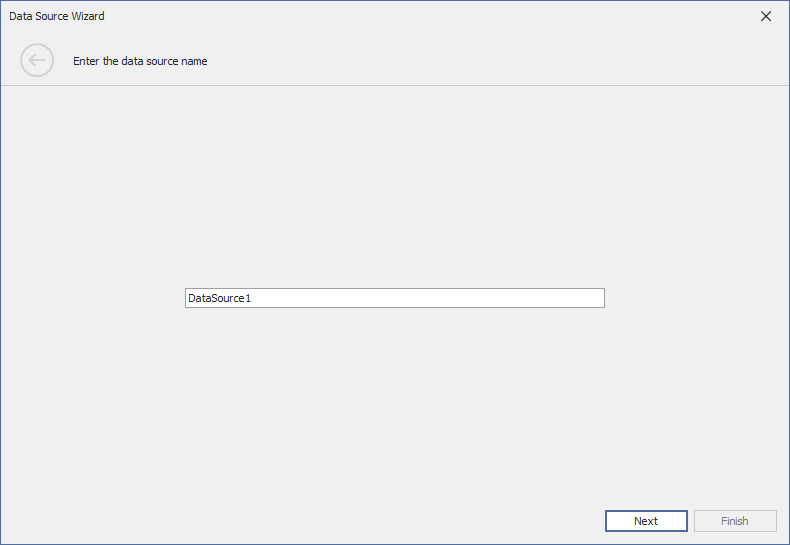
Adds a custom page for naming data sources.
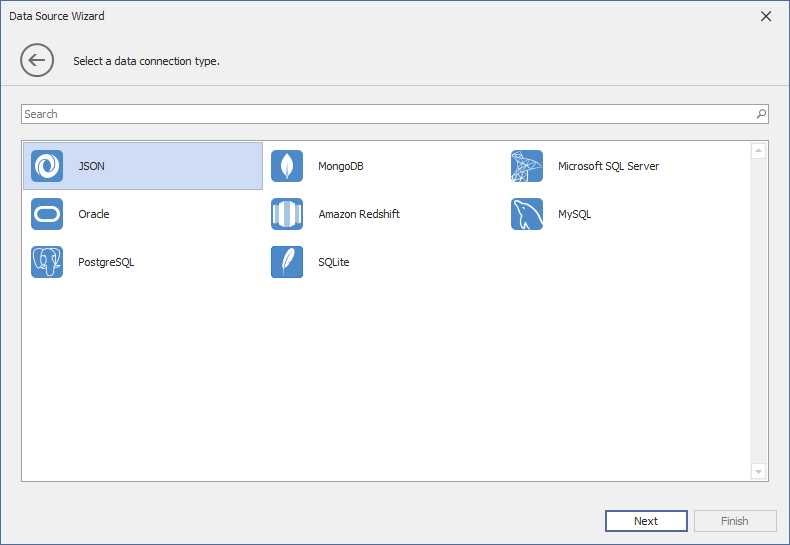
Limits the available SQL data source providers to MSSQLServer, Oracle, Amazon Redshift, MySQL, Postgres, and SQLite.
The WizardCustomizationService class implements the IWizardCustomizationService interface and allows you to customize the Data Source Wizard. The CustomizeDataSourceWizard method body contains the main logic for wizard customization:
- Registers a custom data source name creation service (
DataSourceNameCreationService), which adds a page for naming the data source. - Sets the Wizard start page to the custom page (
ChooseDataSourceNamePage). - Limits the available data source types and providers to a predefined list.
DataSourceNameCreationService is a helper class used to generate and validate unique data source names within the designer. It ensures that names are valid and do not conflict with existing data sources.
using DevExpress.Data.Utils;
using DevExpress.DataAccess.UI.Wizard;
using DevExpress.DataAccess.Wizard.Model;
using DevExpress.DataAccess.Wizard.Presenters;
using DevExpress.DataAccess.Wizard.Services;
using DevExpress.XtraReports.Wizards;
using System.ComponentModel;
using System.ComponentModel.Design;

namespace CustomizeDataSource {
    public class WizardCustomizationService : IWizardCustomizationService {
        static readonly string[] allowedSqlDataSourceProviders = new[] {
            "MSSqlServer", "Oracle", "Amazon Redshift", "MySql", "Postgres", "SQLite"
        };

        public void CustomizeDataSourceWizard(DevExpress.DataAccess.UI.Wizard.IWizardCustomization<DevExpress.XtraReports.Wizards.XtraReportModel> tool) {
            //Add the ChooseDataSourceNamePage page to the Wizard.
            var serviceProvider = tool.Resolve<IServiceProvider>();
            tool.RegisterInstance<IDataSourceNameCreationService>(new DataSourceNameCreationService(serviceProvider));
            tool.StartPage = typeof(ChooseDataSourceNamePage<XtraReportModel>);

            //Specify data source types and providers.
            tool.RegisterInstance(new DataSourceTypes(WizardDataSourceType.Sql | WizardDataSourceType.MongoDB | WizardDataSourceType.Json));
            var providerList = tool.Resolve<List<ProviderLookupItem>>();
            providerList.RemoveAll(x => !allowedSqlDataSourceProviders.Contains(x.ProviderKey));
        }

        void IWizardCustomizationService.CustomizeReportWizard(DevExpress.DataAccess.UI.Wizard.IWizardCustomization<DevExpress.XtraReports.Wizards.XtraReportModel> tool) { }

        bool IWizardCustomizationService.TryCreateDataSource(IDataSourceModel model, out object dataSource, out string dataMember) {
            dataSource = null;
            dataMember = null;
            return false;
        }
        bool IWizardCustomizationService.TryCreateReport(IDesignerHost designerHost, DevExpress.XtraReports.Wizards.XtraReportModel model, object dataSource, string dataMember) {
            return false;
        }
    }

    class DataSourceNameCreationService : IDataSourceNameCreationService {
        const string defaultDataSourceName = "DataSource";
        readonly IServiceProvider serviceProvider;
        public DataSourceNameCreationService(IServiceProvider serviceProvider) {
            this.serviceProvider = serviceProvider;
        }
        public string CreateName() {
            IContainer container = serviceProvider.GetService<IDesignerHost>().Container;
            int index = 1;
            string name = $"{defaultDataSourceName}{index}";
            while (container.Components[name] != null) {
                index++;
                name = $"{defaultDataSourceName}{index}";
            }
            return name;
        }

        public bool ValidateName(string name) {
            IContainer container = serviceProvider.GetService<IDesignerHost>().Container;
            return !HasWrongCharacters(name)
                && container.Components[name] == null;
        }

        static bool HasWrongCharacters(string name) {
            if(string.IsNullOrEmpty(name) || (!char.IsLetter(name[0]) && name[0] != '_')) {
                return true;
            }
            foreach(char c in name) {
                if(!char.IsLetterOrDigit(c) && c != '_') {
                    return true;
                }
            }
            return false;
        }
    }
}
To apply your wizard customization logic to the End-User Report Designer for WinForms, pass an instance of your IWizardCustomizationSevice implemetation to the report designer’s XRDesignMdiController.AddService method as shown below.
DesignMdiController.AddService<IWizardCustomizationService>(new WizardCustomizationService());
Tip
You can choose a proper page and a presenter, and create descendants for your custom page. The following help topic describe page views and presenters available in the Data Source Wizard: