Customize Report Wizard Pages
- 8 minutes to read
This document describes how to add a custom page to the Report Wizard.
Important
Customization options described in this help topic are available to owners of DevExpress WinForms, DXperience, and Universal subscriptions (subscriptions that include DevExpress WinForms UI Controls). The DevExpress Reporting Subscription does not support UI customization in Report Viewer or End-User Report Designer. You can use ReportPrintTool and ReportDesignTool classes to display Print Preview and End-User Report Designer in their default configurations.
Refer to the following help topic for information on subscription options: Installation - Subscriptions that Include Reporting Components.
Create a Custom Report Wizard Page
A wizard page definition consists of a View and a Presenter. The View defines the page’s visual interface. The Presenter determines the program logic behind the wizard page.
To create a custom wizard page, implement the following classes:
Page View Class
A page view class is an DevExpress.XtraEditors.XtraUserControl descendant populated with data editors. A custom page view class should be inherited from WizardViewBase, a base class that implements the DevExpress.DataAccess.Wizard.Views.IWizardPageView interface. A page view class should also implement a specific interface required to associate a presenter with a page view. These interfaces are contained in the DevExpress.DataAccess.Wizard.Views namespace.
Implementation Example
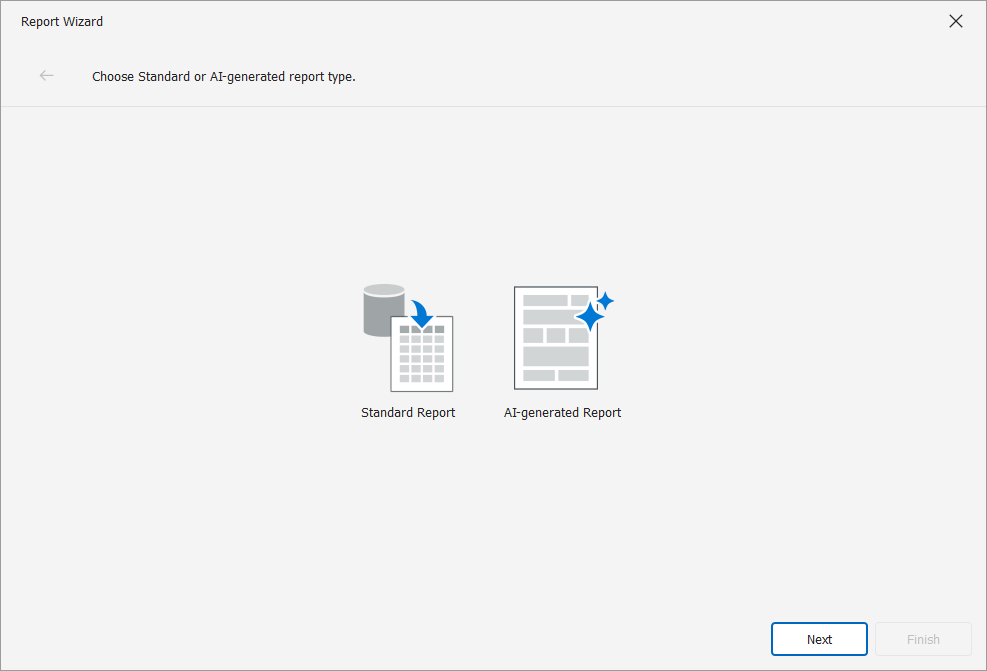
In the following example, the ChooseReportCreationModePage page overrides the Report Wizard start page and allows users to select an AI-powered report generation option. The page contains two options: Standard Report and AI-generated Report.
ChooseReportCreationModePageView identifies a custom page view (a WizardViewBase descendant that implements IChooseReportCreationModePageView). ChooseReportCreationModePageView defines page GUI elements such as “Standard Report” and “AI-generated Report” items, text header, and other elements.
using System.ComponentModel;
using DevExpress.AIIntegration.Reporting.Wizard;
using DevExpress.AIIntegration.WinForms.Reporting.Wizard.Images;
using DevExpress.DataAccess.UI.Wizard.Views;
using DevExpress.Utils.Svg;
using DevExpress.XtraBars.Ribbon;
using DevExpress.XtraReports.Design;

namespace AIWizardCustomizationExample.Customization {
    public partial class ChooseReportCreationModePageView : WizardViewBase, IChooseReportCreationModePageView {
        public override string HeaderDescription => "Choose Standard or AI-generated report type.";

        [Browsable(false), DesignerSerializationVisibility(DesignerSerializationVisibility.Hidden)]
        public ReportCreationMode CreationMode {
            get { return (ReportCreationMode)reportTypeGallery.GetValue(ReportCreationMode.Standard); }
            set { reportTypeGallery.SetValue(value); }
        }

        public event EventHandler CreationModeChanged;

        public ChooseReportCreationModePageView() {
            InitializeComponent();
        }

        protected override void OnLoad(EventArgs e) {
            base.OnLoad(e);
            reportTypeGallery.ClearGallery();
            reportTypeGallery.InitializeGallery(list => AddReportItems(list));
            reportTypeGallery.SetSkinStyle(LookAndFeel.ActiveSkinName);
        }

        protected void AddItem(IList<GalleryItem> list, string text, SvgImage svgImage, object tag) {
            list.Add(reportTypeGallery.CreateItem(text, svgImage, tag));
        }

        protected virtual void AddReportItems(IList<GalleryItem> list) {
            AddItem(list, "Standard Report", SvgImageLocator.GetWizardImage("StandardReport"), ReportCreationMode.Standard);
            AddItem(list, "AI-generated Report", AIWizardImages.IconReportAI, ReportCreationMode.AI);
        }

        void OnItemCheckedChanged(object sender, GalleryItemEventArgs e) {
            if(!e.Item.Checked)
                return;
            CreationModeChanged?.Invoke(this, EventArgs.Empty);
        }

        void OnItemDoubleClick(object sender, GalleryItemClickEventArgs e) {
            MoveForward();
        }
    }
}
Presenter Class
A page presenter is inherited from the base WizardPageBase<TView, TModel> class or from the existing wizard presenters. A page presenter should override the WizardPageBase<TView,TModel>.GetNextPageType method that returns the type of the subsequent wizard page and defines the order in which wizard pages are displayed.
Implementation Example
In the following example, the ChooseReportCreationModePage page overrides the Report Wizard start page and allows users to select an AI-powered report generation option. The page contains two options: Standard Report and AI-generated Report.
ChooseReportCreationModePage identifies a page presenter (WizardPageBase descendant). AI-generated ChooseReportCreationModePage defines the logic used to navigate to the next page based on the selected item.
using DevExpress.AIIntegration.Reporting.Wizard.Presenters;
using DevExpress.Data.WizardFramework;
using DevExpress.XtraReports.Wizards;
using DevExpress.XtraReports.Wizards.Presenters;

namespace AIWizardCustomizationExample.Customization {
    public class ChooseReportCreationModePage<TModel> : WizardPageBase<IChooseReportCreationModePageView, TModel> where TModel: XtraReportModel {
        public ChooseReportCreationModePage(IChooseReportCreationModePageView view) : base(view) { }

        public override bool MoveNextEnabled => true;
        public override bool FinishEnabled => false;

        public override void Begin() {
            View.CreationMode = Model.GetIsAIReportType() ? ReportCreationMode.AI : ReportCreationMode.Standard;
            View.CreationModeChanged += OnCreationModeChanged;
        }

        public override void Commit() {
            View.CreationModeChanged-= OnCreationModeChanged;
            Model.SetIsAIReportType(View.CreationMode == ReportCreationMode.AI);
        }

        public override Type GetNextPageType() {
            return View.CreationMode == ReportCreationMode.Standard
                ? typeof(ChooseReportTypePage<XtraReportModel>)
                : typeof(AIChooseDataSourceOptionPage<XtraReportModel>);
        }

        void OnCreationModeChanged(object? sender, EventArgs e) => RaiseChanged();
    }
}
You can choose a page and a presenter, and create descendants for your custom page. The following help topics describe page views and presenters available in the Data Source and Report Wizards:
Incorporate a Custom Page Into the Report Wizard
To customize the Report and/or Data Source wizard, implement the IWizardCustomizationService interface. Use the IWizardCustomizationService.CustomizeDataSourceWizard method to modify the Data Source wizard and the IWizardCustomizationService.CustomizeReportWizard method to modify the Report wizard. Both methods receive a tool argument of the IWizardCustomization<TModel> type, which gives access to the IWizardCustomization<TModel>.StartPage property. You can use this property to set the first wizard page.
Call the IWizardCustomization<TModel>.RegisterPage<TPageType, TPageInstance> and IWizardCustomization<TModel>.RegisterPageView<TViewType, TViewInstance> methods to register a presenter and a view for each custom page. The RegisterPage method associates the type that identifies the page within the wizard (returned by the previous page’s GetNextPageType method) with the actual page type. In the same way, the RegisterPageView method associates the type that identifies the page view (the corresponding presenter’s type parameter) with the actual type. You can substitute any standard wizard page with a custom descendant.
Implementation Example
In the following example, the ChooseReportCreationModePage page overrides the Report Wizard start page and allows users to select an AI-powered report generation option. The page contains two options: Standard Report and AI-generated Report.
The following code registers pages with AI-related options:
using DevExpress.AIIntegration.Reporting.Wizard.Presenters;
using DevExpress.AIIntegration.Reporting.Wizard.Views;
using DevExpress.AIIntegration.WinForms;
using DevExpress.AIIntegration.WinForms.Reporting;
using DevExpress.AIIntegration.WinForms.Reporting.Wizard;
using DevExpress.AIIntegration.WinForms.Reporting.Wizard.Views;
using DevExpress.Data.Utils;
using DevExpress.DataAccess.UI.Wizard;
using DevExpress.DataAccess.Wizard.Model;
using DevExpress.XtraReports.Design;
using DevExpress.XtraReports.UI;
using DevExpress.XtraReports.Wizards;

namespace AIWizardCustomizationExample.Customization {
    internal class WizardCustomizationService : IWizardCustomizationService {
        public void CustomizeReportWizard(IWizardCustomization<XtraReportModel> tool) {
            tool.StartPage = typeof(ChooseReportCreationModePage<XtraReportModel>);
            tool.RegisterPage<ChooseReportCreationModePage<XtraReportModel>, ChooseReportCreationModePage<XtraReportModel>>();
            tool.RegisterPageView<IChooseReportCreationModePageView, ChooseReportCreationModePageView>();
        }

            public void CustomizeDataSourceWizard(IWizardCustomization<XtraReportModel> tool) { }

            public bool TryCreateDataSource(IDataSourceModel model, out object dataSource, out string dataMember) {
                dataSource = null;
                dataMember = null;
                return false;
            }

            public bool TryCreateReport(IDesignerHost designerHost, XtraReportModel model, object dataSource, string dataMember) {
                if(model.GetIsAIReportType()) {
                    DoWithOverlay(designerHost, () => {
                        var builder = new AIReportBuilder(designerHost, dataSource, dataMember);
                        builder.Build((XtraReport)designerHost.RootComponent, model);
                    });
                    return true;
                }
                return false;
            }

            void DoWithOverlay(IDesignerHost designerHost, Action action) {
                Control control = designerHost.GetService<ReportTabControlBase>();
                using(var waitForm = new AIOverlayForm()) {
                    waitForm.ShowLoading(control);
                    try {
                        action();
                        waitForm.Close();
                    } catch(Exception ex) {
                        waitForm.ShowError(control, ex.Message, false);
                    }
                }
            }
    }
}
Register the Wizard Customization Extension
In the previous steps, you created a new page with custom logic for the Report Wizard. To apply this wizard customization to the End-User Report Designer for WinForms, pass an instance of your IWizardCustomizationSevice implementation to the report designer’s XRDesignMdiController.AddService method as shown below.
reportDesigner1.AddService<IWizardCustomizationService>(new WizardCustomizationService());
When you invoke the Report Wizard, the created custom page appears: