TextParagraph Class
A paragraph in a text area.
Declaration
public class TextParagraph extends OfficeObjectRemarks
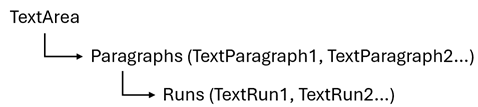
To specify the text area content, add TextParagraph objects to the collection returned by the TextArea.getParagraphs() method.
To split a paragraph into runs (spans of text that share the same formatting), add TextRun objects to the collection returned by the TextParagraph.getRuns() method.
A new shape’s text area initially contains one default empty paragraph to keep the presentation document structure valid. This is the first paragraph in the collection returned by the OfficeTextArea.getParagraphs() method.
Example
The following code snippet creates a new presentation, adds three slides, and populates slides with content:
The following example creates a three-slide PowerPoint presentation, saves the presentation as a PPTX file, and exports it to a PDF document.
Demonstrated features:
- Create a new presentation
- Add slides based on layouts
- Work with placeholders for titles, subtitles, and body text
- Insert and format text content
- Build bullet lists
- Create and populate tables, apply table styling and formatting
- Set a custom background for all slides
- Add footer text and date
- Save a presentation as a PPTX file
- Export a presentation to PDF

Slide 1: Presentation Title
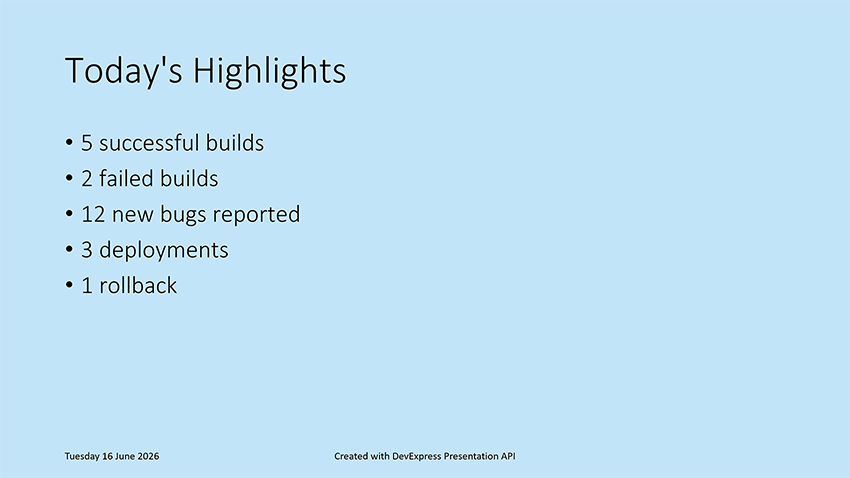
Slide 2: Today’s Highlights
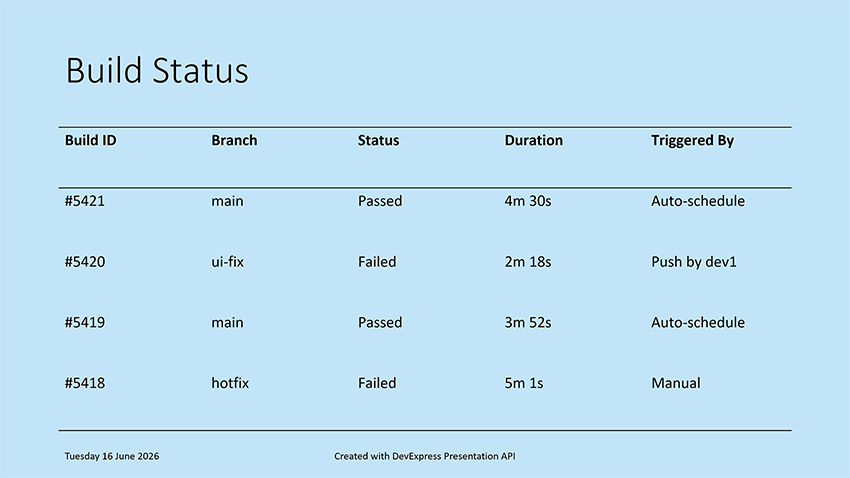
Slide 3: Build Status
package presentation;

import com.devexpress.docs.office.*;
import com.devexpress.system.drawing.*;
import com.devexpress.docs.presentation.*;

import java.io.FileOutputStream;
import java.io.IOException;
import java.nio.channels.*;
import java.nio.file.*;
import java.time.LocalDate;
import java.time.format.DateTimeFormatter;

public class Main {
    public static void main(String[] args) throws Exception {
        // Create a presentation.
        try (Presentation presentation = new Presentation()) {
            // Remove the default, blank slide from the presentation.
            presentation.getSlides().clear();

            createTitleSlide(presentation);
            createHighlightsSlide(presentation);
            createBuildStatusSlide(presentation);
            customizePresentationBackground(presentation, Color.fromArgb(194, 228, 249));
            addFooter(presentation);

            savePresentationToPptx(presentation);
            exportPresentationToPdf(presentation, "export-result.pdf");
        }
    }

    // Crease Slide 1: Presentation Title
    static void createTitleSlide(Presentation presentation) {
        SlideMaster slideMaster = presentation.getSlideMasters().get(0);
        Slide slide1 = new Slide(slideMaster.getLayouts().get(SlideLayoutType.TITLE));

        // Locate the centered title placeholder on the slide.
        Shape title = findPlaceholder(slide1, PlaceholderType.CENTERED_TITLE);

        // Specify the title.
        if (title != null) {
            title.setTextArea(new TextArea("Daily Testing Status Report"));
        }

        // Obtain the subtitle placeholder on the slide.
        Shape subtitle = findPlaceholder(slide1, PlaceholderType.SUBTITLE);

        // Display the current date in the subtitle placeholder.
        if (subtitle != null) {
            String date = LocalDate.now().format(DateTimeFormatter.ofPattern("EEEE, MMMM dd, yyyy"));
            subtitle.setTextArea(new TextArea(date));
        }

        presentation.getSlides().add(slide1);
    }

    // Create Slide 2: Today's Highlights
    static void createHighlightsSlide(Presentation presentation) {
        SlideMaster master = presentation.getSlideMasters().get(0);

        // Create a slide based on the Object layout.
        Slide slide2 = new Slide(master.getLayouts().getOrCreate(SlideLayoutType.OBJECT));
        Shape title = findPlaceholder(slide2, PlaceholderType.TITLE);

        if (title != null) {
            title.setTextArea(new TextArea("Today's Highlights"));
        }

        Shape body = findPlaceholder(slide2, PlaceholderType.BODY);

        if (body != null) {
            // Define slide content displayed as a bullet list.
            String[] highlights = {
                    "5 successful builds",
                    "2 failed builds",
                    "12 new bugs reported",
                    "3 deployments",
                    "1 rollback"};

            // Create a text area with multiple paragraphs.
            TextArea textArea = new TextArea();
            textArea.getParagraphs().clear();

            for (String item : highlights) {
                textArea.getParagraphs().add(new TextParagraph(item));
            }

            // Assign the text area to the placeholder shape.
            body.setTextArea(textArea);
        }
        presentation.getSlides().add(slide2);
    }

    // Create Slide 3: Build Status
    static void createBuildStatusSlide(Presentation presentation) {
        SlideMaster master = presentation.getSlideMasters().get(0);
        Slide slide3 = new Slide(master.getLayouts().getOrCreate(SlideLayoutType.OBJECT));

        Shape title = findPlaceholder(slide3, PlaceholderType.TITLE);

        if (title != null) {
            title.setTextArea(new TextArea("Build Status"));
        }

        Shape body = findPlaceholder(slide3, PlaceholderType.BODY);

        if (body != null) {
            RectangleF bounds = presentation.getActualShapeBounds(slide3, body);
            slide3.getShapes().remove(body);

            // Create a 5x5 table positioned within the placeholder bounds.
            Table table = new Table(
                    5,
                    5,
                    bounds.getX(),
                    bounds.getY(),
                    bounds.getWidth(),
                    bounds.getHeight());

            // Add the table to the slide.
            slide3.getShapes().add(table);

            // Populate the table with build status information.
            populateBuildTable(table);

            // Apply a predefined table style.
            table.setStyle(new ThemedTableStyle(TableStyleType.LIGHT_STYLE_1));

            // Disable alternating row colors.
            table.setHasBandedRows(false);
        }
        presentation.getSlides().add(slide3);
    }

    // Display a footer within presentation slides.
    static void addFooter(Presentation presentation) {
        HeaderFooterManager manager = presentation.getHeaderFooterManager();
        for(Slide slide : presentation.getSlides()) {
            manager.addFooterPlaceholder(slide, "Created with DevExpress Presentation API");
            manager.addDateTimePlaceholder(slide,
                    LocalDate.of(2026, 06, 14).format(
                            DateTimeFormatter.ofPattern(
                                    "EEEE dd MMMM yyyy")));
        }
    }

    // Specify the background color of a presentation.
    static void customizePresentationBackground(Presentation presentation, Color bgColor) {
        // Obtain the first slide master in the presentation.
        SlideMaster slideMaster = presentation.getSlideMasters().get(0);

        // Apply a custom background color to all slides that use this slide master.
        slideMaster.setBackground(
                new CustomSlideBackground(
                        new SolidFill(bgColor)));
    }

    // Save a presentation to a PPTX file.
    static void savePresentationToPptx(Presentation presentation)
            throws IOException {
        Path outputDir = Path.of("output");
        Files.createDirectories(outputDir);

        try (WritableByteChannel writableByteChannel =
                     FileChannel.open(outputDir.resolve("presentation.pptx"),
                             StandardOpenOption.CREATE,
                             StandardOpenOption.WRITE,
                             StandardOpenOption.TRUNCATE_EXISTING)) {

            presentation.saveDocument(writableByteChannel, DocumentFormat.PPTX);
        }
    }

    // Export a presentation to PDF.
    static void exportPresentationToPdf(Presentation presentation, String fileName)
            throws IOException {
        Path outputDir = Path.of("export");
        Files.createDirectories(outputDir);

        Path pdfPath = outputDir.resolve(fileName);

        try (FileOutputStream stream = new FileOutputStream(pdfPath.toFile())) {
            presentation.exportToPdf(stream);
        }
    }

    // Utility method: populates a table with data.
    static void populateBuildTable(Table table) {
        // Define table content.
        String[][] data = {
                {"Build ID", "Branch", "Status", "Duration", "Triggered By"},
                {"#5421", "main", "Passed", "4m 30s", "Auto-schedule"},
                {"#5420", "ui-fix", "Failed", "2m 18s", "Push by dev1"},
                {"#5419", "main", "Passed", "3m 52s", "Auto-schedule"},
                {"#5418", "hotfix", "Failed", "5m 1s", "Manual"}};

        // Fill table cells with data.
        for (int row = 0; row < data.length; row++) {
            for (int col = 0; col < data[row].length; col++) {
                table.getThis(row, col)
                        .getTextArea()
                        .setText(data[row][col]);
            }
        }
    }

    // Utility method: searches for a placeholder shape of the specified type.
    static Shape findPlaceholder(Slide slide, PlaceholderType type) {
        for (ShapeBase shapeBase : slide.getShapes()) {
            if (shapeBase instanceof Shape shape
                    && shape.getPlaceholderSettings().getType() == type) {
                return shape;
            }
        }
        return null;
    }
}
Inherited Members
Inheritance
Constructors
TextParagraph() Constructor
Initializes a new instance of the TextParagraph class.
Declaration
public TextParagraph()TextParagraph(String text) Constructor
Initializes a new instance of the TextParagraph class with specified settings.
Declaration
public TextParagraph(String text)Parameters
| Name | Type | Description |
|---|---|---|
| text | String | The initial paragraph text. |
Methods
deepClone() Method
Returns a deep copy of this TextParagraph instance.
Declaration
public TextParagraph deepClone()Returns
| Type | Description |
|---|---|
TextParagraph |
A deep copy of this |
getProperties() Method
Returns paragraph properties as indents, bullet settings, and spacing.
Declaration
public TextParagraphProperties getProperties()Returns
| Type | Description |
|---|---|
| TextParagraphProperties | Paragraph properties. |
getRuns() Method
Returns the collection of text regions with individual formatting.
Declaration
public ITextRunCollection getRuns()Returns
| Type | Description |
|---|---|
| com.devexpress.docs.office.ITextRunCollection | A collection of text runs. |
getText() Method
Returns the paragraph text.
Declaration
public String getText()Returns
| Type | Description |
|---|---|
| String | The paragraph text. |
Remarks
Use the “\r\n” character sequence to split the text into runs.
setProperties(TextParagraphProperties value) Method
Sets paragraph properties as indents, bullet settings, and spacing.
Declaration
public void setProperties(TextParagraphProperties value)Parameters
| Name | Type | Description |
|---|---|---|
| value | TextParagraphProperties | Paragraph properties. |
setText(String value) Method
Sets the paragraph text.
Declaration
public void setText(String value)Parameters
| Name | Type | Description |
|---|---|---|
| value | String | The paragraph text. |
Remarks
Use the “\r\n” character sequence to split the text into runs.