EffectProperties Class
Contains effect properties.
Declaration
public class EffectProperties extends EffectPropertiesBaseRemarks
The following code snippet accesses effect properties of a shape and configures blur and soft edge effects:
import com.devexpress.docs.presentation.*;
import com.devexpress.docs.office.*;

// Access and configure shape effect properties.
EffectProperties effects = shape.getEffects();
effects.setBlur(new BlurEffect(3.0f, false));
effects.setSoftEdge(new SoftEdgeEffect(2.0f));
Inherited Members
Inheritance
EffectProperties()
Initializes a new instance of the EffectProperties class.
Declaration
public EffectProperties()Methods
deepClone() Method
Returns a deep copy of this EffectProperties instance.
Declaration
public EffectProperties deepClone()Returns
| Type | Description |
|---|---|
EffectProperties |
A deep copy of this |
getBlur() Method
Returns a blur effect.
Declaration
public BlurEffect getBlur()Returns
| Type | Description |
|---|---|
| BlurEffect | A |
Remarks
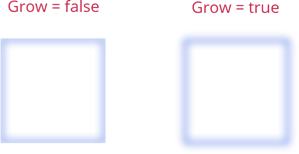
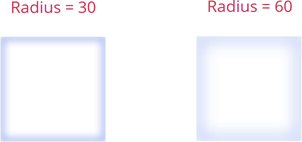
The BlurEffect class exposes methods that you can use to configure the blur effect:
- setGrow()
Specifies whether the blur effect extends beyond the original bounds of the shape:
- setRadius()
Specifies the radius of the blur effect:
getFillOverlay() Method
Returns the fill overlay effect.
Declaration
public FillOverlayEffect getFillOverlay()Returns
| Type | Description |
|---|---|
| FillOverlayEffect | A |
getGlow() Method
Returns a glow effect.
Declaration
public GlowEffect getGlow()Returns
| Type | Description |
|---|---|
| GlowEffect | A |
getSoftEdge() Method
Returns the soft edge effect applied to the object.
Declaration
public SoftEdgeEffect getSoftEdge()Returns
| Type | Description |
|---|---|
| SoftEdgeEffect | An object that specifies the soft edge effect applied to the object. |
setBlur(BlurEffect value) Method
Sets a blur effect.
Declaration
public void setBlur(BlurEffect value)Parameters
| Name | Type | Description |
|---|---|---|
| value | BlurEffect | A |
Remarks
The BlurEffect class exposes methods that you can use to configure the blur effect:
- setGrow()
Specifies whether the blur effect extends beyond the original bounds of the shape:
- setRadius()
Specifies the radius of the blur effect:
The following code snippet applies a blur effect to a shape:
package presentation;

import com.devexpress.docs.office.*;
import com.devexpress.system.drawing.*;
import com.devexpress.docs.presentation.*;

// Create a presentation.
try(Presentation presentation = new Presentation()) {
    presentation.getSlides().clear();

    Slide slide = new Slide(SlideLayoutType.BLANK);
    presentation.getSlides().add(slide);

    LineStyle outlineStyle = new LineStyle();
    outlineStyle.setFill(new SolidFill(Color.getRoyalBlue()));
    outlineStyle.setWidth(8);

    ShapeEffectProperties effectProperties = new ShapeEffectProperties();
    effectProperties.setBlur(new BlurEffect(60, true));

    Shape shape1 = new Shape(ShapeType.getRectangle()) {{
        setOutline(outlineStyle);
        setFill(new SolidFill(Color.getWhite()));
        setX(100);
        setY(100);
        setWidth(300);
        setHeight(300);
        setEffects(effectProperties);
    }};

    slide.getShapes().add(shape1);

    // Implement additional presentation processing logic.
}
setFillOverlay(FillOverlayEffect value) Method
Sets the fill overlay effect.
Declaration
public void setFillOverlay(FillOverlayEffect value)Parameters
| Name | Type | Description |
|---|---|---|
| value | FillOverlayEffect | A |
Remarks
The following code snippet applies a fill overlay effect to a shape:
import com.devexpress.docs.office.*;
import com.devexpress.system.drawing.*;
import com.devexpress.docs.presentation.*;

// Create a presentation.
try(Presentation presentation = new Presentation()) {
    presentation.getSlides().clear();

    Slide slide = new Slide(SlideLayoutType.BLANK);
    presentation.getSlides().add(slide);

    LineStyle outlineStyle = new LineStyle();
    outlineStyle.setFill(new SolidFill(Color.getRoyalBlue()));
    outlineStyle.setWidth(8);

    FillOverlayEffect fillOverlayEffect = new FillOverlayEffect();
    fillOverlayEffect.setBlendMode(BlendMode.LIGHTEN);
    fillOverlayEffect.setFill(new SolidFill(Color.getYellow()));

    ShapeEffectProperties effectProperties = new ShapeEffectProperties();
    effectProperties.setFillOverlay(fillOverlayEffect);

    Shape shape = new Shape(ShapeType.getRectangle(), 30, 30, 300, 300) {{
        setOutline(outlineStyle);
        setFill(new SolidFill(Color.getDarkBlue()));
        setEffects(effectProperties);
    }};

    slide.getShapes().add(shape);

    // Perform additional presentation processing logic.
}
setGlow(GlowEffect value) Method
Sets a glow effect.
Declaration
public void setGlow(GlowEffect value)Parameters
| Name | Type | Description |
|---|---|---|
| value | GlowEffect | A |
setSoftEdge(SoftEdgeEffect value) Method
Sets the soft edge effect applied to the object.
Declaration
public void setSoftEdge(SoftEdgeEffect value)Parameters
| Name | Type | Description |
|---|---|---|
| value | SoftEdgeEffect | An object that specifies the soft edge effect applied to the object. |