Extract Presentation Content
- 8 minutes to read
DevExpress PowerPoint Presentation API allows you to extract different types of content from PowerPoint presentations:
- Slide text
- Paragraph text
- Slide notes
- Note body text
- Pictures
Obtain Slides and Shapes
Use the following methods to obtain presentation content (slides, shapes, and notes):
Content Extraction Implementation Details
Code snippets in this help topic use the following techniques to extract presentation content:
- Sort shapes by position
- The order of shapes in the getShapes() collection does not necessarily match their visual order on a slide. To process content from top to bottom and from left to right, sort shapes by their
YandXcoordinates. - Filter shapes
You can exclude certain shape types from extraction results (for example, slide number placeholders, empty text shapes, shapes without text content). Use the getType() method to identify shape type.
Use the getText() method to identify whether the shape contains text. The method returns an empty string if the shape does not contain text content.
Extract Slide Text
Use the shape.getTextArea().getText() method to obtain the shape text.
Extract Text from a Specific Slide
The following code snippet implements the extractTextFromSlide method that extracts text from the specified slide. The code processes shapes that contain text (top and leftmost shapes go first):

import com.devexpress.docs.presentation.*;
import java.util.*;

String extractTextFromSlide(Slide slide) {
    String slideText = "";

    // Collect text shapes for sorting.
    List<Shape> textShapes = new ArrayList<>();

    // Iterate through all shapes on the slide.
    for (ShapeBase shapeBase : slide.getShapes()) {
        // Add only shapes that contain text.
        if (shapeBase instanceof Shape shape &&
                shape.getTextArea() != null) {

            textShapes.add(shape);
        }
    }

    // Sort shapes from top to bottom and from left to right.
    textShapes.sort(
            Comparator.comparing(Shape::getY)
                    .thenComparing(Shape::getX));

    // Extract text from sorted shapes.
    for (Shape textShape : textShapes) {
        String shapeText = textShape.getTextArea().getText();

        // Skip slide number placeholders and empty text.
        if ((textShape.getPlaceholderSettings() != null &&
                textShape.getPlaceholderSettings().getType()
                        == PlaceholderType.SLIDE_NUMBER)
                || shapeText == null
                || shapeText.isBlank()) {

            continue;
        }

        // Append shape text to the result.
        slideText += shapeText + "\r\n";
    }

    return slideText;
}
User Feedback
Developers who use DevExpress products often highlight the following key benefits:
💹 Comprehensive product lineup
DevExpress offers a wide range of tools — 19 products, including 15 control libraries — along with cross-platform packages. Developers can select what they need for a specific project or use a full-featured suite.
💭 Try before you buy
DevExpress offers online demos and a free 30-day trial, allowing developers to evaluate whether the tools meet their needs.
The company also backs its products with comprehensive customer support.
❣️User-friendly Tools
Many developers highlight the clarity and optimization of DevExpress controls compared to alternatives. With an intuitive API, the tools are easy to set up and use across a variety of scenarios.
Extract Text from all Slides
The following code snippet extracts text from all slides in a presentation. It uses the extractTextFromSlide method that extracts text from the specified slide.

Slide 1
Slide 2
// Load the presentation from disk.
try(Presentation presentation =
            new Presentation(
                    Files.readAllBytes(Path.of("presentation.pptx")))) {

    // Stores extracted text from all presentation slides.
    String presentationText = "";

    // Iterate through all slides and extract their text content.
    for (Slide slide : presentation.getSlides()) {
        presentationText += extractTextFromSlide(slide);
    }
}
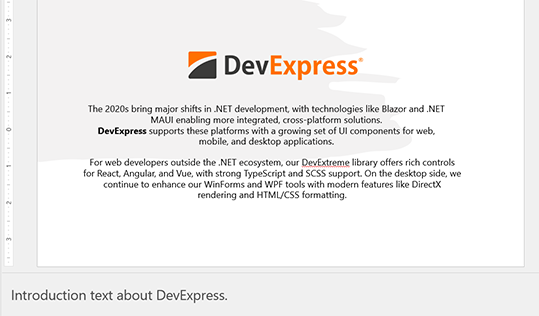
The 2020s bring major shifts in .NET development, with technologies like Blazor and .NET MAUI enabling more integrated, cross-platform solutions.
DevExpress supports these platforms with a growing set of UI components for web, mobile, and desktop applications.
For web developers outside the .NET ecosystem, our DevExtreme library offers rich controls for React, Angular, and Vue, with strong TypeScript and SCSS support. On the desktop side, we continue to enhance our WinForms and WPF tools with modern features like DirectX rendering and HTML/CSS formatting.
User Feedback
Developers who use DevExpress products often highlight the following key benefits:
💹 Comprehensive product lineup
DevExpress offers a wide range of tools — 19 products, including 15 control libraries — along with cross-platform packages. Developers can select exactly what they need for a specific project or use a full-featured suite.
💭 Try before you buy
DevExpress offers online demos and a free 30-day trial, allowing developers to evaluate whether the tools are intuitive and meet their needs.
The company also backs its products with comprehensive customer support.
❣️User-friendly Tools
Many developers highlight the clarity and optimization of DevExpress controls compared to alternatives. With an intuitive API, the tools are easy to set up and use across a variety of scenarios.
Extract Text from a Specific Paragraph of a Specific Shape
The following code snippet searches for a shape by name on the specified slide and, if the shape is found, extracts text from the specified paragraph. If the shape or paragraph is not found, the extractParagraph method returns an empty string.

import com.devexpress.docs.office.*;
import com.devexpress.docs.presentation.*;

String extractParagraph(Slide slide, String shapeName, int paraIndex) {
    try {
        // Find shape by name on the slide.
        Shape shape = slide.getShapes()
                .find(Shape.class, s -> s.getName().equals(shapeName));

        if (shape == null)
            return "";

        ITextParagraphCollection paragraphs = shape.getTextArea().getParagraphs();
        if (paragraphs == null || paraIndex >= paragraphs.size())
            return "";

        // Extract text from the specified paragraph.
        return paragraphs.get(paraIndex).getText();

    } catch (Exception ex) {
        return "";
    }
}
DevExpress supports these platforms with a growing set of UI components for web, mobile, and desktop applications.
Extract Note Text
Use the Slide.getNotes() method to obtain slide notes.
Extract Note Text from a Specific Slide
The following code snippet implements the extractNoteText method that extracts the note text from the specified slide.
import com.devexpress.docs.office.*;
import com.devexpress.docs.presentation.*;

String extractNoteText(Slide slide) {
    try {
        // Get the notes slide associated with the slide.
        NotesSlide notesSlide = slide.getNotes();
        if (notesSlide == null)
            return "";

        StringBuilder noteText = new StringBuilder();

        // Iterate through all shapes on the notes slide.
        for (ShapeBase shape : notesSlide.getShapes()) {
            // Process only text shapes.
            if (!(shape instanceof Shape textNoteShape))
                continue;

            // Get the text container from the shape.
            TextArea textArea = textNoteShape.getTextArea();
            if (textArea == null)
                continue;

            // Extract raw text content.
            String text = textArea.getText();
            if (text == null || text.isBlank())
                continue;

            // Skip system placeholders (for example, slide number fields).
            PlaceholderSettings placeholder = textNoteShape.getPlaceholderSettings();
            if (placeholder != null
                    && placeholder.getType() == PlaceholderType.SLIDE_NUMBER)
                continue;

            // Add newline separator between multiple note blocks.
            if (!noteText.isEmpty())
                noteText.append("\r\n");

            // Append the note text.
            noteText.append(text);
        }

        // Return the aggregated note text.
        return noteText.toString();

    } catch (Exception ex) {
        return "";
    }
}
Introduction text about DevExpress.
Extract Note Text from All Slides
The following code snippet extracts the note text from all slides. The code processes note shapes that contain text (top and leftmost shapes go first). It uses the extractNoteText method that extracts note text from the specified slide.
Slide 1

Slide 2
String extractNoteTextForAllSlides(Presentation presentation) {
    // Accumulates extracted note text from all slides.
    StringBuilder result = new StringBuilder();

    // Iterate through all slides in the presentation.
    for(Slide slide : presentation.getSlides()) {

        // Extract note text for the current slide.
        String noteText = extractNoteText(slide);

        // Append only non-empty note text.
        if(!noteText.isEmpty()) {
            result.append(noteText);
            result.append(System.lineSeparator());
        }
    }

    return result.toString();
}
Introduction text about DevExpress.
Key Benefits
Describe key benefits to the customer.
Extract Pictures
Use the PictureShape class to access pictures stored in presentation slides.
Extract Pictures from a Specific Slide
The following code snippet extracts pictures from the specified slide and saves them as PNG files.

import com.devexpress.docs.presentation.*;
import com.devexpress.docs.OfficeImage;
import com.devexpress.drawing.DXImageFormat;
import java.nio.file.*;
import java.util.*;

public class Main {
    public static void main(String[] args) throws Exception {
        // Load the presentation from disk.
        try(Presentation presentation =
                    new Presentation(
                            Files.readAllBytes(Path.of("presentation.pptx")))) {

            // Stores the image index used in output file names.
            int index = 0;

            // Specify the directory where extracted images will be saved.
            Path outputDir = Path.of("output");

            // Ensure the output directory exists.
            Files.createDirectories(outputDir);

            // Extract pictures from the first slide.
            List<PictureShape> pictureShapes =
                    extractPicturesFromSlide(presentation.getSlides().getFirst());

            // Save extracted pictures to disk.
            for(PictureShape pictureShape : pictureShapes) {
                ((OfficeImage) pictureShape.getImage()).getDXImage()
                        .save(outputDir.resolve("picture-" + index + ".png")
                                .toString(), DXImageFormat.getPng());
                index++;
            }
        }
    }

    static List<PictureShape> extractPicturesFromSlide(Slide slide) {
        // Collect picture shapes for sorting.
        List<PictureShape> pictureShapes = new ArrayList<>();

        // Iterate through all shapes on the slide.
        for(ShapeBase shape : slide.getShapes()) {
            // Add only shapes that contain pictures.
            if(shape instanceof PictureShape pictureShape) {
                pictureShapes.add(pictureShape);
            }
        }

        // Sort shapes from top to bottom and from left to right.
        pictureShapes.sort(
                Comparator.comparing(PictureShape::getY)
                        .thenComparing(PictureShape::getX));

        return pictureShapes;
    }
}
Extract Pictures from all Slides
The following code snippet extracts pictures from all presentation slides and saves them as PNG files. It uses the extractPicturesFromSlide method that extracts pictures from the specified slide.

Slide 1
Slide 2
public static void main(String[] args) throws Exception {
    // Load the presentation from disk.
    try(Presentation presentation =
                new Presentation(
                        Files.readAllBytes(Path.of("presentation.pptx")))) {

        int index = 0;
        Path outputDir = Path.of("output");

        List<PictureShape> pictureShapes = new ArrayList<>();

        // Extract pictures from all slides in the presentation.
        for(Slide slide : presentation.getSlides()) {
            pictureShapes.addAll(extractPicturesFromSlide(slide));
        }

        for (PictureShape pictureShape : pictureShapes) {
            ((OfficeImage) pictureShape.getImage()).getDXImage()
                    .save(outputDir.resolve("picture-" + index + ".png")
                            .toString(), DXImageFormat.getPng());
            index++;
        }
    }
}