Migrate from ASPxClientDashboard to DashboardControl API
- 5 minutes to read
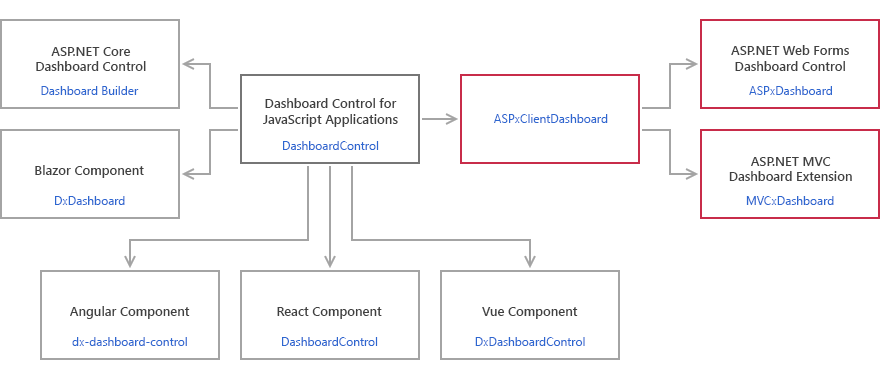
DashboardControl API is a unified API and an entry point for Web Dashboard customization for all Web Dashboard controls. This API makes it easy to share the JavaScript code between platforms: the code became almost identical for all supported platforms.
The ASPxDashboard control and MVCxDashboard extension have a client-side equivalent called ASPxClientDashboard. It is a wrapper for the DashboardControl with a similar, but limited API.
To migrate to the unified client API in ASP.NET Web Forms and ASP.NET MVC applications, first obtain the DashboardControl instance. You can then use the table in this article to replace the ASPxClientDashboard API calls with the corresponding DashboardControl API.
Tip
See the following topic about the Web Dashboard architecture: Web Dashboard Technical Overview.
Step 1. Obtain the DashboardControl Instance
The ASPxClientDashboard object is a wrapper for DashboardControl. Follow the steps below to get the DashboardControl instance:
- Handle the ASPxClientDashboard.BeforeRender event.
- In the event handler, call the ASPxClientDashboard.GetDashboardControl method.
The GetDashboardControl method returns the DashboardControl instance that is common for all supported platforms:
See the following topics for details and event handling examples:
- Client-Side API Overview for ASP.NET Web Forms Dashboard
- Client-Side API Overview for ASP.NET MVC Dashboard
Step 2. Change the ASPxClientDashboard to DashboardControl API
The main difference between the two API versions is the capitalization of the first letter. The ASPxClientDashboard API uses Pascal Case (“OnItemClick”). The DashboardControl API uses Camel Case (“onItemClick”).
DashboardControl- methods and events- Change the API from Pascal Case to Camel Case.
- Extensions - methods and events
- Call the DashboardControl.findExtension(extensionName) method and pass the extension name as a parameter to obtain the extension instance. Change the API from Pascal Case to Camel Case.
- Client events
- Handle client events in the
onBeforeRenderevent handler. Call the extension’sonmethod (for example, ViewerApiExtension.on) and pass the event handler name as a parameter. - Return value and parameter types
- Change the
ASPxClientDashboardreturn value and parameter types to theDashboardControltype aliases and classes.
API Reference
Refer to these API lists to find the corresponding members in a unified API when you migrate from the ASPxClientDashboard API.
Interactivity
Common
- How to add custom interactivity to a dashboard:
- How to obtain a dashboard item’s underlying data for a clicked visual element:
Master Filtering
How to apply a master filter on the client:
- [ASP.NET Web Forms](https://github.com/DevExpress-Examples/asp-net-web-forms-dashboard-apply-master-filter-in-code)
Drill-Down
- How to drill down on the client:
Selection
- How to add custom interactivity to a dashboard:
Customization
- How to create a JSON connection at runtime:
- How to calculate the Viewer’s layout size based on the dashboard size:
Dashboard State
- How to save a dashboard state to cookies:
- How to store dashboard state in the dashboard layout:
Work with Data
- How to obtain underlying data for the specified dashboard item:
- How to reset the data source cache:
Toolbar Customization
- How to add custom properties:
- JavaScript Customization for Dashboard components for Blazor:
- How to export all dashboard items into the same PDF document:
Export Data
Common
To PDF
To Excel
To Image
Parameters
- How to specify dashboard parameter values on the client:
Designer and Viewer Modes
- How to switch between Designer and Viewer modes:
Work with a Dashboard
Maximize and Restore Items
Data Inspector
Tab Pages
- How to change chart arguments at runtime: