StripLine Class
A strip line.
Namespace: DevExpress.Web.ASPxGantt
Assembly: DevExpress.Web.ASPxGantt.v20.1.dll
NuGet Package: DevExpress.Web
Declaration
Related API Members
The following members return StripLine objects:
Remarks
The ASPxGantt uses strip lines to highlight certain time or time intervals in the chart. Use the StripLines collection to access strip lines.
Use the Start property to specify an individual line or combine it with the End property setting to specify a time interval.
You can also use the Title and CssClass properties to specify the object’s title and appearance settings.
Create a Single Strip Line
Create a StripLine object, specify its Start property, and add this object to the control’s StripLines collection.
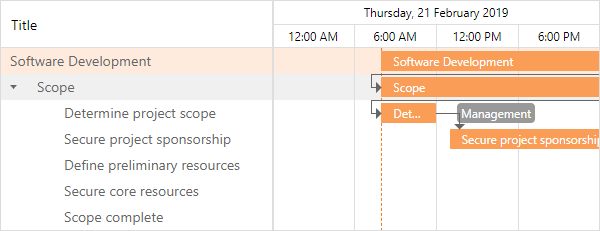
Declaratively:
<dx:ASPxGantt ID="Gantt" runat="server"...>
    ...
    <SettingsStripLine>
        <StripLines>
            <dx:StripLine Title="Start Time" Start="2020-06-21T08:00:00.000Z"/>
        </StripLines>
    </SettingsStripLine>
</dx:ASPxGantt>
In code:
StripLine startLine = new StripLine();
startLine.Title = "Start Time";
startLine.Start = new DateTime(2019, 02, 21, 08, 00, 00);

Gantt.SettingsStripLine.StripLines.Add(startLine);
Highlight a Time Interval
Create a StripLine object, specify its Start and End properties, and add this object to the control’s StripLines collection.
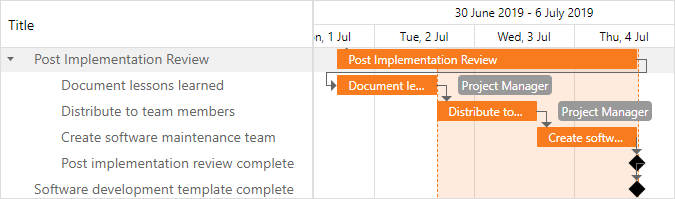
Declaratively:
<dx:ASPxGantt ID="Gantt" runat="server"...>
    ...
    <SettingsStripLine>
        <StripLines>
            <dx:StripLine Title="Final Period" Start="2019-07-02T12:00:00.000Z" End="2019-07-04T12:00:00.000Z" />
        </StripLines>
    </SettingsStripLine>
</dx:ASPxGantt>
In code:
StripLine finalPeriod = new StripLine();
finalPeriod.Title = "Final Period";
finalPeriod.Start = new DateTime(2019, 07, 02);
finalPeriod.End = new DateTime(2019, 07, 04);

Gantt.SettingsStripLine.StripLines.Add(finalPeriod);
Highlight Current Time
Set the ShowCurrentTime property to true in the GanttStripLineSettings object to highlight current time in the control. Use the CurrentTimeUpdateInterval property to specify the time interval between the current time updates.
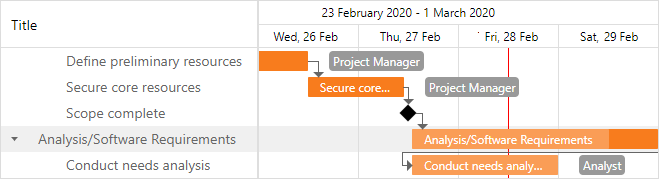
Declaratively:
<dx:ASPxGantt ID="Gantt" runat="server"...>
    ...
    <SettingsStripLine ShowCurrentTime="true" CurrentTimeUpdateInterval="5" />
</dx:ASPxGantt>
In code:
Gantt.SettingsStripLine.ShowCurrentTime = true;
Gantt.SettingsStripLine.CurrentTimeUpdateInterval = "5";