GanttToolbarSettings Class
Contains toolbar settings.
Namespace: DevExpress.Web.ASPxGantt
Assembly: DevExpress.Web.ASPxGantt.v20.1.dll
NuGet Package: DevExpress.Web
Declaration
Related API Members
The following members return GanttToolbarSettings objects:
Remarks
The ASPxGantt control allows you to display the most frequently used commands in the built-in toolbar.
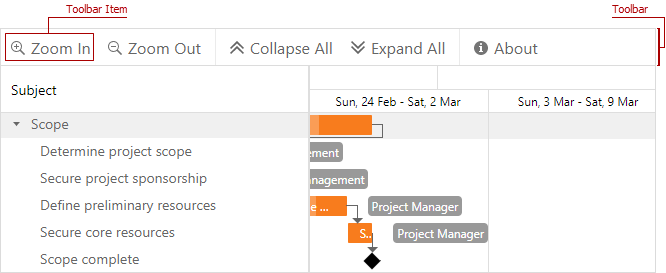
The toolbar has a set of predefined items and supports custom items. Use the Items collection to access toolbar items.
Available toolbar item types:
Toolbar Item Type | Description |
|---|---|
A toolbar item that adds a task. | |
A toolbar item that collapses all tasks. | |
A toolbar item that expands all tasks. | |
A toolbar item that switches the control to full screen mode. | |
A toolbar item that repeats the undone action. | |
A toolbar item that removes a task. | |
A toolbar item that reverses an action. | |
A toolbar item that zooms in. | |
A custom toolbar item. | |
A toolbar item that zooms out. |
Create a Standard Toolbar Item
Create any of supported standard toolbar items, specify its Text property, and add this toolbar item to the Items collection.
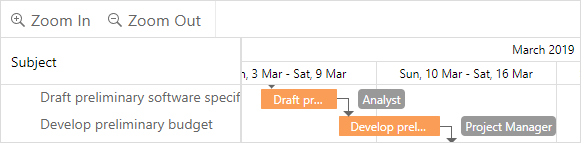
<dx:ASPxGantt ID="Gantt" runat="server"...>
    ...
    <SettingsToolbar>
        <Items>
            <dx:GanttZoomInToolbarItem Text="Zoom In" />
            <dx:GanttZoomOutToolbarItem Text="Zoom Out" />
        </Items>
    </SettingsToolbar>
</dx:ASPxGantt>
Create a Custom Toolbar Item
Create a GanttCustomToolbarItem object, specify its Text and CommandName properties, and add this toolbar item to the Items collection. To handle the toolbar item click, handle the CustomCommand event.
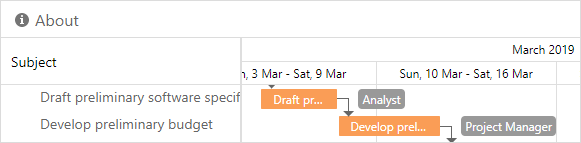
<dx:ASPxGantt ID="Gantt">
    <SettingsToolbar>
        <Items>
            <dx:GanttCustomToolbarItem Text="About" CommandName="About" />
        </Items>
    </SettingsToolbar>
    <ClientSideEvents CustomCommand="CustomCommand" />
    ...
</dx:ASPxGantt>
function CustomCommand(s, e) {
    if (e.commandName == "About")
        alert('Sample message');
}
Show and Hide Toolbar
Set the Visible property to true to hide the toolbar.
<dx:ASPxGantt ID="Gantt" runat="server"...>
    ...
    <SettingsToolbar Visible="false" />
</dx:ASPxGantt>
Change Toolbar Alignment
Set the Alignment property to one of the GanttToolbarAlignment enumeration values to change the toolbar alignment.
<dx:ASPxGantt ID="Gantt" runat="server"...>
    ...
    <SettingsToolbar Alignment="Right" />
</dx:ASPxGantt>