Migrate XAF Application from ASP.NET WebForms to ASP.NET Core Blazor
- 10 minutes to read
XAF v25.2+ no longer supports .NET Framework, so Web Forms projects cannot be updated to v25.2. We also removed certain legacy APIs and features based on .NET. Review the full list of removed APIs in the following knowledge base article: T1312589 - XAF - Legacy .NET Framework (WinForms and ASP.NET WebForms) APIs, .NET-based API/Modules, and Security System have been removed from distribution.
We recommend that you migrate your XAF Web Forms applications to the Blazor framework.
This guide helps you migrate your XAF application from Web Forms to Blazor v25.2. During migration, you can use our XafApiConverter tool (available on GitHub). This tool automates some routine tasks and simplifies the update process. However, you still need to review and modify the code.
Prerequisites
Follow these steps before you migrate your application:
- Upgrade your project to v25.1. Check that your project compiles, runs, and all features work correctly.
- Backup your databases. Migration changes the database structure.
- If you use our tools to update the project, make sure that you use a version control system for your project’s sources. This allows you to review the changes the tools make.
Important
These migration recommendations do not cover all configurations. Use them as a starting point. Steps vary by operating system, installed software, and DevExpress version. You are responsible for application, database, network, and other settings based on client, security, environment, and other requirements. Review these settings with your database, network, and IT infrastructure administrators, and follow their guidance for your environment.
Step 1. Remove Outdated Security APIs and Convert User Data in Databases to a New Format
This step is required if your application uses built-in user and role types other than PermissionPolicyUser and PermissionPolicyRole, or if it uses the legacy password hashing algorithm.
Find a step-by-step migration guide in the following documentation section: Remove .NET Framework (WinForms / ASP.NET Web Forms) & Legacy .NET API: Legacy Security System Implementations.
Step 2. Remove Legacy APIs
In v25.2, we removed .NET Framework APIs and certain legacy APIs and features based on .NET. You must remove these APIs/modules from your code before you update your application to v25.2. You can use our converter tool or update your code manually.
Use the Converter Tool to Update Legacy APIs
The XafApiConverter tool scans your application’s types and checks if XAF .NET v25.2 provides equivalent types. If the tool cannot find an equivalent, it either fully comments out the class with a note about unavailability or places a comment if full removal is impractical. The tool usually comments out controllers, because XAF ASP.NET Web Forms features do not work in XAF Blazor applications.
You can find the tool’s source code in the following GitHub repository: XafApiConverter. Compile the XafApiConverter project and run the executable file from the command line:
XafApiConverter.exe <PathToYourSolution> migrate-types
Replace <PathToYourSolution> with the full path to your solution. If you enter a folder path, the tool processes every solution in the folder and its subfolders.
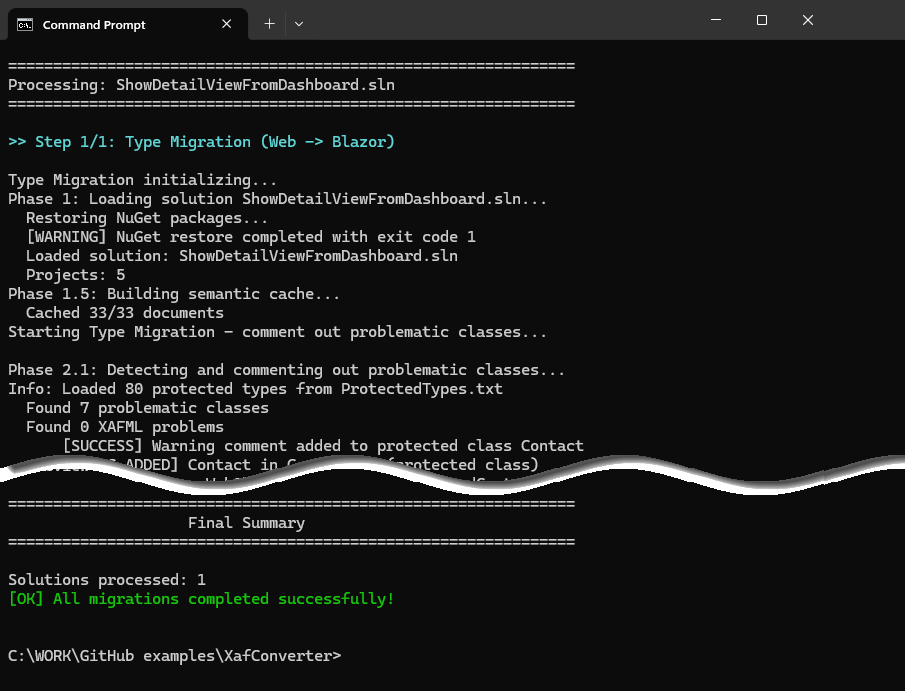
After the tool finishes, review the results and update the code that the tool did not process.
Update Legacy APIs Manually
Review your application code. Update, comment, or remove the following code:
- Modules removed in v25.2
- Maps (DevExpress.ExpressApp.Maps.Web)
- KPI (DevExpress.ExpressApp.Kpi)
- Script Recorder (DevExpress.ExpressApp.ScriptRecorder)
- Pivot Chart (DevExpress.ExpressApp.PivotChart.Web)
- Workflow (DevExpress.ExpressApp.Workflow)
- Web Forms-specific APIs and UI components that have no analogs in the Blazor platform, such as
Page,ASPxcontrols,LayoutItemTemplate,LayoutGroupTemplate, HTTP Handlers. - Other APIs removed in v25.2.
- References to assemblies and NuGet packages that are removed in v25.2.
To see the complete list of removed types, APIs, modules, and assemblies, refer to the following knowledge base article: T1312589 - XAF - Legacy .NET Framework….
Step 3. Refactor XAF Data Model, Controllers, and Other Business Logic Code
In XAF v25.2 we, removed built-in business classes (such as Address, Note, Person) from DevExpress.Persistent.BaseImpl.Xpo and DevExpress.Persistent.Base libraries. If your application uses these classes, you must copy their implementation code from the XAF source code to your project. The source code is usually placed in the following directory: %PROGRAMFILES%\DevExpress 25.1\Components\Sources\.
For the complete list of removed business classes, check the Removed-BaseImpl-Base-DC-API.txt file in the following knowledge base article: T1312589 - XAF - Legacy .NET Framework….
Also review the following help topics :
- Core - ValueManager API availability and deprecated static helpers in XAF .NET 6+ apps (Blazor, Web API Service, WinForms)
- Dependency Injection (DI)
- Determine if the Current User Has Specific Permissions
- Access the Currently Logged User for Data Filtering, Business Logic, and Security Permissions
Step 4. Migrate the Application from EF 6 to EF Core
XAF v25.2 no longer supports Entity Framework 6. You must migrate applications to EF Core.
To align EF 6 code with EF Core principles, refactor your business objects and DbContext to follow EF Core patterns. You can create a new EF Core project using the Template Kit or review the MainDemo.NET.EFCore demo application for code structure examples.
Additionally, review the following Microsoft’s migration documentation:
Step 5. Migrate the Application from .NET Framework to .NET
To migrate an application to .NET, follow these steps:
- Convert assembly references to NuGet packages.
- Convert .csproj files from .NET Framework format to SDK style.
You can perform these tasks manually or use our converter tools.
Use the Converter Tools to Convert Your Project
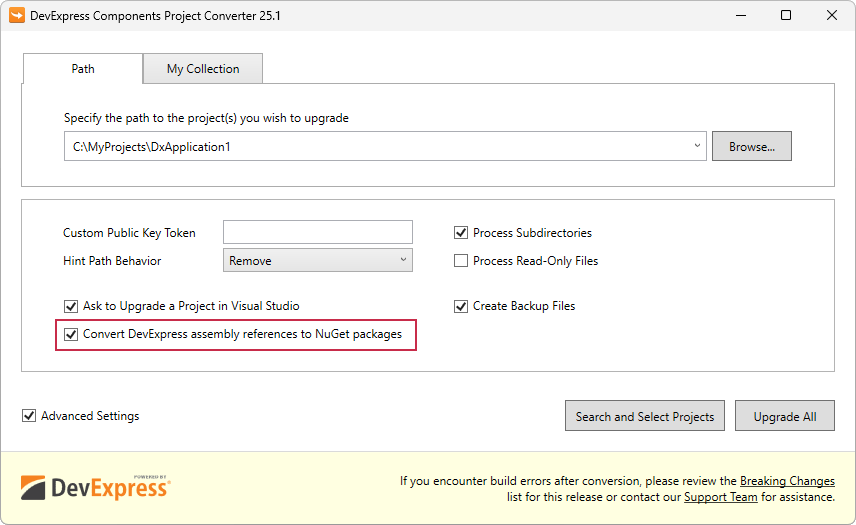
If your application uses assembly references, use the DevExpress ProjectConverter tool to change the references to NuGet packages.
Run the Project Converter tool. Select Convert DevExpress assembly references to NuGet packages and upgrade your application.
Use the XafApiConverter tool to convert .csproj files from .NET Framework format to an SDK-style project. Run XafApiConverter.exe from the command line:
XafApiConverter.exe <PathToYourSolution> project-conversionReplace
<PathToYourSolution>with the full path to your solution. If you enter a folder path, the tool processes every solution in the folder and its subfolders.The tool makes the following changes:
- Converts .csproj files to an SDK-style format.
- Updates the target framework to .NET 9.0.
- Adds XAF NuGet packages.
- Removes legacy assembly references.
- Updates the AssemblyInfo.cs file.
Convert Your Project Manually
- Use the DevExpress Template Kit or CLI template to create a new solution. Specify the same name, additional modules, ORM, and authentication settings as your project.
- Move code from your old project to the new project.
Step 6. Convert Your Project to a Blazor Application
The easiest way to get the required code for a Blazor application is to create a new Blazor project and copy the code from it.
- Use the DevExpress Template Kit or CLI template to create a new solution with a Blazor project. Specify the same name, ORM, additional modules, and authentication settings as your project.
- Get the missing Blazor application code from the new solution. Add the XAF Blazor project from the new solution to your old solution.
Update the connection string:
{
    "ConnectionStrings": {
        "ConnectionString": "Your connection string here"
    }
}
Note
Discover key differences in XAF ASP.NET Core Blazor Server and the latest platform best practices in the following help topic: Frequently Asked Questions - Blazor UI (FAQ).
Step 7. Refine your project, Fix Application Warnings and Errors
Refine your project so that it compiles and runs. You can use the MainDemo.NET.EFCore demo application as an example. You can also use a new project from the Template Kit to see code structure and utility classes.
Once your v25.1 application builds and runs successfully, you can update it to v25.2.
FAQ
- Can I update my application directly to v25.2?
No. First, update your application to v25.1. Then, use XafApiConverter to migrate the application. XafApiConverter analyzes semantic trees based on DevExpress product versions. To recognize types correctly, conversion should be performed against a v25.1-based application.
Perform the migration in v25.1, verify the application works correctly, and only after that update to v25.2.
- What should I do if XafApiConverter comments out a critical class?
- If the class uses a removed type, find an alternative in the Blazor API. Rewrite the class for Blazor. If no alternative exists, reconsider your business logic.
See also Frequently Asked Questions - Blazor UI (FAQ) - Can I use XafApiConverter on production code?
- Yes, but always make a backup. The tool automates routine tasks, but you must back up the database. Use Git to track changes. Review all automated changes and test your application after migration.
- What should I do with custom ASPx editors?
ASPx editors work only in Web Forms projects. Remove ASPx editors and rewrite them as Blazor components. Use standard Blazor editors if possible. Migration example:
// Old (Web Forms)
public class CustomDateEditor : ASPxDateTimePropertyEditor {
    // Web Forms specific code
}

// New (Blazor)
public class CustomDateEditor : DateTimePropertyEditor {
    // Blazor specific code
}
For additional information, please refer to the following documentation topics:
- Customize a Built-in Property Editor (Blazor)
- Implement a Property Editor Based on a Custom Component (Blazor)
- How to: Include a Custom UI Control That Is Not Integrated by Default (WinForms and ASP.NET Core Blazor)
- Underlying Controls and Components Behind UI Elements (ASP.NET Core Blazor)
- Ways to Access UI Elements and Their Controls
- Can I use the tool for XAF WinForms applications?
Yes. WinForms migration is simpler because the WinForms API stays mostly unchanged in .NET Core or .NET 8+. To migrate, run the following code:
XafApiConverter.exe <PathToYourSolution> project-conversionAlternatively, you can manually migrate your XAF WinForms app from .NET Framework to .NET 8+ and then run the Project Converter v25.2. WinForms apps do not require an intermediate upgrade to v25.1, because the converter automatically comments out removed and legacy API. You still need to migrate the remaining parts manually using the instructions from this article.
- What if the build succeeds but the application does not start?
- Check the following common issues:
- Connection string is not set. Check appsettings.json.
- A module is not registered. Check Program.cs and Startup.cs.
- Database migration is not executed. Update your database.
- Security is not configured. Check
SecurityStrategyin your configuration.
- How can I find types removed in v25.2?
- Read the following breaking change note: T1312589 - XAF - Legacy .NET Framework….
- Refer to the following document: XafApiConverter\Source\Converter\removed-api.txt.
- Run
XafApiConverter.exe --show-mappings.
- Where can I find Blazor code examples?
- XAF Online Documentation contains hundreds of Blazor code examples. It is a single source of truth for many popular tasks. If you use AI-powered assistants and IDE, configure them to use our documentation MCP server for the best results.
- XAF demo applications ship with XAF. You can find source code in the following folder: %PUBLIC%\Documents\DevExpress Demos 26.1\Components\XAF.
- Template Kit - create and examine a new project.
- GitHub examples.
- Support Center tickets - search the support knowledge base. Our hybrid search engine allows you to search through documentation topics, knowledge base articles (KB), GitHub code examples, and popular tickets.
Have a Question or an Issue? Contact Our Technical Support.
Share feedback on these migration instructions, or report it in the DevExpress Support Center (https://devexpress.com/ask). We use your input to improve these guidelines for the XAF community and to help resolve DevExpress-related project issues.