WinForms Application Templates
- 2 minutes to read
The XAF uses built-in Templates for automatic UI construction. The templates for WinForms applications are listed below.
Main Form Template (LightStyleMainForm)

Class: LightStyleMainForm
Namespace: DevExpress.ExpressApp.Win.Templates.Bars.
Displays the main Window without excessive borders. To use this template, set the IModelOptionsWin.FormStyle property to Standard and WinApplication.UseLightStyle to true.
Main Ribbon Form Template (LightStyleMainRibbonForm)

Class: LightStyleMainRibbonForm
Namespace: DevExpress.ExpressApp.Win.Templates.Ribbon
Displays the main Window with the Ribbon form style without excessive borders. To use this template, set the IModelOptionsWin.FormStyle property to Ribbon and WinApplication.UseLightStyle to true.
Detail Form Template (DetailFormV2)

Class: DetailFormV2
Namespace: DevExpress.ExpressApp.Win.Templates.Bars
Displays a Detail View in a new Window. To use this template, set the IModelOptionsWin.FormStyle property to Standard.
Detail Ribbon Form Template (DetailRibbonFormV2)

Class: DetailRibbonFormV2
Namespace: DevExpress.ExpressApp.Win.Templates.Ribbon
Displays a Detail View in a new Window with the Ribbon form style. To use this template, set the IModelOptionsWin.FormStyle property to Ribbon.
Popup Form Template (PopupForm)

Class: PopupForm
Namespace: DevExpress.ExpressApp.Win.Templates
Used to display pop-up windows with a Detail View. For instance, a logon form is displayed by the PopupForm Template.
Nested Frame Template (NestedFrameTemplateV2)
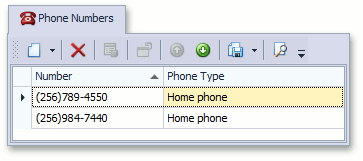
Class: NestedFrameTemplateV2
Namespace: DevExpress.ExpressApp.Win.Templates.Bars
Used to display a Window or Frame nested into another Window or Frame. For instance, a List Property Editor or Detail Property Editor’s window is displayed by the NestedFrameTemplateV2 Template.
Lookup Form Template (LookupForm)

Class: LookupForm
Namespace: DevExpress.ExpressApp.Win.Templates
Used to display pop-up windows with a List View. For instance, PopupWindowShowAction type Actions use the LookupForm Template to display their pop-up window.
Lookup Control Template (LookupControlTemplate)

Class: LookupControlTemplate
Namespace: DevExpress.ExpressApp.Win.Templates
Used to display a Lookup Property Editor’s drop down window.
Logon Window Template (LogonPopupForm)
Class: LogonPopupForm
Namespace: DevExpress.ExpressApp.Win.Templates
Defines the logon window layout and appearance.
OutlookStyleMainRibbonForm
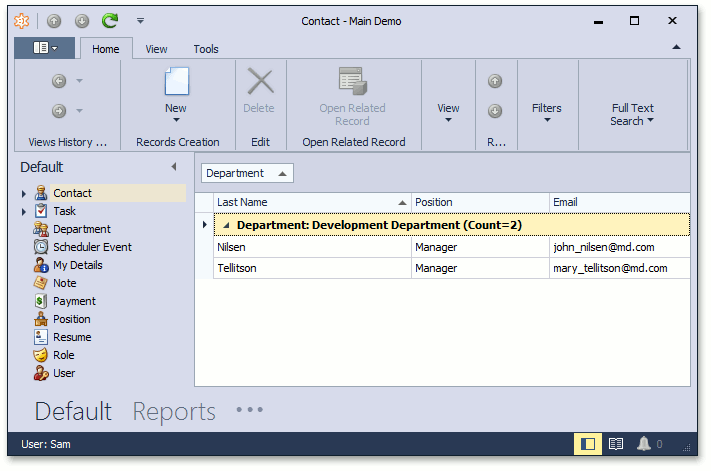
Class: OutlookStyleMainRibbonForm
Namespace: DevExpress.ExpressApp.Win.Templates.Ribbon
Used to display the main Window with the Outlook form style. To use this template, apply settings as the IModelRootGroupsStyle.RootGroupsStyle article describes, and set the RootGroupStyle property to OutlookSimple or OutlookAnimated.
How To’s
- How to: Access the Bar Manager (WinForms)
- How to: Access the Document Manager (WinForms)
- How to: Access the Ribbon Control (WinForms)
- How to: Create a Custom WinForms Ribbon Template
- How to: Create a Custom WinForms Standard Template
- How to: Adjust Window Size and Style (WinForms)
- Window Status Messages in XAF WinForms Applications
- High DPI Support in a Windows Forms Application