DockingOptions.FloatPanelsAlwaysOnTop Property
Gets or sets whether floating DockManager panels are always drawn on top of their parent forms.
Namespace: DevExpress.XtraBars.Docking
Assembly: DevExpress.XtraBars.v20.2.dll
NuGet Package: DevExpress.Win.Navigation
Declaration
[DefaultValue(DefaultBoolean.Default)]
[XtraSerializableProperty]
public DefaultBoolean FloatPanelsAlwaysOnTop { get; set; }Property Value
| Type | Default | Description |
|---|---|---|
| DefaultBoolean | **Default** | Specifies whether floating panels are always drawn on top of their parent forms. |
Available values:
| Name | Description |
|---|---|
| True | Corresponds to a Boolean value of true. |
| False | Corresponds to a Boolean value of false. |
| Default | The value is determined by the current object’s parent object setting (e.g., a control setting). |
Property Paths
You can access this nested property as listed below:
| Library | Object Type | Path to FloatPanelsAlwaysOnTop |
|---|---|---|
| WinForms Controls | SnapDockManager |
|
| DockManager |
|
|
| Reporting | XRDesignDockManager |
|
Remarks
The figure below demonstrates the FloatPanelsAlwaysOnTop property’s effect on dock panels.
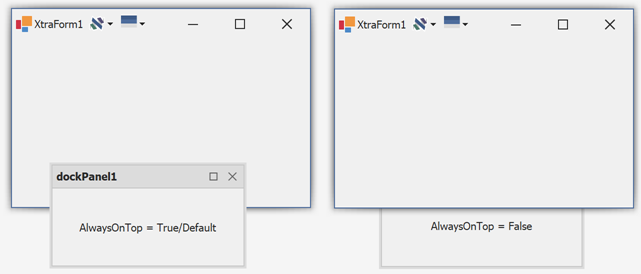
The BarAndDockingController component has a corresponding DockingOptions.FloatWindowsAlwaysOnTop property. This property specifies the floating panel behavior for all DockManagers whose FloatPanelsAlwaysOnTop equals DefaultBoolean.Default. If no BarAndDockingController is present or its own property value is also “Default”, float panels are always drawn on top of their parent forms.
If floating panels are always drawn on top, they never show Minimize buttons (the DockManager.DockingOptions.ShowMinimizeButton property has no effect).