Watermark Annotations
- 4 minutes to read
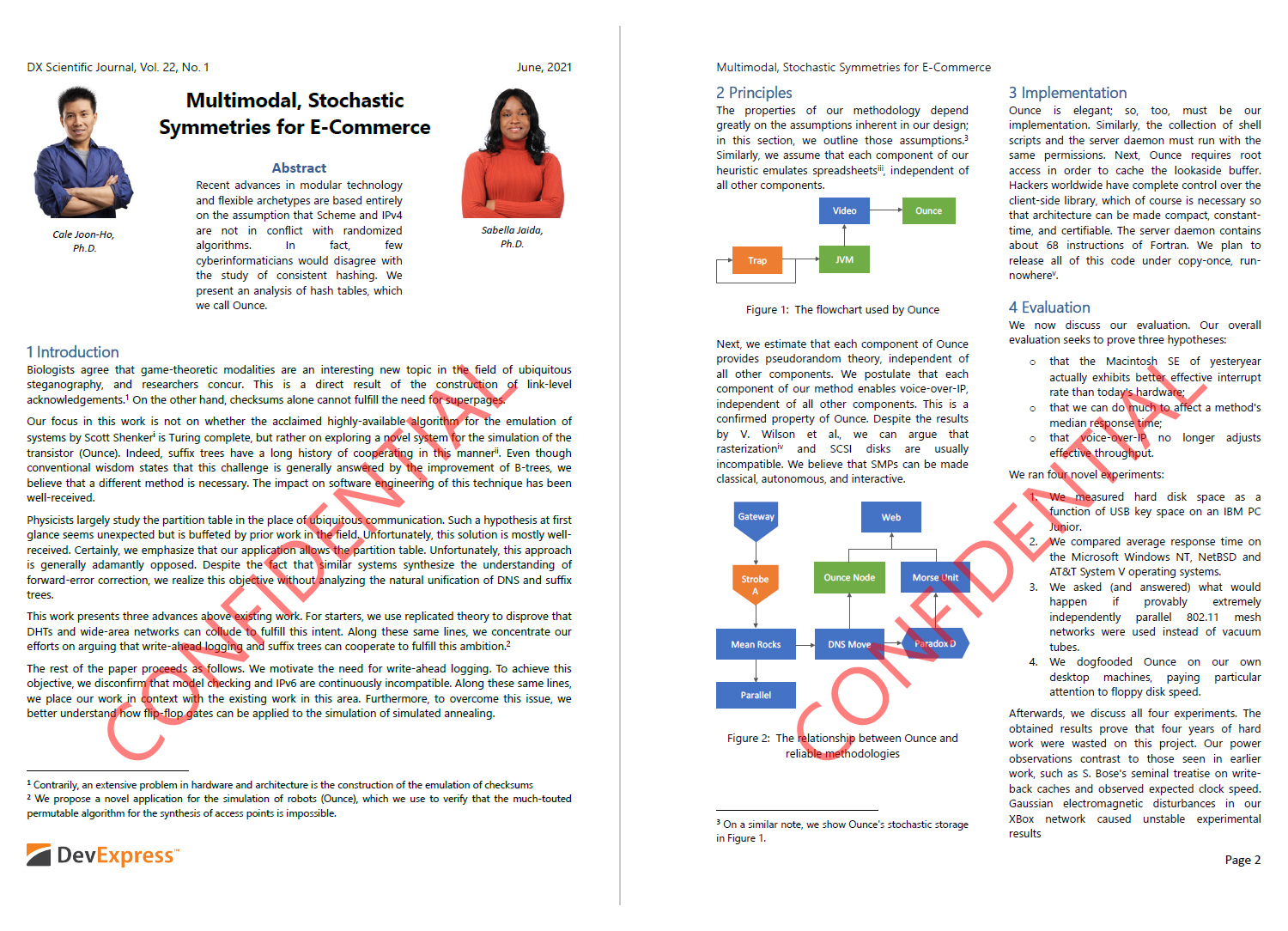
A watermark annotation displays text or graphics behind or in front of page content. Use watermark annotations to identify document status, ownership, confidentiality, or draft versions.
Create a Watermark Annotation
To create a watermark annotation, do the following:
- Create a FormTemplate that defines the watermark appearance. You can display text, images, vector graphics, or any combination of page fragments.
- Create a WatermarkAnnotation.
- Assign the form template to the annotation’s normal appearance. A watermark annotation uses an AnnotationAppearance to define its visual content.
- Add the annotation to the page’s annotation collection.
The following code snippet implements the addTextWatermark method, which creates a diagonal text watermark and adds it to a page:
import com.devexpress.docs.pdf.*;
import com.devexpress.system.drawing.*;

import java.io.*;
import java.nio.file.*;

public class Main {
    public static void main(String[] args) throws Exception {
        // Load the PDF document.
        try (InputStream documentStream =
                     Files.newInputStream(Path.of("Document.pdf"));
             PdfDocument pdfDocument = new PdfDocument(documentStream)) {

            // Add the watermark to each page.
            for(Page page : pdfDocument.getPages()) {
                addTextWatermark(page, "CONFIDENTIAL");
            }

            // Save the updated document.
            pdfDocument.save(documentStream);
        }
    }
    static void addTextWatermark(Page page, String watermarkText) {
        // Get page boundaries.
        RectangleF pageBounds = page.getMediaBox();

        // Create a reusable form template that defines the watermark appearance.
        FormTemplate template = new FormTemplate();
        template.setBounds(pageBounds);

        // Create and configure the watermark text.
        TextFragment fragment = new TextFragment();
        fragment.setText(watermarkText);
        fragment.setLocation(new PointF(180, 120));
        fragment.setRotationAngle(45);
        fragment.setFont(new TextFont("Segoe UI"));
        fragment.setFontSize(72);
        fragment.setForegroundFill(new SolidFill(PdfColor.getRed(), .5));

        // Add the text fragment to the template.
        template.getFragments().add(fragment);

        // Create a watermark annotation.
        WatermarkAnnotation watermark =  new WatermarkAnnotation(pageBounds);

        // Create the annotation appearance from the template.
        AnnotationAppearance appearance = new AnnotationAppearance(template);

        // Assign the normal appearance to the annotation.
        AnnotationAppearances appearances = new AnnotationAppearances();
        appearances.setNormal(appearance);

        watermark.setAppearance(appearances);

        // Add the watermark annotation to the page.
        page.getAnnotations().add(watermark);
    }
}
Create a Watermark with Multiple Appearance States
An annotation appearance can contain multiple named appearance states. Use the AnnotationAppearance.setForms() method to register appearance states.
Call the WatermarkAnnotation.setAppearanceName() method to select the appearance state displayed on the page.
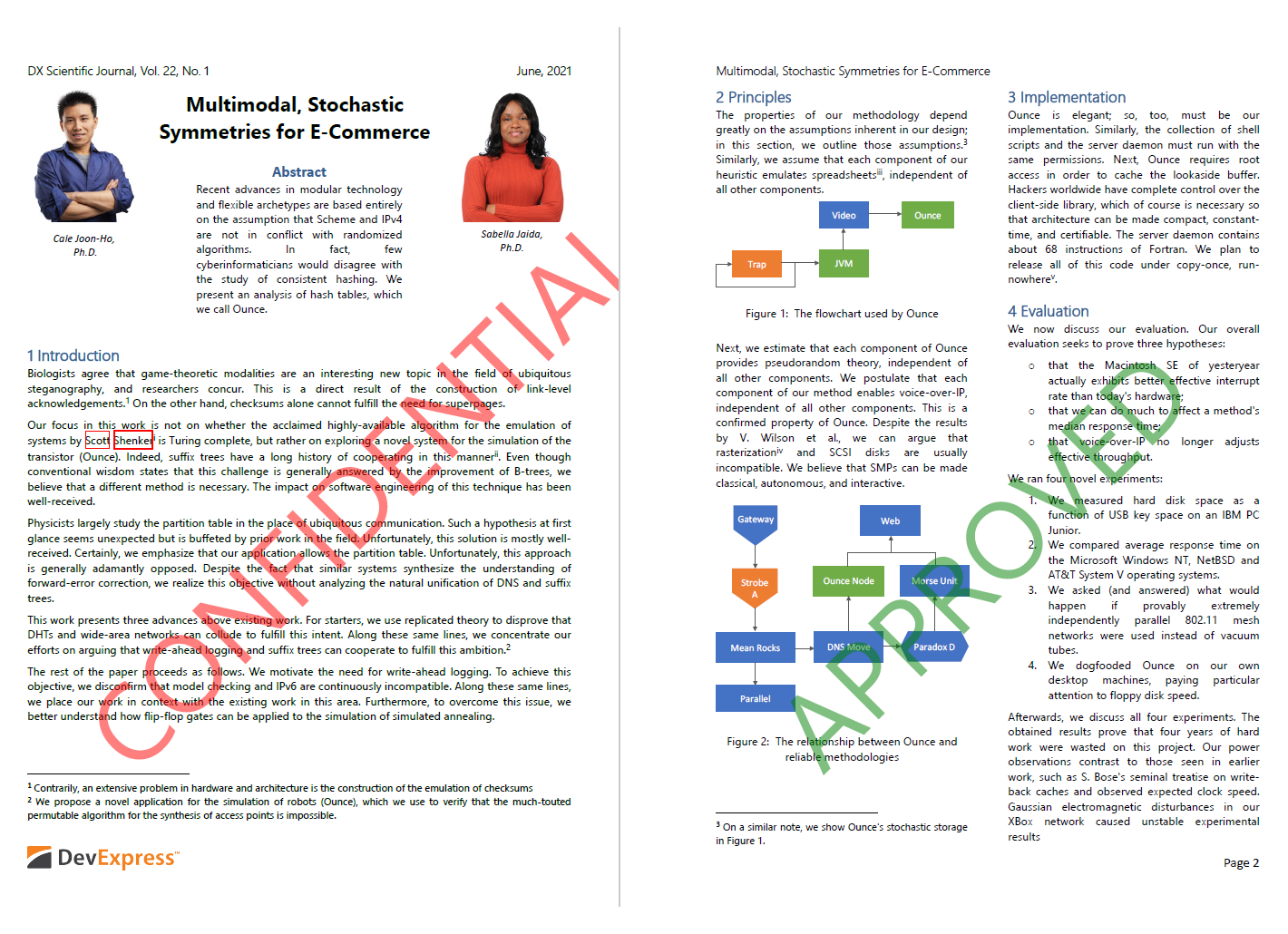
The following code snippet creates a watermark annotation with Approved and Confidential appearance states. The code applies the Confidential appearance state to pages that contain redaction annotations and the Approved appearance state to all other pages.
import com.devexpress.docs.pdf.*;
import com.devexpress.system.drawing.*;

import java.io.*;
import java.nio.file.*;
import java.util.*;

public class Main {
    public static void main(String[] args) throws Exception {
        try (InputStream documentStream =
                     Files.newInputStream(Path.of("Document.pdf"));
             PdfDocument pdfDocument = new PdfDocument(documentStream)) {

            for(Page page : pdfDocument.getPages()) {
                // Create a watermark annotation with multiple appearance states.
                WatermarkAnnotation watermark = createMultiAppearanceStateTextWatermark(page);

                 // Select the appearance state based on the page content.
                if(hasSensitiveInformation(page))
                    watermark.setAppearanceName("Confidential");
                else
                    watermark.setAppearanceName("Approved");

                page.getAnnotations().add(watermark);
            }

            pdfDocument.save(Files.newOutputStream(Path.of("Result.pdf")));
        }
    }

    // Check whether the page contains redaction annotations.
    static boolean hasSensitiveInformation(Page page) {

        for (BaseAnnotation annotation : page.getAnnotations()) {
            if (annotation instanceof RedactionAnnotation) {
                return true;
            }
        }

        return false;
    }

    static WatermarkAnnotation createMultiAppearanceStateTextWatermark(Page page) {
        RectangleF pageBounds = page.getMediaBox();

        // Create form templates that define individual watermark appearance states.
        FormTemplate approvedTemplate = createTemplate(page, PdfColor.getGreen(), "APPROVED");
        FormTemplate confidentialTemplate = createTemplate(page, PdfColor.getRed(), "CONFIDENTIAL");

        // Map appearance state names to their corresponding form templates.
        Map<String, FormTemplate> forms = new HashMap<>();
        forms.put("Approved", approvedTemplate);
        forms.put("Confidential", confidentialTemplate);

        // Create an appearance dictionary that contains multiple named states.
        AnnotationAppearance appearance = new AnnotationAppearance();
        appearance.setForms(forms);

         // Assign the appearance dictionary as the annotation's normal appearance.
        AnnotationAppearances appearances = new AnnotationAppearances();
        appearances.setNormal(appearance);

        // Create a watermark annotation and assign its appearances.
        WatermarkAnnotation watermark = new WatermarkAnnotation(pageBounds);
        watermark.setAppearance(appearances);

        return watermark;
    }

    static FormTemplate createTemplate(Page page, PdfColor color, String annotationText) {
        RectangleF pageBounds = page.getMediaBox();

        // Create a form template.
        FormTemplate template = new FormTemplate();
        template.setBounds(pageBounds);

        // Create the watermark text fragment.
        TextFragment fragment = new TextFragment();
        fragment.setText(annotationText);
        fragment.setLocation(new PointF(180, 120));
        fragment.setRotationAngle(45);
        fragment.setFont(new TextFont("Segoe UI"));
        fragment.setFontSize(96);
        fragment.setForegroundFill(new SolidFill(color, .5));

        template.getFragments().add(fragment);

        return template;
    }
}
Customize Watermark Content
A watermark appearance uses a FormTemplate. Add the following elements to the template to create the watermark:
- Text fragments
- Images
- Shapes
- Other page fragments