PDF-Specific Export Options
- 2 minutes to read
When exporting a document, you can configure PDF-specific export options using the following dialog.
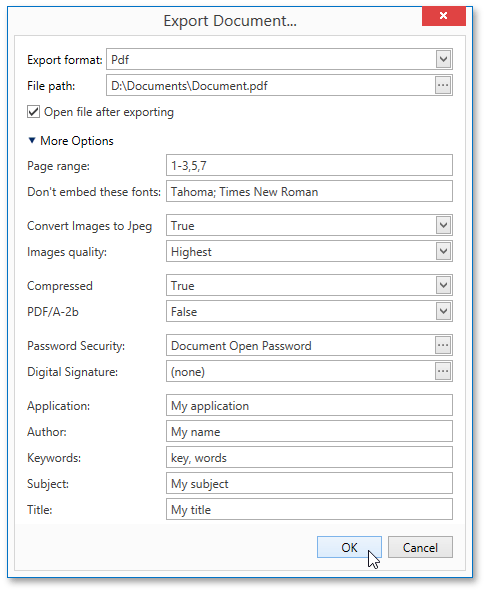
General Options
Page range
Specifies a range of pages that will be included in the resulting file. To separate page numbers, use commas. To set page ranges, use hyphens.
Don’t embed these fonts
Specifies font names that should not be embedded into the resulting file to reduce the file size. To separate fonts, use semicolons.
Export editing fields to AcroForms
Specifies whether to convert report editing fields to interactive form fields (AcroForms) in the exported PDF.
PDF/A compatibility
Specifies document compatibility with PDF/A specification (PDF/A-1a, PDF/A-1b, PDF/A-2a, PDF/A-2b, PDF/A-3a, PDF/A-3b).
PDF/UA compatibility
Specifies whether to conform the exported PDF document to the PDF/UA (Universal Accessibility) standard. The following values are available:
- PDF/UA-1 — based on ISO 14289-1 and PDF 1.7.
- PDF/UA-2 — based on ISO 14289-2 and PDF 2.0.
Rasterize Images
Specifies whether to rasterize vector images during export.
Rasterization Resolution
Specifies the resolution (in DPI) used for rasterized images.
Convert images to JPEG
Specifies whether to convert all bitmaps to JPEG format during export.
Image quality
Specifies the image quality level. The higher the quality, the bigger the file, and vice versa.
Password Security
Click the … button next to Password security to open the Password Security dialog. You can require a password to open the document and restrict permissions to edit, print, and copy. Use the Encryption Level option to specify the encryption algorithm (128-bit AES, 256-bit AES, or 128-bit ARC4).
Digital Signature
Click the … button next to Digital signature to open the Signature Options dialog. Select a Certificate to sign the document, optionally load a signature Image, and fill in Reason, Location, Accessible Description, and Contact Information fields.
Additional Options
You can also fill Application, Author, Keywords, Subject, and Title fields. These options specify the Document Properties of the created PDF file.