Backend Web API Service (CTP)
- 3 minutes to read
Important
We do not recommend that you use the Backend Web API Service in production code. We made this service available to gather feedback from anyone who considers it for future use.
Overview
You can utilize the Backend Web API Service (Web API) to reuse existing data models and Security System settings (users, roles, and permissions) stored in an XAF application database (backend) in non-XAF applications. This service can be hosted as part of a Blazor Server project or as a standalone ASP.NET Core project.
The Web API creates URLs (endpoints) that allow you to execute CRUD operations with business objects. It uses ASP.NET Core OData 8.0 (OData v4.0) to support paging, filters, and other OData options. The current Web API version supports the XPO ORM only.
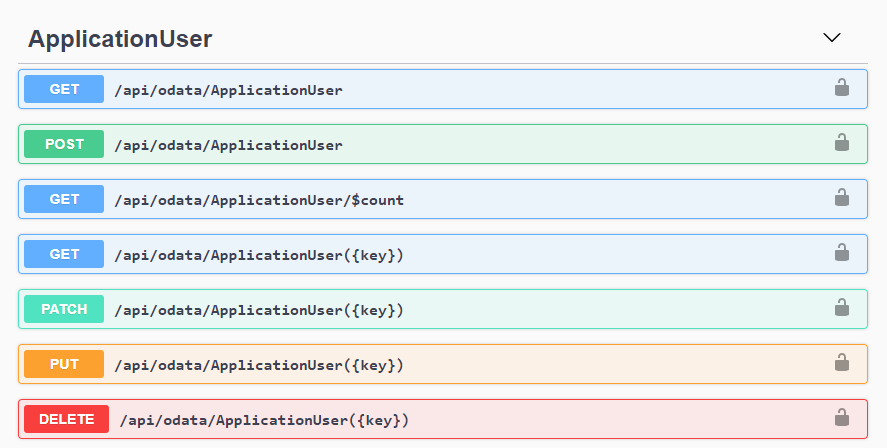
The Web API utilizes Swagger to display and test endpoints. You can also test them with other platforms (for example, Postman).
The Web API is available in v21.2 and later.
How to Use
You can add the Web API to an existing Blazor Server project or create a new project with this service:
- Create a new application with the Web API.
- Add a Web API project to an existing application.
- Add the Web API service to a Blazor Server project.
After you add the Web API to your project, you can use it as described in the following articles:
- Create Endpoints for Business Objects and Test the Web API (CTP).
- Make HTTP Requests to the Web API from .NET Applications.
- Create Custom Endpoints.
- Access XafApplication, ObjectSpace, and Security System in Custom Endpoint Methods.
Authentication Options
The Web API supports all standard ASP.NET Core authentication techniques that you can specify in the MySolution.WebApi\Startup.cs (MySolution.Blazor.Server.Startup.cs) file. See the following topic for details: Authentication in Web API Projects.
Performance Considerations
You can disable logging to improve the Web API performance. To do this, set the LogLevel.DevExpress.ExpressApp option to None.
File: MySolution.Blazor.Server\appsettings.json (MySolution.Blazor.Server\appsettings.Development.json for debugging)
// ...
"LogLevel": {
    "Default": "Information",
    "Microsoft": "Warning",
    "Microsoft.Hosting.Lifetime": "Information",
    "DevExpress.ExpressApp": "None"
}
// ...
Use logging options other than None (for example, the DevExpress.ExpressApp = Debug) only for debugging purposes because logging reduces performance. See the following topic for more information: Log Files.
Use the Web API as the Middle Tier Server in WinForms Applications
You can also use the Web API as the Middle Tier Server in WinForms Applications. See the following topics for details: