Palettes
By default, the editor displays three color palettes: Theme Colors, Gradient Theme Colors and Standard Colors. The Recent Colors palette is automatically created when an end-user selects a custom color from the More Colors dialog. A user can replace default palettes or add any number of custom color palettes.
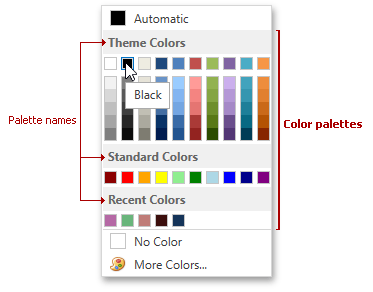
The table below lists the main members that affect element appearance and functionality.
| Characteristics | ColorEdit Members | PopupColorEdit Members |
|---|---|---|
| Palettes Source | ColorEdit.Palettes | PopupColorEdit.Palettes |
| Recent Colors Palette Name | ColorEdit.RecentColors | PopupColorEdit.RecentColors |
| Color Chips Layout | ColorEdit.ColumnCount | PopupColorEdit.ColumnCount |