BarcodeLabel Class
Contains settings that configure a barcode label displayed as a barcode header or footer.
Declaration
public class BarcodeLabel extends JavaObjectRemarks
Use the BarcodeLabel class to customize the appearance and layout of barcode labels. A label can display text above (header) or below (footer) the barcode and supports the following settings:
- Text content
- Font and text color
- Text alignment
- Padding
- Visibility
Create a BarcodeLabel object and pass it to the BarcodeOptionsBuilder.withHeader() or BarcodeOptionsBuilder.withFooter() method to add a customized header or footer to the barcode.
If you only need to display plain text without additional formatting, use withHeader(String text) and withFooter(String text) methods.
The following code snippet uses the Fluent API to create a QR Code barcode, customize its encoding parameters, and add a header and footer.
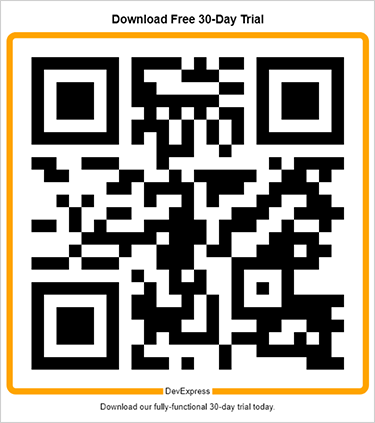
package barcodes;

import com.devexpress.docs.*;
import com.devexpress.drawing.*;
import com.devexpress.docs.barcode.*;
import com.devexpress.system.drawing.*;

import java.io.*;
import java.nio.file.*;

public class Main {
    public static void main(String[] args) throws Exception {
        // Customize QR Code header parameters.
        BarcodeLabel barcodeHeader = new BarcodeLabel();
        barcodeHeader.setText("Download Free 30-Day Trial");
        barcodeHeader.setAlignment(DXStringAlignment.CENTER);
        barcodeHeader.setFont(new DXFont("Arial", 14, DXFontStyle.BOLD));
        barcodeHeader.setForeColor(Color.getBlack());
        barcodeHeader.setPadding(new Padding(10));
        barcodeHeader.setVisible(true);

        // Customize QR Code footer parameters.
        BarcodeLabel barcodeFooter = new BarcodeLabel();
        barcodeFooter.setText("Download our fully-functional 30-day trial today.");
        barcodeFooter.setAlignment(DXStringAlignment.CENTER);
        barcodeFooter.setFont(new DXFont("Arial", 10));
        barcodeFooter.setForeColor(Color.getBlack());
        barcodeFooter.setPadding(new Padding(9));
        barcodeFooter.setVisible(true);

        // Customize QR Code frame parameters.
        RectangleQRFrameOptions frameOptions = new RectangleQRFrameOptions();
        frameOptions.setPadding(new Padding(10));
        frameOptions.setFrameColor(Color.getOrange());
        frameOptions.setFrameWidth(10);
        frameOptions.setText("DevExpress");
        frameOptions.setCornerRadius(10);
        frameOptions.setTextAlignment(QRFrameTextAlignment.CENTER);
        frameOptions.setTextColor(Color.getBlack());
        frameOptions.setTextPosition(QRFrameTextPosition.BOTTOM);

        // Customize QR Code parameters.
        QRCodeOptions options = QRCodeOptionsBuilder.create()
            .withFrameOptions(frameOptions)
            .withHeader(barcodeHeader)
            .withFooter(barcodeFooter)
            .withShowText(false)
            .withWidth(600)
            .build();

        Path outputDir = Path.of("output");
        Files.createDirectories(outputDir);

        try (FileOutputStream fileStream = new FileOutputStream(
                outputDir.resolve("qrcode.png").toFile());
             BarcodeGenerator barcodeGenerator = new BarcodeGenerator(options)) {
            barcodeGenerator.export(
                    "https://www.devexpress.com/try",
                    fileStream,
                    DXImageFormat.getPng());
        }
    }
}
Refer to the following help topic for additional information: Barcode Options.
Inherited Members
Inheritance
BarcodeLabel()
Initializes a new instance of the BarcodeLabel class.
Declaration
public BarcodeLabel()Methods
clone() Method
Creates a copy of the current object.
Declaration
public BarcodeLabel clone()Returns
| Type | Description |
|---|---|
BarcodeLabel |
The |
getAlignment() Method
Gets the horizontal alignment of the label text.
Declaration
public DXStringAlignment getAlignment()Returns
| Type | Description |
|---|---|
| DXStringAlignment | The horizontal alignment. |
getFont() Method
Gets the font used to display the label text.
Declaration
public DXFont getFont()Returns
| Type | Description |
|---|---|
| DXFont | The font used to display the label text. |
getForeColor() Method
Gets the label’s foreground color.
Declaration
public Color getForeColor()Returns
| Type | Description |
|---|---|
| Color | The foreground color. |
getPadding() Method
Gets the label’s internal spacing.
Declaration
public Padding getPadding()Returns
| Type | Description |
|---|---|
| Padding | The internal spacing. |
getText() Method
Gets the text displayed in the barcode label.
Declaration
public String getText()Returns
| Type | Description |
|---|---|
| String | The text displayed in the barcode label. |
getVisible() Method
Gets whether the barcode label is displayed.
Declaration
public boolean getVisible()Returns
| Type | Description |
|---|---|
| boolean |
|
setAlignment(DXStringAlignment value) Method
Sets the horizontal alignment of the label text.
Declaration
public void setAlignment(DXStringAlignment value)Parameters
| Name | Type | Description |
|---|---|---|
| value | DXStringAlignment | The horizontal alignment. |
setFont(DXFont value) Method
Sets the font used to display the label text.
Declaration
public void setFont(DXFont value)Parameters
| Name | Type | Description |
|---|---|---|
| value | DXFont | The font used to display the label text. |
setForeColor(Color value) Method
Sets the label’s foreground color.
Declaration
public void setForeColor(Color value)Parameters
| Name | Type | Description |
|---|---|---|
| value | Color | The foreground color. |
setPadding(Padding value) Method
Sets the label’s internal spacing.
Declaration
public void setPadding(Padding value)Parameters
| Name | Type | Description |
|---|---|---|
| value | Padding | The internal spacing. |
setText(String value) Method
Sets the text displayed in the barcode label.
Declaration
public void setText(String value)Parameters
| Name | Type | Description |
|---|---|---|
| value | String | The text displayed in the barcode label. |
setVisible(boolean value) Method
Sets whether the barcode label is displayed.
Declaration
public void setVisible(boolean value)Parameters
| Name | Type | Description |
|---|---|---|
| value | boolean |
|