License Key for DevExpress .NET Products
- 8 minutes to read
DevExpress license keys store information purchases made through DevExpress.com/authorized resellers and/or 30-day product trials. You will need a valid license key to build DevExpress-powered software projects. If you build a project that includes unlicensed DevExpress products, the build process will display a warning or throw an error.
Important
This help topic contains information on license keys generated for DevExpress .NET products. Do NOT use this .NET license in your JS-based or DevExtreme client-side apps. If using DevExtreme (React, Angular, Vue, JS), please refer to the following DevExtreme-specific licensing help topic: DevExtreme Licensing.
License Keys and DevExpress Versions
A DevExpress license key is specific to each major version (for example, v25.2, v26.1). When you upgrade to a new major version, download your updated license key and use it in your development environment.
Note that a license key for the newer version is compatible with previous versions. If you develop multiple projects that use different DevExpress releases, you can register a single license key for the latest required version.
Where to Obtain Your License Key - Quick Overview
Registering your license and using your license key will depend on how you install DevExpress products:
- Let the DevExpress Unified Installer Handle Your Key
- Once executed, the DevExpress Unified Installer asks for your DevExpress.com account credentials. If you login successfully, the installer automatically obtains your License Key and places it into its correct location. Run the installer in Repair/Register mode to update your key when necessary.
- Download Your License Key from DevExpress.com
- You can install DevExpress products as NuGet packages on a developer machine. You can also create a custom assembly (DLL) delivery mechanism for your build server. When bypassing the DevExpress Unified Installer, you can download your license key and register it in the system manually (via a file on disk or an environment variable). To download and use your license key, please review detailed instructions later in this help topic.
Note
DevExpress .NET License Key is different from your DevExpress NuGet Feed URL/Key. Both these keys must be kept secret. As always, please refer to the DevExpress End User License Agreement for licensing terms/conditions.
DevExpress Unified Installer (Windows)
DevExpress Unified Installer handles all licensing-related tasks automatically. Once you enter your DevExpress.com account credentials, the wizard obtains your License Key. It writes the key to the system registry and to the following key file:
%AppData%\DevExpress\DevExpress_License.txt
When you build a project that includes DevExpress products, DevExpress code locates the key and allows the build process to complete successfully.
If you used our products before license keys were introduced (before v25.1), you should not experience any changes when installing or updating DevExpress products. No manual actions are necessary.
Online NuGet Feeds, CI/CD, and Other Installation Methods (Windows, macOS, Linux)
This license registration method applies to all supported platforms (you can use it in any environment). We recommend this method for your internal build farms (if using Continuous Integration Systems – CI/CD). Please refer to the DevExpress End User License Agreement for licensing terms/conditions when installing DevExpress libraries on build farms.
Obtain Your Trial or Licensed Product Key
Login to the DevExpress.com Download Manager. Once you reach our Download Manager webpage, locate and download your license key file.

Register Your Key: Basics
The general principle behind the licensing mechanism is simple: every time you build a project that uses DevExpress libraries, ensure that one of the following is available:
- Recommended option: A text file
DevExpress_License.txtis present in the designated folder. - Alternative option: An environment variable
DevExpress_Licensecontains your license key.
Note
DO NOT publish your personal .NET License Key to production environments as part of your application code (or in any other resources). You DO NOT need to share the key with your application end users. This key is only required for local development or internal build farms.
Register Your Key: Local Development
Store Your License Key in the Default Location
The DevExpress licensing algorithm searches for a valid license file in the default location/folder. File location depends on the operating system.
- Microsoft Windows:
%AppData%\DevExpress\DevExpress_License.txt - MacOS:
$HOME/Library/Application Support/DevExpress/DevExpress_License.txt - Linux:
$HOME/.config/DevExpress/DevExpress_License.txt
Store Your License Key in a Custom Folder
You can move your license key file to a custom folder (not the default folder location listed above). To do so, create an environment variable that contains the path to this custom location:
Variable name (case-sensitive): DevExpress_LicensePath
Store Your License Key in an Environment Variable
You can write the key itself into an environment variable:
Variable name (case-sensitive): DevExpress_License
If your application is built inside a Docker container (not in fast mode), use the ARG instruction in your Dockerfile to initialize the license key:
ARG DevExpress_License="LCXv1..."
Important
Use the exact casing (DevExpress_License.txt, DevExpress_LicensePath, DevExpress_License) to avoid license activation issues. On most Unix-like systems, file and environment variable names are case-sensitive.
For example, a macOS development machine or Linux-based CI/CD pipeline will not activate the DevExpress license if the environment variable is named DEVEXPRESS_LICENSE or devexpress_license.
Register Your Key: CI/CD Systems
If you are using a CI/CD system, download your license key and register it using a secure file (DevExpress_License.txt). Refer to the following help topic for more information:
DevExpress .NET Products - NuGet Packages & Licensing in Popular Continuous Integration Systems
In that topic, you will find detailed instructions and examples for popular CI/CD systems:
Update Your License Key
You may need to update your license key if you or your license manager did one of the following:
- Upgraded your DevExpress .NET/JS components to the next major version (for example, you previously registered your v25.1 license key and now you need to obtain and re-register your v25.2+ license key)
- Purchased a license to a product you were evaluating (30-day trial)
- Purchased an additional product
- Renewed your expired license OR extended/prolonged your trial version
- Assigned new/existing licenses to developers in your company
- Changed your DevExpress account email address
You can run the DevExpress Unified installer in Modify mode after you completed your purchase. The wizard asks for your DevExpress.com credentials and then retrieves your up-to-date license key automatically.
If you use other installation methods, update your key manually. Replace the file in the default/custom location or update the environment variable value if that is the storage type you selected.
Note
In some cases, a trial version message may persist after you purchased a license and updated your license key. Review the following help topic for troubleshooting steps: Remove the Trial Version Message
Troubleshoot License Key Errors and Warnings
The DevExpress .NET license verification mechanism, powered by Roslyn analyzers, embeds an attribute into your project assembly during compilation/build: DXLicenseInformationAttribute. This attribute contains your license key hash without PII. You can check the attribute value using your IDE or tools like ILSpy (see the image below).
If the DevExpress license key on your local or build server machine is missing or invalid, you will see the following messages with troubleshooting instructions:
- Licensing-related warnings in build output (review the list below)
- Trial messages in application UI (for additional information, see Convert a Trial Version to a Licensed Version)
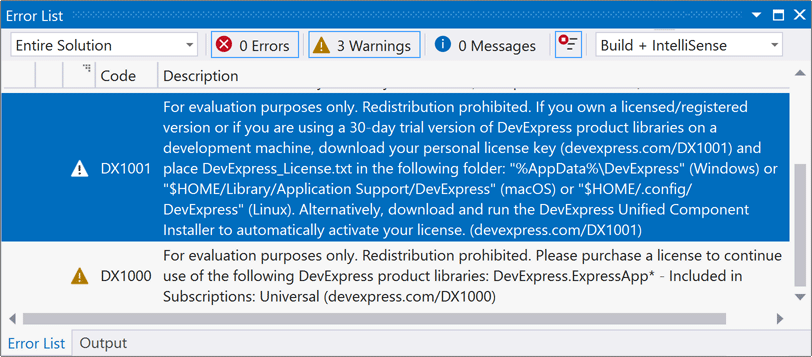
You may encounter the following licensing-related build warnings.
DX1000
- Why it appears
- You are using a trial (evaluation) version of DevExpress libraries.
- Error message
- For evaluation purposes only. Redistribution prohibited. Please purchase a license to continue use of the following DevExpress product libraries: (Product List).
- How to resolve
- Purchase a license to listed products and register your license key. If already purchased, update your license key. On Unix-like systems, check the name of the file or environment variable that holds the license key. These names are case-sensitive.
DX1001
- Why it appears
- No license key found on your machine.
- Error message
- For evaluation purposes only. Redistribution prohibited. If you own a licensed/registered version or if you are using a 30-day trial version of DevExpress product libraries on a development machine, download your personal license key (devexpress.com/DX1001) and place DevExpress_License.txt in the following folder: “%AppData%/DevExpress” (Windows) or “$HOME/Library/Application Support/DevExpress” (MacOS) or “$HOME/.config/DevExpress” (Linux). Alternatively, download and run the DevExpress Unified Component Installer to automatically activate your license.
- How to resolve
- Login to your DevExpress account and obtain your license key. Register the license key in your system. On Unix-like systems, check the name of the file or environment variable that holds the license key. These names are case-sensitive.
DX1002
- Why it appears
- Older DevExpress license key version is incompatible with newer DevExpress products you use in the project. Update the license key to a newer version.
- Error message
- For evaluation purposes only. Redistribution prohibited. Incompatible DevExpress license key version (vXX.X). Download and register an updated DevExpress license key (vXX.X+). Clear IDE/NuGet cache and rebuild your project (devexpress.com/DX1002).
- How to resolve
- Update the license key in your system. If you develop multiple projects that use different DevExpress releases, register the latest available DevExpress license key.