DevExpress Products: UI Localization Overview
- 7 minutes to read
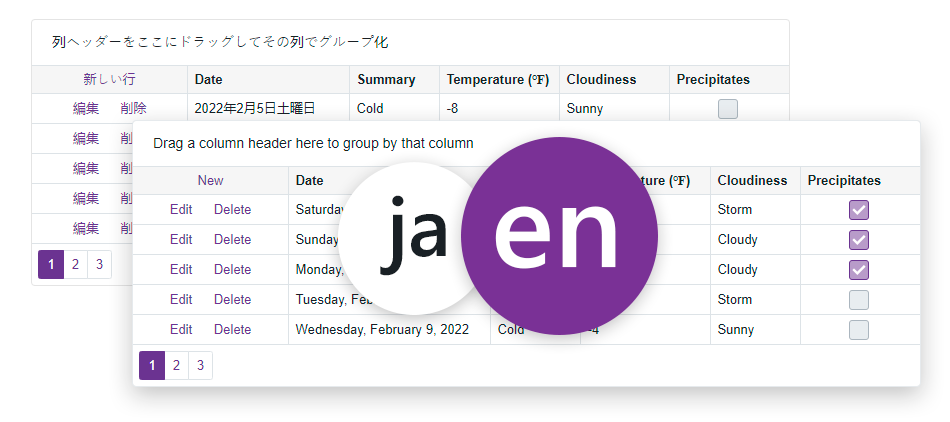
Localization allows you to translate DevExpress UI controls and components into different languages. From straightforward localization with pre-built satellite resource assemblies to manual translation of the UI, DevExpress Subscriptions include everything you need to quickly develop multicultural enterprise applications and websites.
Tools
You can use the following tools to manage translations:
Important
With the release of the Localization Tool, Localization Service and Localization UI Client utilities are in maintenance mode.
Until we ensure that the new Localization Tool addresses most existing customer needs effectively, the UI Localization Service will remain available for supported product versions, and you can use it to modify translation resources. User translations for v23.1 and earlier releases will no longer be available through the Localization Service UI (view, edit, download, create). These translations will be retained by DevExpress should you require them. You can request your old translation archives via the DevExpress Support Center.
UI Localization Client and product-specific localization utilities will be deprecated as redundant.
The following table lists differences between the tools:
Comparison Aspects | Localization Tool | Localization Service (Maintenance mode) | Localization UI Client (Maintenance mode) |
|---|---|---|---|
Location | Visual Studio (part of the .NET installer) | ||
Availability | Open Source (full source code is available – you can create you own tools based on localization resources) | Closed Source (proprietary) | Closed Source (proprietary) |
Platform/OS | Desktop (Windows) | Web (any browser for Windows, macOS, Linux, etc.) | Desktop (Windows) |
Supported DevExpress Products | - WinForms, WPF - Blazor, ASP.NET MVC 5, WebForms - Reporting, BI Dashboard - XAF (WinForms/Blazor) - ASP.NET Core (RichEdit, Spreadsheet only) - To be implemented: JS/TS, VCL, .NET MAUI | - WinForms, WPF - Blazor, ASP.NET MVC 5, WebForms - Reporting, BI Dashboard - XAF (WinForms/Blazor) | - WinForms, WPF - Blazor, ASP.NET MVC 5, WebForms - Reporting, BI Dashboard |
Supported Cultures | All | All | All |
Access to Localization Strings | All strings | All strings | Only strings used in the current application |
Access to Source Resources | Yes | Yes (but cannot be easily modified and require delayed signing for satellite assemblies) | No |
Supported Export Types | - Satellite assemblies (*.resources.dll) - Single or merged RESX file - Multiple or source RESX files - NuGet packages (*.nupkg) | - Satellite assemblies (*.resources.dll) - NuGet packages (*.nupkg) only for DE, ES, JA | Single/merged RESX file |
Efficient Data Navigation and Shaping | Yes (advanced filtering, sorting, grouping, search, and other capabilities powered by the WinForms Grid Control + keyboard shortcut support) | No (only basic filtering capabilities) | No (only basic capabilities) |
Migration between DevExpress Versions | Yes (automatic) | Yes (manual) | No |
Translation Context | Yes (comments) To be implemented: part of speech, gender, number, case, etc. | No | No |
External Collaboration Support | Yes (multiple translators can split localization tasks and then merge changes into the main database) | No | No |
Version Control, Rollback, Backup | Yes (advanced, with built-in database update, merge, backup) | Yes (basic) | No |
Automated Machine Translation | Yes (advanced, AI prompt-based, powered by an LLM of your choice) | Yes (basic Microsoft Bing Translator) | No |
Bulk String Translation | Supports simultaneous translation of multiple identical strings | No | No |
Data Validation | Yes (diagnostic logs and built-in unique value validation, grouping for consistent translations among products) | No | No |
Tools - FAQ
I translated components with the new Localization Tool. How do I reuse or migrate translations when a new version is out?
An existing culture is version-independent, but a new DevExpress version may introduce localization-related changes.
The following help topic lists detailed version upgrade steps: Version Control.
Can I reuse my custom translations from the localization.devexpress.com web service in the new Localization Tool?
Only RESX files can be reused. The following help topic describes the migration workflow: Migrate from Localization Service.
I am on macOS/Linux, but your tool is Windows-based. Do you have an alternative?
You can use our Localization Service. Until we ensure that the new Localization Tool addresses most existing customer needs effectively, the web service will remain available. In addition, you can now manually translate RESX and JSON files in our GitHub localization repo using external tools, such as AI-powered assistants, if this better suits your needs.
Note
We may reevaluate this position for new DevExpress versions in the future as our new tool may support Web or other OS/platforms.
Does the new Localization Tool support DevExtreme (JS/TS), .NET MAUI, or VCL (Delphi/C++Builder) application localization?
While not available at this time, it is our long-term goal to introduce one localization solution for all DevExpress UI platforms/frameworks. In this release, we supported specific ASP.NET Core scenarios with our Reporting, Dashboard, Rich Text Editor, and SpreadSheet components (see the Export To | JSON menu command). There may be additional integrations in the future as we evolve the tool.
What is your translation coverage for different languages/cultures?
Most of our existing translations were compiled by the DevExpress developer community. These resources may be inaccurate and/or incomplete. The new Localization Tool does not change that globally.
The only exception is our German (de) translations. We reviewed them with external translators in the last year (more than 50,000 strings), and they should be accurate. Feel free to contact us if you find translation errors in any culture/language.
Localization Techniques
Satellite Resource Assemblies
DevExpress controls can be localized using satellite resource assemblies. DevExpress delivers satellite assemblies for a large variety of languages and cultures.
Install Pre-Built Localized Resources (DE, JA, ES)
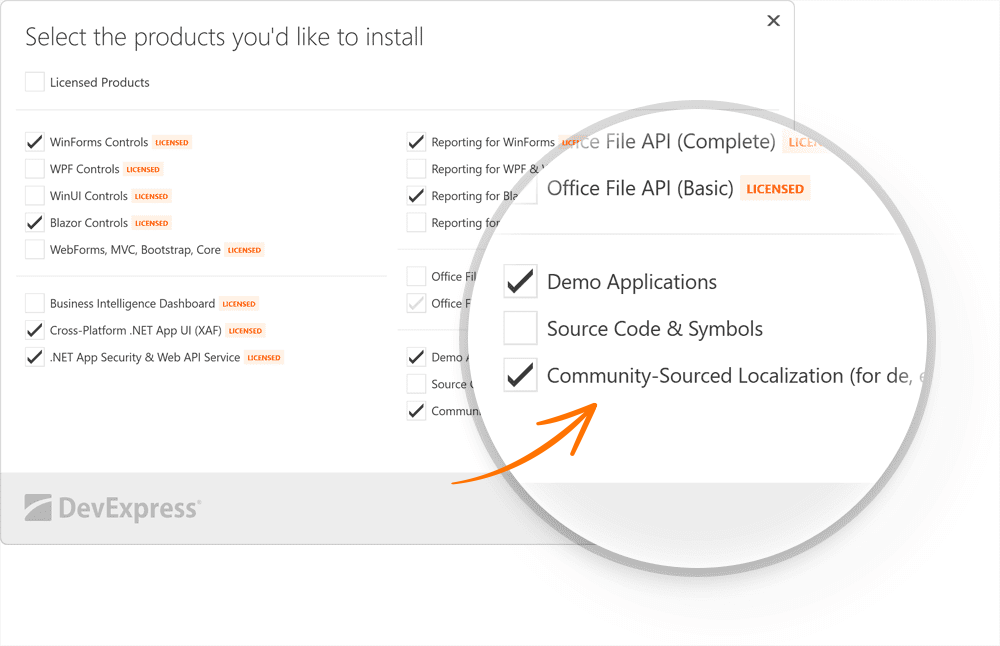
DevExpress Unified Component Installer includes an option to install community-sourced localized resources for certain languages: German (DE), Japanese (JA), and Spanish (ES).
With v22.2+, these resources are not installed by default. The Unified Component Installer does not add “de”, “ja”, and “es” community-sourced localized assemblies to the Global Assembly Cache (GAC). You can install them at your discretion:
- Run the Unified Component Installer in “Modify” mode.
Enable the Community-Sourced Localization (for de, es, ja) option.
- Click Next.
- Click Accept & Continue.
You can find localized resources in the following folders:
C:\Program Files\DevExpress 26.1\Components\Bin\Framework (for a 64-bit Windows OS)
C:\Program Files (x86)\DevExpress 26.1\Components\Bin\Framework (for a 32-bit Windows OS)
C:\Program Files\DevExpress 26.1\Components\Bin\NetCore (for a 64-bit Windows OS)
C:\Program Files (x86)\DevExpress 26.1\Components\Bin\NetCore (for a 32-bit Windows OS)
Store Localized Resources in a Version Control System
To store localized satellite assemblies in the version control system, do the following:
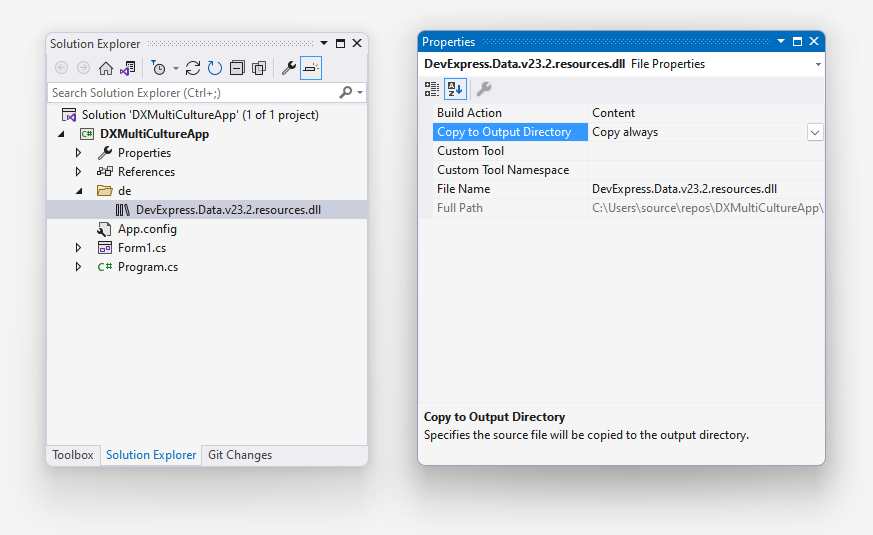
- Include localized satellite assemblies in your executable project within corresponding language-specific folders (for example, “de”).
- In the Solution Explorer, set file properties as follows:
- Build Action = Content
- Copy To Output Directory = Copy always
Platform-Specific Localization
See the following topics for platform-specific information:
- WinForms
- WPF
- Blazor
- ASP.NET Web Forms
- ASP.NET MVC
- Reports
- BI Dashboard
- .NET MAUI
- Cross-Platform .NET App Framework (XAF)
- JavaScript / DevExtreme (Angular, React, Vue)
Tip
Use DevExpress Online Localization Service to modify our shipped resources or create satellite assemblies for a different language.
Localization of Single-File Applications
If you publish your project (for example, WinForms) as a single-file application (see Single-file deployment), you need to use the solution described in the Store Localized Resources in a Version Control System section to localize your application. Otherwise, your single-file application will not be able to resolve satellite assemblies (even if you put them in the correct subdirectories after you publish the application).
Localization-Related API (Localizer Objects)
DevExpress controls use Localizer objects to obtain strings for UI elements. Localization-related APIs (Localizer objects) take priority over satellite resource assemblies.
You can create custom localizer objects for specific UI controls or use the global XtraLocalizer class to localize all DevExpress UI controls in your application.
See the following topics for platform-specific information:
Identification of Non-Translated Resources
- Use our cross-platform DevExpress UI Localization Client (Maintenance Mode) tool shipped as part of your DevExpress subscription. This tool streamlines the entire localization process. You can quickly find non-translated strings and translate them during a debug session.
- Handle the XtraLocalizer.QueryLocalizedStringNonTranslated event to collect non-localized resource strings for further translation. The event allows you to focus on the strings that require translation in your application.