Generate and Edit Tagged PDF Documents
- 8 minutes to read
A tagged PDF document contains a logical structure tree that describes the hierarchy of document elements. Assistive technologies use this structure tree to interpret content and navigate the document.
The PDF Document API allows you to create and edit a PDF document’s structure tree. The structure tree contains StructureElement objects that define document elements such as headings, paragraphs, tables, and table cells.
The PdfDocument.getStructureTree() method returns the document’s structure tree. Top-level elements are stored in the collection returned by the getElements() method.
Use the StructureTree.addChildElement() method to add elements to the root of the tree. To create nested elements, call the StructureElement.addChildElement() method.
Create a Structure Tree for a New PDF Document
The StructureTree class allows you to create a logical document hierarchy.
To create a PDF/UA-compliant document, specify the required document metadata before you save the document. Set the PDF/UA version and assign a document title. PDF accessibility validators require this metadata.
Use one of the following structure type descriptors to create structure elements:
- Pdf17StructureTypeDescriptor – Lists structure types defined in the PDF 1.7 specification.
- Pdf20StructureTypeDescriptor – Lists structure types defined in the PDF 2.0 specification.
The StructureTree.addChildElement() method adds a top-level element to the structure tree. The method accepts a standard structure type or a custom structure descriptor.
After you create a structure element, call the StructureElement.addChildElement() method to add child elements.
The following code snippet creates a tagged PDF document, configures PDF/UA metadata, and specifies marked content information through the MarkInfo class. The code snippet enables marked content, user properties, and disables the suspects flag before saving the document.
package pdf;

import com.devexpress.docs.pdf.*;
import com.devexpress.system.drawing.*;
import com.devexpress.drawing.printing.*;

import java.io.*;
import java.util.*;
import java.nio.file.*;

public class Main {
    public static void main(String[] args) throws Exception {
        try (PdfDocument document = new PdfDocument()) {
            Locale documentLocale = Locale.forLanguageTag("en-US");
            String title = "Invoice";

            // Specify PDF/UA metadata.
            document.getMetadata().getXmp()
                    .getXmpPdfUASchema()
                    .setPart(new XmpInteger(1));

            document.getMetadata().getXmp()
                    .getXmpDublinCoreSchema()
                    .getTitle()
                    .add(documentLocale.toLanguageTag(), title);

            // Specify marked content information.
            MarkInfo markInfo = document.getMarkInfo();
            markInfo.setMarked(true);
            markInfo.setUserProperties(true);
            markInfo.setSuspects(false);

            Page page = document.getPages().add(DXPaperKind.A4);

            // Create the root Document structure element.
            StructureElement root = document.getStructureTree()
                    .addChildElement(Pdf17StructureType.DOCUMENT);

            // Add a section to the document structure.
            StructureElement section = root.addChildElement(Pdf17StructureType.SECT);

            // Add a heading element.
            StructureElement heading = section.addChildElement(Pdf17StructureType.H1);
            heading.addFragment(page, new TextFragment() {{
                setText(title);
                setLocation(new PointF(50, 800));
                setFont(new TextFont("Arial", TextFontStyle.BOLD));
                setFontSize(24);
            }});

            // Add a paragraph element.
            StructureElement paragraph = section.addChildElement(Pdf17StructureType.P);
            paragraph.addFragment(page, new TextFragment() {{
                setText("Invoice details");
                setLocation(new PointF(50, 760));
            }});

            // Save the tagged PDF document.
            try (OutputStream stream =
                         Files.newOutputStream(
                                 Path.of("TaggedDocument.pdf"))) {
                document.save(stream);
            }
        }
    }
}
Create an Accessible Invoice
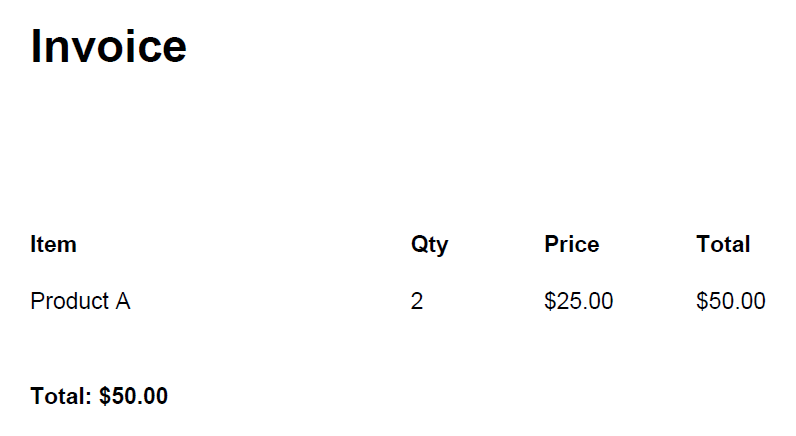
The following code snippet creates a tagged PDF document that contains an accessible invoice. It builds a logical structure tree with a document, section, heading, table, and paragraph elements.
The example assigns layout and table attributes, adds text fragments to the corresponding structure elements, and saves the document as a tagged PDF.
package pdf;

import com.devexpress.docs.pdf.*;
import com.devexpress.system.drawing.*;
import com.devexpress.drawing.printing.*;

import java.nio.file.*;
import java.nio.channels.*;

public class Main {
    public static void main(String[] args) throws Exception {
        try (PdfDocument document = new PdfDocument()) {

            Page page = document.getPages().add(DXPaperKind.A4);

            // Create the root Document element.
            StructureElement doc = document.getStructureTree()
                    .addChildElement(Pdf17StructureType.DOCUMENT);

            // Add a section to the document.
            StructureElement section =
                    doc.addChildElement(Pdf17StructureType.SECT);

            // Add a heading.
            StructureElement heading =
                    section.addChildElement(Pdf17StructureType.H1);
            heading.addFragment(page, new TextFragment(){{
                    setText("Invoice");
                    setLocation(new PointF(50, 800));
                    setFont(new TextFont("Arial", TextFontStyle.BOLD));
                    setFontSize(24);}});

            // Create a table with layout attributes.
            StructureElement table =
                    section.addChildElement(Pdf17StructureType.TABLE);

            table.getAttributes().add(new LayoutAttribute() {{
                    setPlacement(LayoutPlacement.BLOCK);
                    setWritingMode(WritingMode.LEFT_TO_RIGHT);
                }});

            table.getAttributes().add(
                    new TableAttribute() {{
                        setSummary("Invoice items");
                    }});

            StructureElement header =
                    table.addChildElement(Pdf17StructureType.T_HEAD);
            StructureElement headerRow =
                    header.addChildElement(Pdf17StructureType.TR);

            // Add table header cells.
            StructureElement th1 =
                    headerRow.addChildElement(Pdf17StructureType.TH);
            th1.getAttributes().add(
                    new TableAttribute(){{
                        setScope(TableScope.COLUMN);
                    }});
            th1.addFragment(page, new TextFragment() {
                {
                    setText("Item");
                    setLocation(new PointF(50, 700));
                    setFont(new TextFont("Arial", TextFontStyle.BOLD));
                    setFontSize(12);
                }});

            StructureElement th2 =
                    headerRow.addChildElement(Pdf17StructureType.TH);
            th2.getAttributes().add(
                    new TableAttribute() {{
                        setScope(TableScope.COLUMN);
                    }});
            th2.addFragment(page, new TextFragment() {{
                    setText("Qty");
                    setLocation(new PointF(250, 700));
                    setFont(new TextFont("Arial", TextFontStyle.BOLD));
                }});

            StructureElement th3 =
                    headerRow.addChildElement(Pdf17StructureType.TH);
            th3.getAttributes().add(
                    new TableAttribute() {{
                        setScope(TableScope.COLUMN);
                    }});
            th3.addFragment(page, new TextFragment() {{
                    setText("Price");
                    setLocation(new PointF(320, 700));
                    setFont(new TextFont("Arial", TextFontStyle.BOLD));
                }});

            StructureElement th4 =
                    headerRow.addChildElement(Pdf17StructureType.TH);
            th4.getAttributes().add(
                    new TableAttribute() {{
                        setScope(TableScope.COLUMN);
                    }});
            th4.addFragment(page, new TextFragment() {{
                    setText("Total");
                    setLocation(new PointF(400, 700));
                    setFont(new TextFont("Arial", TextFontStyle.BOLD));
                }});

            // Add table body with a data row.
            StructureElement body =
                    table.addChildElement(Pdf17StructureType.T_BODY);
            StructureElement dataRow =
                    body.addChildElement(Pdf17StructureType.TR);

            StructureElement td1 =
                    dataRow.addChildElement(Pdf17StructureType.TD);
            td1.addFragment(page, new TextFragment() {{
                    setText("Product A");
                    setLocation(new PointF(50, 670));
                }});

            StructureElement td2 =
                    dataRow.addChildElement(Pdf17StructureType.TD);
            td2.addFragment(page, new TextFragment() {{
                    setText("2");
                    setLocation(new PointF(250, 670));
                }});

            StructureElement td3 =
                    dataRow.addChildElement(Pdf17StructureType.TD);
            td3.addFragment(page, new TextFragment() {{
                    setText("$25.00");
                    setLocation(new PointF(320, 670));
                }});

            StructureElement td4 =
                    dataRow.addChildElement(Pdf17StructureType.TD);
            td4.addFragment(page, new TextFragment() {{
                    setText("$50.00");
                    setLocation(new PointF(400, 670));
                }});

            // Add a paragraph with the total amount.
            StructureElement total =
                    section.addChildElement(Pdf17StructureType.P);
            total.addFragment(page, new TextFragment() {{
                    setText("Total: $50.00");
                    setLocation(new PointF(50, 620));
                    setFont(new TextFont("Arial", TextFontStyle.BOLD));
                }});

            try(WritableByteChannel writableByteChannel =
                    FileChannel.open(
                        Path.of("TaggedInvoice.pdf"),
                        StandardOpenOption.CREATE,
                        StandardOpenOption.WRITE,
                        StandardOpenOption.TRUNCATE_EXISTING)) {
                document.save(writableByteChannel);
            }
        }
    }
}
The following screenshot illustrates the result:
Map Custom Structure Tags to Standard PDF Roles
The StructureTree.getRoleMap() method returns a dictionary that maps custom structure tags to standard PDF roles.
Role mapping allows applications to use custom structure names while maintaining compatibility with PDF accessibility tools. For example, the custom CompanyTitle tag can map to the standard H1 heading role.
The following code snippet creates a tagged PDF document, maps custom structure tags to standard PDF roles, and uses custom tags to mark a document heading and a content block:
import com.devexpress.docs.pdf.*;
import com.devexpress.system.drawing.*;
import com.devexpress.drawing.printing.*;

import java.nio.file.*;

public class Main {
    public static void main(String[] args) throws Exception {
        try (PdfDocument document = new PdfDocument()) {
            // Create a page
            Page page = document.getPages().add(DXPaperKind.A4);

            // Access the document structure tree.
            StructureTree structureTree = document.getStructureTree();

            // Map custom structure tags to standard PDF roles.
            structureTree.getRoleMap().put("CompanyTitle", "H1");
            structureTree.getRoleMap().put("ContentBlock", "P");

            // Create the root Document structure element.
            StructureElement documentElement =
                    structureTree.addChildElement(
                            Pdf17StructureType.DOCUMENT);

            // Add a custom heading element mapped to the H1 role.
            StructureElement title = documentElement.addChildElement(
                    new Pdf17StructureTypeDescriptor("CompanyTitle"));

            title.addFragment(page, new TextFragment() {{
                setText("Sample Document");
                setLocation(new PointF(50, 800));
                setFontSize(32);
            }});

            // Add a custom content element mapped to the P role.
            StructureElement content =
                    documentElement.addChildElement(
                            new Pdf17StructureTypeDescriptor("ContentBlock"));

            content.addFragment(page, new TextFragment() {{
                setText("This document demonstrates custom structure tags mapped to standard PDF roles.");
                setLocation(new PointF(50, 760));
            }});

            // Save the tagged PDF document.
            try(OutputStream outputStream =
                        Files.newOutputStream(Path.of("TaggedWithRoleMap.pdf"))) {

                document.save(outputStream);
            }
        }
    }
}
Note
The StructureTree.getNamespaces() method returns namespace entries associated with the document’s structure tree. Use namespaces when you define custom structure types based on PDF 2.0 extension vocabularies or other non-standard structure vocabularies. Standard structure types defined by PDF 1.7 or PDF 2.0 do not require manual namespace configuration.
Edit an Existing PDF Document Structure Tree
Use the StructureTree.getElements() method to access the collection of top-level elements in an existing PDF document. The collection allows you to review, modify, add, or remove structure elements.
Use the StructureElement.addChildElement() method to insert new elements into an existing hierarchy.
The following code snippet adds a heading element to an existing document structure tree:
import com.devexpress.docs.pdf.*;
import com.devexpress.system.drawing.*;

import java.io.*;
import java.nio.file.*;

public class Main {
    public static void main(String[] args) throws Exception {
        try (InputStream stream = Files.newInputStream( Path.of("Document.pdf"));
             PdfDocument document = new PdfDocument(stream)) {

            StructureTree tree = document.getStructureTree();

            // Find the first section element.
            StructureElement section = (StructureElement)tree.getElements()
                    .find(e -> e instanceof StructureElement &&
                            ((StructureElement)e)
                                    .getDescriptor()
                                    .getValue()
                                    .equals("Sect"));

            if (section != null) {
                // Add a new heading to the section.
                StructureElement heading = section.addChildElement(Pdf17StructureType.H2);
                heading.addFragment(
                        document.getPages().getFirst(),
                        new TextFragment() {{
                            setText("New Heading");
                            setFontSize(18);
                            setLocation(new PointF(50, 700));
                        }});
            }

            // Save the updated PDF document.
            try(OutputStream outputStream =
                        Files.newOutputStream(Path.of("UpdatedDocument.pdf"))) {
                document.save(outputStream);
            }
        }
    }
}
Remove Elements from a Structure Tree
Call the IStructureElementCollection.remove() method to remove an element from the document structure tree. Removing a structure element changes the logical document hierarchy but does not delete associated page content.
The following code snippet removes a Private structure element from an existing PDF document’s structure tree. The example searches top-level structure elements by descriptor value and removes the matching element from the logical document structure.
import com.devexpress.docs.pdf.*;
import com.devexpress.system.drawing.*;

import java.io.*;
import java.nio.file.*;

public class Main {
    public static void main(String[] args) throws Exception {
        try (InputStream stream = Files.newInputStream(Path.of("DocumentWithPrivateElement.pdf"));
             PdfDocument document = new PdfDocument(stream)) {

            // Access the document structure tree.
            StructureTree tree = document.getStructureTree();

            // Find the structure element with the "Private" custom tag.
            StructureElement element = (StructureElement)tree.getElements()
                    .find(e -> e instanceof StructureElement &&
                            ((StructureElement)e)
                                    .getDescriptor()
                                    .getValue().equals("Private"));

            if (element != null) {

                // Remove the element from the logical structure tree.
                // Associated page content remains unchanged.
                tree.getElements().remove(element);
            }

            // Save the updated PDF document.
            try(OutputStream outputStream =
                        Files.newOutputStream(Path.of("UpdatedDocument.pdf"))) {

                document.save(outputStream);
            }
        }
    }
}