Open DevExpress Documentation from Visual Studio
- 2 minutes to read
Follow instructions in this article to make DevExpress documentation available from Visual Studio. Once you complete the setup, you can place the caret on a DevExpress class or member and press F1 to see related documentation.
Two setup methods are available:
- Launch online documentation in your web browser.
- Launch offline documentation in Microsoft Help Viewer (requires a separate installation) and access information without an active internet connection.

Open DevExpress Documentation Online
If you have DevExpress .NET products installed, you can open the DevExpress online documentation from the Visual Studio IDE.
To view help topics online, go to the Help menu in Visual Studio and choose Set Help Preference > Launch in Browser.

Open DevExpress Documentation Offline
Download and Install Microsoft Help Viewer
Install Microsoft Help Viewer to view offline documentation. Refer to the Microsoft Help Viewer installation article for instructions.
Download and Install DevExpress Offline Documentation
Login to the DevExpress.com Download Manager web page: https://www.devexpress.com/ClientCenter/DownloadManager/
Expand the section that corresponds to your subscription. Select a version that you use. To start the download, click .exe or .zip next to .NET Product Documentation:
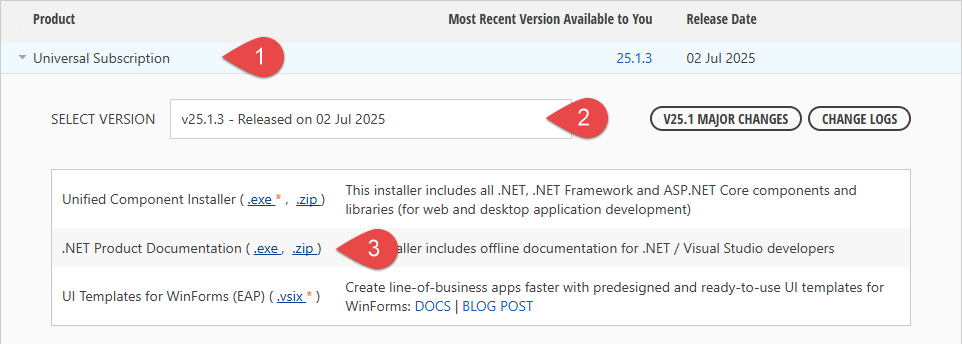
Once the installer download completes, execute the file to setup offline documentation on your machine.
Change Documentation Viewer Preference in Visual Studio
Go to the Help menu in Visual Studio and choose Set Help Preference > Launch in Help Viewer.