Chat with Your Own Data
- 5 minutes to read
When integrating the AI Chat Control with the OpenAI Assistant API, you can configure it to retain and reference a specific context (for example, a text file or a PDF document). By providing a supplementary document as a context source, the assistant is primed with background information. OpenAI automatically parses the document and searches through it to retrieve relevant content to better respond to user queries.
- Install the
DevExpress.AIIntegration.OpenAINuGet package. Create an assistant.
using OpenAI; using OpenAI.Assistants; using OpenAI.Files; using System.IO; using System.ClientModel; using System.Threading.Tasks; using System.Threading; using System; #pragma warning disable OPENAI001 public class OpenAIAssistantCreator { readonly AssistantClient assistantClient; readonly OpenAIFileClient fileClient; readonly string deployment; public OpenAIAssistantCreator(OpenAIClient client, string deployment) { assistantClient = client.GetAssistantClient(); fileClient = client.GetOpenAIFileClient(); this.deployment = deployment; } public async Task<string> CreateAssistantAsync( Stream data, string fileName, string instructions, bool useFileSearchTool = true, CancellationToken ct = default) { data.Position = 0; ClientResult<OpenAIFile> fileResponse = await fileClient.UploadFileAsync(data, fileName, FileUploadPurpose.Assistants, ct); OpenAIFile file = fileResponse.Value; var resources = new ToolResources() { CodeInterpreter = new CodeInterpreterToolResources(), FileSearch = useFileSearchTool ? new FileSearchToolResources() : null }; resources.FileSearch?.NewVectorStores.Add(new VectorStoreCreationHelper([file.Id])); resources.CodeInterpreter.FileIds.Add(file.Id); AssistantCreationOptions assistantCreationOptions = new AssistantCreationOptions() { Name = Guid.NewGuid().ToString(), Instructions = instructions, ToolResources = resources }; assistantCreationOptions.Tools.Add(new CodeInterpreterToolDefinition()); if (useFileSearchTool) { assistantCreationOptions.Tools.Add(new FileSearchToolDefinition()); } ClientResult<Assistant> assistantResponse = await assistantClient.CreateAssistantAsync(deployment, assistantCreationOptions, ct); Assistant assistant = assistantResponse.Value; return assistant.Id; } } #pragma warning restore OPENAI001Warning
The
OpenAI.OpenAIClientAPI is for evaluation purposes only and is subject to change or removal in a future update. The following code snippet suppresses theOPENAI001diagnostic:Register the OpenAI Assistant service:
using Azure.AI.OpenAI; using System.Windows.Forms; using System.ClientModel; using DevExpress.AIIntegration; using Microsoft.Extensions.AI; namespace AIChat { internal static class Program { [STAThread] static void Main() { Application.EnableVisualStyles(); Application.SetCompatibleTextRenderingDefault(false); var azureOpenAiClient = new Azure.AI.OpenAI.AzureOpenAIClient(AzureOpenAIEndpoint, AzureOpenAIKey); var container = AIExtensionsContainerDesktop.Default; container.RegisterChatClient(azureOpenAiClient.GetChatClient(ModelId).AsIChatClient()); container.RegisterOpenAIAssistants(azureOpenAiClient, ModelId); // For example, ModelId = "gpt-4o-mini" Application.Run(new ChatForm(new OpenAIAssistantCreator(azureChatClient, ModelId))); } private static Uri AzureOpenAIEndpoint = new Uri("YOUR_AZURE_OPENAI_ENDPOINT"); private static ApiKeyCredential AzureOpenAIKey = new ApiKeyCredential("YOUR_AZURE_OPENAI_KEY"); } }Note
The availability of Azure Open AI Assistants depends on the region. Refer to the following article for more information: Assistants (Preview).
Handle the
Initializedevent with an async handler. Call thee.SetupAssistantAsyncmethod to supply the Open AI Assistant identifier:using System.IO; using DevExpress.AIIntegration.Blazor.Chat.WebView; public partial class ChatForm : XtraForm { FileStream dataStream; readonly OpenAIAssistantCreator _openAIAssistantCreator; public ChatForm(OpenAIAssistantCreator openAIAssistantCreator) { InitializeComponent(); _openAIAssistantCreator = openAIAssistantCreator; dataStream = File.OpenRead(@"RestaurantMenu.pdf"); /* * In this example, aiChatControl1 was created and configured at design time. */ aiChatControl1.Initialized += AiChatControl1_Initialized; } async void AiChatControl1_Initialized(object sender, AIChatControlInitializedEventArgs e) { string fileName = "RestaurantMenu.pdf"; string prompt = "You are an Analyst Assistant specializing in PDF file analysis. Your role is to assist users by providing accurate answers to their questions about data contained in these files."; string assistantID = await _openAIAssistantCreator.CreateAssistantAsync(dataStream, fileName, prompt); await e.SetupAssistantAsync(assistantID); } }
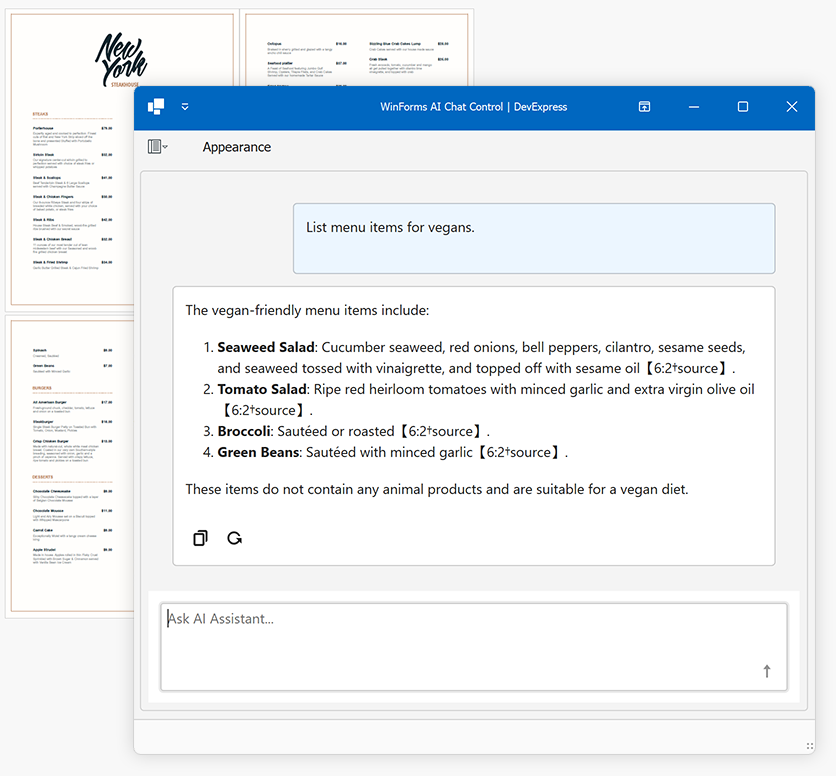
The following screenshot shows the result:
Tip
The AI Chat Control does not render citation references as clickable links. These references appear as plain text (for example, [6:2†source]) in the output. To remove citation references from the AI response before display, handle the AI Chat Control’s MarkdownConvert event:
using Markdig;
using System.Text.RegularExpressions;

void AiChatControl1_MarkdownConvert(object sender, AIChatControlMarkdownConvertEventArgs e) {
    string output = ClearCitationReferences(e.MarkdownText);
    e.HtmlText = (MarkupString)Markdown.ToHtml(output);
}

string ClearCitationReferences(string text) {
    return Regex.Replace(text, @"\【.*?】", "");
}