Chat Resources
- 6 minutes to read
The AI Chat Control can access external or dynamically generated data through resources. A resource is an instance of the AIChatResource class that supplies text or binary content to the AI model at request time.
Resources extend the chat context with additional input (for example, local documents, logs, or images). The AI model uses this data to generate more accurate and context-aware responses.
After you assign resources, the AIChatControl displays the “Attach Context” (+) button. Users can select one or more resources to include in the chat request. A built-in search box helps users quickly find the desired items when the resource list is long.
Tip
The Resources feature is primarily designed to integrate with resources provided by MCP (Model Context Protocol) servers. Use the MCP client SDK to retrieve these resources:
McpClient = await McpClientFactory.CreateAsync(transport);
var mcpResources = await McpClient.ListResourcesAsync();
Resources = mcpResources.Select(x => new AIChatResource(x.Uri, x.Name, LoadResourceData, x.MimeType, x.Description));
See the following example for implementation details: Model Context Protocol .NET SDK — McpClientExtensions.
Define Resources
- Create a collection of AIChatResource objects.
- Use the
ChatResourcesproperty to assign resources to theAIChatControl.
Note
Large PDFs or images may impact performance and token consumption.
using System;
using System.IO;
using System.Collections.Generic;
using System.Text;
using System.Threading;
using System.Threading.Tasks;
using DevExpress.AIIntegration.Blazor.Chat;
using Microsoft.Extensions.AI;
using UglyToad.PdfPig;

namespace DXChatApplication {
    public partial class MainWindow {
        static readonly IReadOnlyList<AIChatResource> Resources = new List<AIChatResource> {
            new AIChatResource(
                "access.txt",
                "Access Log",
                GetLogResourceAsync,
                "text/plain",
                "Contains web server access records collected over the last 24 hours."
                ),
            new AIChatResource(
                "restaurantmenu.pdf",
                "Restaurant Menu",
                GetPdfResourceAsync,
                "application/pdf",
                "Displays New York Steakhouse's current menu."
                ),
            new AIChatResource(
                "dashboard.jpg",
                "Dashboard (Screenshot)",
                GetImageResourceAsync,
                "image/jpeg",
                "A dashboard screenshot that displays the latest real-time analytics data."
                ),
            new AIChatResource(
                "dxaichat.md",
                "AI Chat Documentation",
                GetDocsResourceAsync,
                "text/markdown",
                "Includes reference documentation that describes AI Chat functionality and usage guidelines."
                )
        };
        public MainWindow() {
            InitializeComponent();
            aiChatControl.ChatResources = Resources;
        }
        // Load a text log file and return it as a single text content block.
        static async Task<IList<AIContent>> GetLogResourceAsync(AIChatResource resource, CancellationToken ct) {
            if (!File.Exists(resource.Uri))
                return new List<AIContent> { new TextContent("Log file not found.") };

            string text = await File.ReadAllTextAsync(resource.Uri, ct).ConfigureAwait(false);
            return new List<AIContent> { new TextContent(text) };
        }

        // Load an image file as binary content.
        static async Task<ReadOnlyMemory<byte>> GetImageResourceAsync(AIChatResource resource, CancellationToken ct) {
            if (!File.Exists(resource.Uri))
                return ReadOnlyMemory<byte>.Empty;

            byte[] data = await File.ReadAllBytesAsync(resource.Uri, ct).ConfigureAwait(false);
            return new ReadOnlyMemory<byte>(data);
        }

        // Load markdown documentation as a string.
        static async Task<string> GetDocsResourceAsync(AIChatResource resource, CancellationToken ct) {
            if (!File.Exists(resource.Uri))
                return "Documentation file not found.";

            return await File.ReadAllTextAsync(resource.Uri, ct).ConfigureAwait(false);
        }

        // Extract all text from a PDF file using the PdfPig library.
        static async Task<string> GetPdfResourceAsync(AIChatResource resource, CancellationToken ct) {
            if (!File.Exists(resource.Uri))
                return "PDF file not found.";

            return await Task.Run(() => {
                var sb = new StringBuilder();
                try {
                    using var pdf = PdfDocument.Open(resource.Uri);
                    foreach (var page in pdf.GetPages()) {
                        sb.AppendLine(page.Text);
                    }
                }
                catch (Exception ex) {
                    return $"[Error reading PDF: {ex.Message}]";
                }
                return sb.ToString();
            }, ct).ConfigureAwait(false);
        }
    }
}
Resource Parameters
| Parameter | Description |
|---|---|
| Uri | Gets or sets the resource identifier (for example, a file name, local path, or external URI). |
| Guid | Gets the unique, autogenerated identifier. |
| Name | Gets or sets the resource name displayed in the chat UI. |
| MimeType | Gets or sets the resource content type (for example, text/plain, application/pdf, image/jpeg). |
| Description | Gets or sets the resource description displayed in a tooltip. |
Customize Resource Appearance
Use the AIChatControl.ResourceItemTemplate property to supply a Razor-based template for resource items displayed in the chat’s “Attach Context” dropdown:
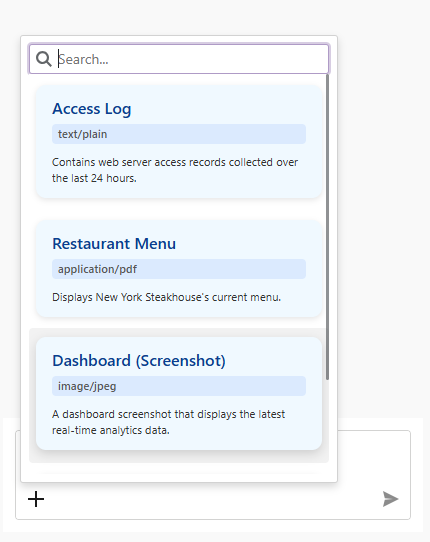
using DevExpress.AIIntegration.Blazor.Chat;
using Microsoft.AspNetCore.Components;

//...
RenderFragment<AIChatResource> ResourceTemplate;

public MainWindow() {
    InitializeComponent();
    aiChatControl.ChatResources = Resources;

    ResourceTemplate = resource => builder => {
        builder.OpenComponent<Resource>(0);
        builder.AddAttribute(1, "resource", resource);
        builder.CloseComponent();
    };

    // Assign a Razor-based template.
    aiChatControl.ResourceItemTemplate = ResourceTemplate;
}
The Resource.razor file:
@using Microsoft.AspNetCore.Components.Web
@using DevExpress.AIIntegration.Blazor.Chat

<div class="resource-item">
    <div class="resource-name">@resource.Name</div>
    <div class="resource-meta">
        <span class="resource-type">@resource.MimeType</span>
        <span class="resource-desc">@resource.Description</span>
    </div>
</div>

@code {
    [Parameter]
    public AIChatResource resource { get; set; }
}

<style>
    .resource-item {
        background-color: #f0f9ff;
        border-radius: 10px;
        padding: 12px 16px;
        margin: 6px 0;
        box-shadow: 0 2px 6px rgba(0,0,0,0.1);
        transition: transform 0.2s, box-shadow 0.2s;
        cursor: pointer;
    }

    .resource-item:hover {
        transform: translateY(-2px);
        box-shadow: 0 4px 12px rgba(0,0,0,0.15);
    }

    .resource-name {
        font-weight: 600;
        font-size: 1rem;
        color: #0b3d91;
        margin-bottom: 4px;
    }

    .resource-meta {
        display: flex;
        flex-direction: column;
        flex-wrap: wrap;
        gap: 10px;
        font-size: 0.7rem;
        color: #555;
    }

    .resource-type {
        background-color: #dbeafe;
        padding: 2px 6px;
        border-radius: 4px;
        font-weight: 500;
    }

    .resource-desc {
        flex: 1;
        color: #333;
        overflow: hidden;
        text-overflow: ellipsis;
        word-break: break-word;
    }
</style>
Best Practices
- Use short and scannable resource names.
- Specify consistent MIME types (incorrect values can reduce model relevance).
- Avoid sending confidential resources unless necessary.
- Enforce size limits on resources to prevent excessive token usage.
- Log resource access for auditing (for example, when dealing with sensitive or compliance-related data).