# TreeList.PrintDialog() Method | WinForms Controls | DevExpress Documentation
# TreeList.PrintDialog() Method
Opens the Print dialog that allows a user to print the data displayed in the control.
**Namespace**: [DevExpress.XtraTreeList](/WindowsForms/DevExpress.XtraTreeList)
**Assembly**:
DevExpress.XtraTreeList.v26.1.dll
**NuGet Packages**:
[DevExpress.Win.Navigation](https://www.nuget.org/packages/DevExpress.Win.Navigation/26.1.6), [DevExpress.Win.TreeList](https://www.nuget.org/packages/DevExpress.Win.TreeList/26.1.6)
## Declaration
- C#
- VB.NET
public void PrintDialog()
Public Sub PrintDialog
## Remarks
The [ShowRibbonPrintPreview()](/WindowsForms/DevExpress.XtraTreeList.TreeList.ShowRibbonPrintPreview) method invokes the **Preview** window that allows a user to do the following:
- select the control’s visual elements to be printed
- set the page size, orientation, and margins
- specify headers and footers
- navigate through the preview
- select a printer, set the number of copies, and print the control
- export the data to different formats (PDF, HTML, XLS, etc.)
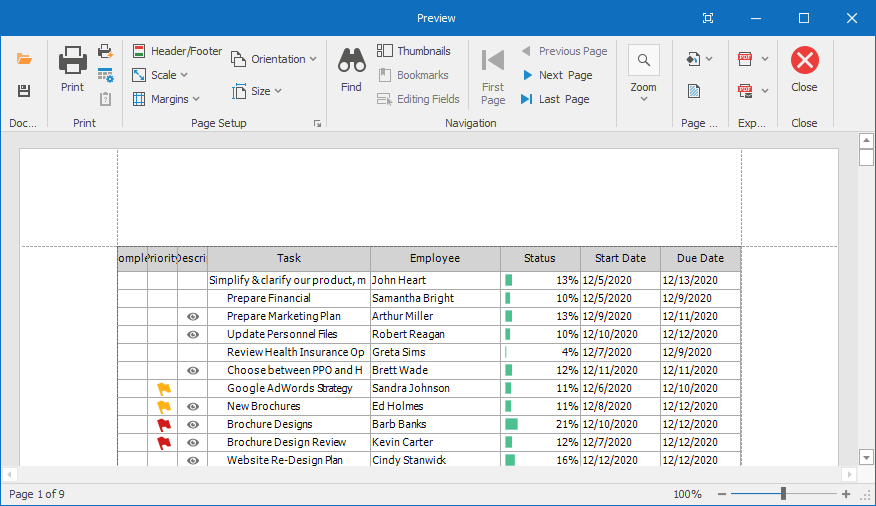
Commands in the window are displayed in the ribbon. You can also call the [ShowPrintPreview()](/WindowsForms/DevExpress.XtraTreeList.TreeList.ShowPrintPreview) method, which invokes the print preview window where commands are displayed in bars.
### Print Preview Commands
A user can call the following commands in the ribbon:
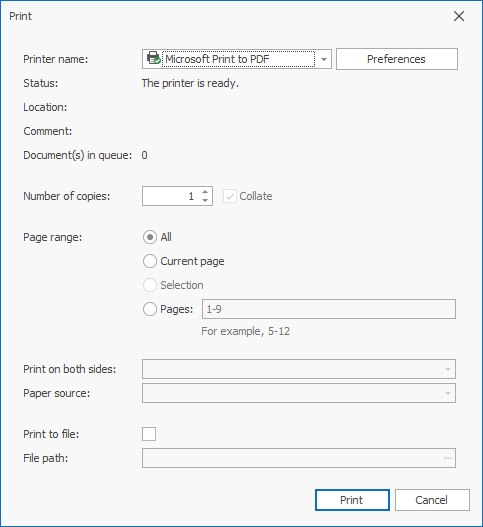
- **Print** — invokes the print dialog, which allows a user to select a printer, specify the number of copies, define the page range, and print the control. You can call the `PrintDialog()` method to invoke this dialog.
- **Print Quick** — prints the control without the print dialog. You can call the [Print()](/WindowsForms/DevExpress.XtraTreeList.TreeList.Print) method to print the control without the print dialog.
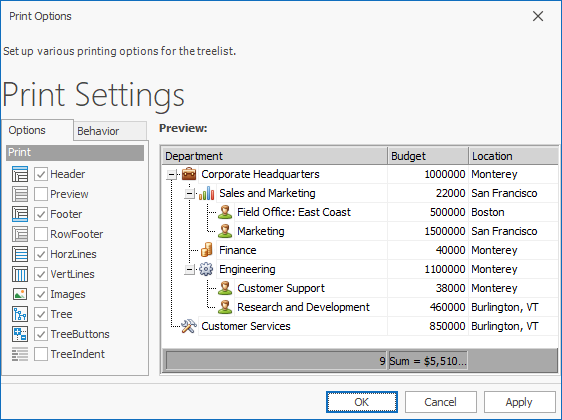
- **Options** — invokes a window that allows a user to specify the visual elements that should be printed: vertical grid lines, headers, etc. You can use the [OptionsPrint](/WindowsForms/DevExpress.XtraTreeList.TreeList.OptionsPrint) property to specify these options in code.
Note that you can only print controls if the project references the [XtraPrinting library](/WindowsForms/2079/controls-and-libraries/printing-exporting). To check if the control can be printed, use the [IsPrintingAvailable](/WindowsForms/DevExpress.XtraTreeList.TreeList.IsPrintingAvailable) property. To check if the control is currently being printed, use the [IsPrinting](/WindowsForms/DevExpress.XtraTreeList.TreeList.IsPrinting) property.
See Also
[Print Tree List](/WindowsForms/311/controls-and-libraries/tree-list/feature-center/print-tree-list)
[IsPrintingAvailable](/WindowsForms/DevExpress.XtraTreeList.TreeList.IsPrintingAvailable)
[Print()](/WindowsForms/DevExpress.XtraTreeList.TreeList.Print)
[ShowPrintPreview()](/WindowsForms/DevExpress.XtraTreeList.TreeList.ShowPrintPreview)
[ShowRibbonPrintPreview()](/WindowsForms/DevExpress.XtraTreeList.TreeList.ShowRibbonPrintPreview)
[TreeList Class](/WindowsForms/DevExpress.XtraTreeList.TreeList)
[TreeList Members](/WindowsForms/DevExpress.XtraTreeList.TreeList._members)
[DevExpress.XtraTreeList Namespace](/WindowsForms/DevExpress.XtraTreeList)