# PivotGridControl Class | WinForms Controls | DevExpress Documentation
# PivotGridControl Class
Allows you to create a [pivot table](/WindowsForms/3409/controls-and-libraries/pivot-grid) (cross-tabular format) for multi-dimensional analysis of large amounts of data.
**Namespace**: [DevExpress.XtraPivotGrid](/WindowsForms/DevExpress.XtraPivotGrid)
**Assembly**:
DevExpress.XtraPivotGrid.v26.1.dll
**NuGet Package**:
[DevExpress.Win.PivotGrid](https://www.nuget.org/packages/DevExpress.Win.PivotGrid/26.1.4)
## Declaration
- C#
- VB.NET
[OLAPDataAccessMetadata("All", SupportedProcessingModes = "Pivot", EnableBindingToXPOServerMode = false)]
public class PivotGridControl :
    BaseViewInfoControl,
    IFilteringUIClient,
    IFilterCriteriaBindingAware,
    IComponentLoading,
    ISupportAsyncScrollAnimation,
    IPrintable,
    IBasePrintable,
    IPrintingTarget,
    IToolTipControlClient,
    IPivotGridEventsImplementor,
    IPivotGridEventsImplementorBase,
    ICustomizationFormOwner,
    IPivotGridDataContainerCore,
    IPivotGridDataOwner,
    IDXManagerPopupMenu,
    IBindingList,
    ICollection,
    IEnumerable,
    IList,
    ITypedList,
    IPivotGrid,
    IChartDataSource,
    IPivotGridViewInfoDataOwner,
    IPivotGridPrinterOwner,
    IDataContainerBase,
    IMouseWheelSupport,
    ISupportXtraSerializer,
    ISupportJsonXtraSerializer,
    IThreadSafeAccessible,
    IXtraSerializable,
    IXtraSerializableLayout,
    IXtraSerializableLayoutEx,
    IXtraSupportDeserializeCollectionItem,
    IXtraSupportDeserializeCollection,
    IPivotGestureClient,
    IGestureClient,
    IMouseWheelScrollClient,
    IOptionsLayoutProvider,
    IFilteredComponent,
    IFilteredComponentBase,
    IStringImageProvider,
    IXtraSerializableLayout2,
    IXtraPartlyDeserializable,
    IXtraSupportAllowProperty,
    IPropertyManagerProvider,
    IAccessiblePivot,
    IFilterPanelOwner,
    ISupportFilterCriteriaDisplayStyle
<OLAPDataAccessMetadata("All", SupportedProcessingModes:="Pivot", EnableBindingToXPOServerMode:=False)>
Public Class PivotGridControl
    Inherits BaseViewInfoControl
    Implements IFilteringUIClient,
               IFilterCriteriaBindingAware,
               IComponentLoading,
               ISupportAsyncScrollAnimation,
               IPrintable,
               IBasePrintable,
               IPrintingTarget,
               IToolTipControlClient,
               IPivotGridEventsImplementor,
               IPivotGridEventsImplementorBase,
               ICustomizationFormOwner,
               IPivotGridDataContainerCore,
               IPivotGridDataOwner,
               IDXManagerPopupMenu,
               IBindingList,
               ICollection,
               IEnumerable,
               IList,
               ITypedList,
               IPivotGrid,
               IChartDataSource,
               IPivotGridViewInfoDataOwner,
               IPivotGridPrinterOwner,
               IDataContainerBase,
               IMouseWheelSupport,
               ISupportXtraSerializer,
               ISupportJsonXtraSerializer,
               IThreadSafeAccessible,
               IXtraSerializable,
               IXtraSerializableLayout,
               IXtraSerializableLayoutEx,
               IXtraSupportDeserializeCollectionItem,
               IXtraSupportDeserializeCollection,
               IPivotGestureClient,
               IGestureClient,
               IMouseWheelScrollClient,
               IOptionsLayoutProvider,
               IFilteredComponent,
               IFilteredComponentBase,
               IStringImageProvider,
               IXtraSerializableLayout2,
               IXtraPartlyDeserializable,
               IXtraSupportAllowProperty,
               IPropertyManagerProvider,
               IAccessiblePivot,
               IFilterPanelOwner,
               ISupportFilterCriteriaDisplayStyle
## Related API Members
The following members return **PivotGridControl** objects:
| Library | Related API Members |
| --- | --- |
| WinForms Controls | [FilterPopupExcelParseFilterCriteriaEventArgs.PivotGrid](/WindowsForms/DevExpress.XtraPivotGrid.FilterPopupExcelParseFilterCriteriaEventArgs.PivotGrid) |
| [FilterPopupExcelQueryFilterCriteriaEventArgs.PivotGrid](/WindowsForms/DevExpress.XtraPivotGrid.FilterPopupExcelQueryFilterCriteriaEventArgs.PivotGrid) |
| [PivotGridField.PivotGrid](/WindowsForms/DevExpress.XtraPivotGrid.PivotGridField.PivotGrid) |
| [PivotGridStyleFormatCondition.PivotGrid](/WindowsForms/DevExpress.XtraPivotGrid.PivotGridStyleFormatCondition.PivotGrid) |
| Dashboard | [DashboardItemControlEventArgs.PivotGridControl](/Dashboard/DevExpress.DashboardWin.DashboardItemControlEventArgs.PivotGridControl) |
## Related API Members
The following members return **PivotGridControl** objects:
| Library | Related API Members |
| --- | --- |
| WinForms Controls | [FilterPopupExcelParseFilterCriteriaEventArgs.PivotGrid](/WindowsForms/DevExpress.XtraPivotGrid.FilterPopupExcelParseFilterCriteriaEventArgs.PivotGrid) |
| [FilterPopupExcelQueryFilterCriteriaEventArgs.PivotGrid](/WindowsForms/DevExpress.XtraPivotGrid.FilterPopupExcelQueryFilterCriteriaEventArgs.PivotGrid) |
| [PivotGridField.PivotGrid](/WindowsForms/DevExpress.XtraPivotGrid.PivotGridField.PivotGrid) |
| [PivotGridStyleFormatCondition.PivotGrid](/WindowsForms/DevExpress.XtraPivotGrid.PivotGridStyleFormatCondition.PivotGrid) |
| XAF: Cross-Platform .NET App UI & Web API | [PivotGridListEditor.PivotGridControl](/eXpressAppFramework/DevExpress.ExpressApp.PivotGrid.Win.PivotGridListEditor.PivotGridControl) |
## Remarks
The Pivot Grid Control represents data from an underlying data source in a cross-tabulated form. It calculates summaries and summary totals against specific fields and displays the summary values within data cells. The following summary functions are supported: Sum, Average, Count, Min, Max, StdDev, StdDevp, StdVar, StdVarp.
Fields are basic blocks which an end-user can manipulate in the PivotGrid control. A field is visually represented by a box (field header) which can be dragged between the control’s areas: [Column Header Area](/WindowsForms/1686/controls-and-libraries/pivot-grid/ui-elements/column-header-area), [Row Header Area](/WindowsForms/1685/controls-and-libraries/pivot-grid/ui-elements/row-header-area), [Data Area](/WindowsForms/1693/controls-and-libraries/pivot-grid/ui-elements/data-area) and [Filter Header Area](/WindowsForms/1684/controls-and-libraries/pivot-grid/ui-elements/filter-header-area). Dragging a field between the areas lets you reorganize the data and present it in various forms. The fields positioned within these areas are called [column fields](/WindowsForms/1710/controls-and-libraries/pivot-grid/ui-elements/column-field), [row fields](/WindowsForms/1709/controls-and-libraries/pivot-grid/ui-elements/row-field), [data fields](/WindowsForms/1711/controls-and-libraries/pivot-grid/ui-elements/data-field) and [filter fields](/WindowsForms/1712/controls-and-libraries/pivot-grid/ui-elements/filter-field), respectively.
A field is represented by the [PivotGridField](/WindowsForms/DevExpress.XtraPivotGrid.PivotGridField) class.
For column fields, the control lists their values across the top edge. Similarly, the values of the row fields are listed across the control’s left edge. Thus a cell at the intersection of a column and row is identified by a column field value(s) and row field value(s). Obviously however, multiple records in the control’s data source can have identical values in the specified column field(s) and row field(s). Consequently, a cell in the Pivot Grid Control represents multiple records and it displays a summary value calculated against these records. The summary is calculated against a data field and the summary type is specified by the [PivotGridFieldBase.SummaryType](/CoreLibraries/DevExpress.XtraPivotGrid.PivotGridFieldBase.SummaryType) property of the data field.
The control’s data source is specified by the [PivotGridControl.DataSource](/WindowsForms/DevExpress.XtraPivotGrid.PivotGridControl.DataSource) and [PivotGridControl.DataMember](/WindowsForms/DevExpress.XtraPivotGrid.PivotGridControl.DataMember) properties.
The Pivot Grid Control uses the [Binding API](/CoreLibraries/401533/devexpress-pivot-grid-core-library/data-binding-api) to bind Pivot Grid fields to data. You can use [data source columns](/WindowsForms/401376/controls-and-libraries/pivot-grid/binding-to-data/in-memory-mode/Optimized-Mode/bind-pivot-grid-fields-to-data-columns), [calculated expressions](/WindowsForms/1799/controls-and-libraries/pivot-grid/binding-to-data/in-memory-mode/Optimized-Mode/bind-pivot-grid-fields-to-calculated-expressions), or [window calculations](/WindowsForms/403904/controls-and-libraries/pivot-grid/binding-to-data/in-memory-mode/Optimized-Mode/bind-pivot-grid-fields-to-window-calculations) as data binding sources.
## AI Skills
**DevExpress AI Skills** help your AI assistant generate code that uses Pivot Grid API in accordance with DevExpress best practices:
- [Pivot Grid Skill](https://github.com/DevExpress/agent-skills/tree/main/plugins/dx-winforms/skills/devexpress-winforms-pivot-grid)
- [Agent Skills for DevExpress WinForms Controls](/WindowsForms/406061/ai-assisted-development/agent-skills)
## Example
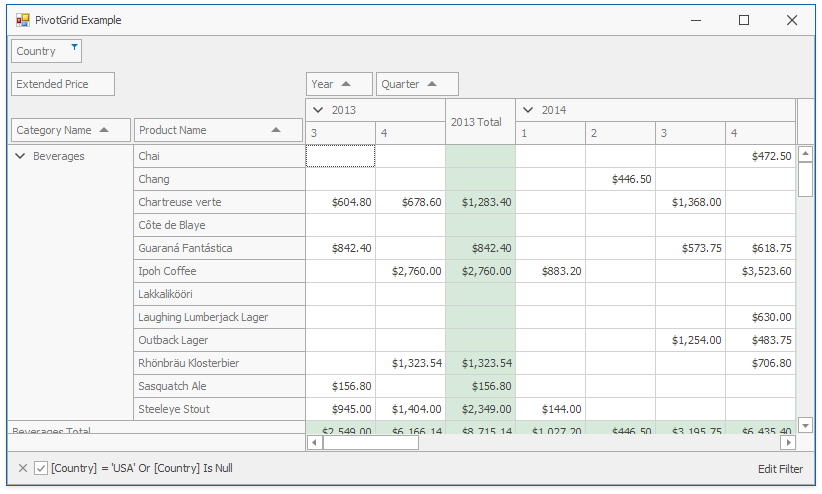
This example demonstrates how to create the [Pivot Grid fields](/WindowsForms/1918/controls-and-libraries/pivot-grid/fundamentals/pivot-grid-fields) in code and specify their location and format. The Pivot Grid’s data source is the [ExcelDataSource](/CoreLibraries/DevExpress.DataAccess.Excel.ExcelDataSource) instance, created in code.
- C#
- VB.NET
using DevExpress.DataAccess.Excel;
using DevExpress.XtraEditors;
using DevExpress.XtraPivotGrid;
using System;

namespace WinFormsPivotGridDataFieldsExample {
    public partial class Form1 : XtraForm {
        public Form1() {
            InitializeComponent();
            this.Load += Form1_Load;
            // Create the Excel Data Source.
            ExcelDataSource ds = new ExcelDataSource();
            ds.FileName = "SalesPerson.xlsx";
            ExcelWorksheetSettings settings = new ExcelWorksheetSettings("Data");
            ds.SourceOptions = new ExcelSourceOptions(settings);
            ds.Fill();
            // Set the pivot's data source.
            pivotGridControl1.DataSource = ds;
            // Create pivot grid fields.
            PivotGridField fieldCategoryName = new PivotGridField() {
                Area = PivotArea.RowArea,
                AreaIndex = 0,
                Caption = "Category Name"
            };
            // Bind fields to columns in the data source.
            DataSourceColumnBinding categoryNameBinding = new DataSourceColumnBinding("CategoryName");
            fieldCategoryName.DataBinding = categoryNameBinding;

            PivotGridField fieldProductName = new PivotGridField() {
                Area = PivotArea.RowArea,
                AreaIndex = 1,
                Caption = "Product Name"
            };

            DataSourceColumnBinding productNameBinding = new DataSourceColumnBinding("ProductName");
            fieldProductName.DataBinding = productNameBinding;

            PivotGridField fieldExtendedPrice = new PivotGridField() {
                Area = PivotArea.DataArea,
                AreaIndex = 0,
                Caption = "Extended Price"
            };

            DataSourceColumnBinding extendedPriceBinding = new DataSourceColumnBinding("Extended Price");
            fieldExtendedPrice.DataBinding = extendedPriceBinding;

            // Specify the field format.
            fieldExtendedPrice.CellFormat.FormatType = DevExpress.Utils.FormatType.Numeric;
            fieldExtendedPrice.CellFormat.FormatString = "c2";

            PivotGridField fieldOrderDate1 = new PivotGridField() {
                Area = PivotArea.ColumnArea,
                AreaIndex = 0,
                Caption = "Year"
            };

            DataSourceColumnBinding fieldOrderDate1Binding = new DataSourceColumnBinding("OrderDate");
            fieldOrderDate1Binding.GroupInterval = PivotGroupInterval.DateYear;
            fieldOrderDate1.DataBinding = fieldOrderDate1Binding;

            PivotGridField fieldOrderDate2 = new PivotGridField() {
                Area = PivotArea.ColumnArea,
                AreaIndex = 1,
                Caption = "Quarter"
            };

            DataSourceColumnBinding fieldOrderDate2Binding = new DataSourceColumnBinding("OrderDate");
            fieldOrderDate2Binding.GroupInterval = PivotGroupInterval.DateQuarter;
            fieldOrderDate2.DataBinding = fieldOrderDate2Binding;

            PivotGridField fieldCountry = new PivotGridField() {
                AreaIndex = 0,
                Caption = "Country"
            };

            DataSourceColumnBinding countryBinding = new DataSourceColumnBinding("Country");
            fieldCountry.DataBinding = countryBinding;

            // Create a field's filter.
            fieldCountry.FilterValues.Clear();
            fieldCountry.FilterValues.FilterType = PivotFilterType.Included;
            fieldCountry.FilterValues.Add("USA");
            // Add fields to the pivot grid.
            pivotGridControl1.Fields.AddRange(new PivotGridField[] {
            fieldCategoryName,
            fieldProductName,
            fieldOrderDate1,
            fieldOrderDate2,
            fieldExtendedPrice,
            fieldCountry});
        }

        private void Form1_Load(object sender, EventArgs e) {
            pivotGridControl1.BestFit();
        }
    }
}
Imports DevExpress.DataAccess.Excel
Imports DevExpress.XtraEditors
Imports DevExpress.XtraPivotGrid
Imports System

Namespace WinFormsPivotGridDataFieldsExample
    Partial Public Class Form1
        Inherits XtraForm

        Public Sub New()
            InitializeComponent()
            AddHandler Me.Load, AddressOf Form1_Load
            ' Create the Excel Data Source.
            Dim ds As New ExcelDataSource()
            ds.FileName = "SalesPerson.xlsx"
            Dim settings As New ExcelWorksheetSettings("Data")
            ds.SourceOptions = New ExcelSourceOptions(settings)
            ds.Fill()
            ' Set the pivot's data source.
            pivotGridControl1.DataSource = ds
            ' Create pivot grid fields.
            Dim fieldCategoryName As New PivotGridField() With {
                .Area = PivotArea.RowArea,
                .AreaIndex = 0,
                .Caption = "Category Name"
            }
            ' Bind fields to columns in the data source.
            Dim categoryNameBinding As New DataSourceColumnBinding("CategoryName")
            fieldCategoryName.DataBinding = categoryNameBinding

            Dim fieldProductName As New PivotGridField() With {
                .Area = PivotArea.RowArea,
                .AreaIndex = 1,
                .Caption = "Product Name"
            }

            Dim productNameBinding As New DataSourceColumnBinding("ProductName")
            fieldProductName.DataBinding = productNameBinding

            Dim fieldExtendedPrice As New PivotGridField() With {
                .Area = PivotArea.DataArea,
                .AreaIndex = 0,
                .Caption = "Extended Price"
            }

            Dim extendedPriceBinding As New DataSourceColumnBinding("Extended Price")
            fieldExtendedPrice.DataBinding = extendedPriceBinding

            ' Specify the field format.
            fieldExtendedPrice.CellFormat.FormatType = DevExpress.Utils.FormatType.Numeric
            fieldExtendedPrice.CellFormat.FormatString = "c2"

            Dim fieldOrderDate1 As New PivotGridField() With {
                .Area = PivotArea.ColumnArea,
                .AreaIndex = 0,
                .Caption = "Year"
            }

            Dim fieldOrderDate1Binding As New DataSourceColumnBinding("OrderDate")
            fieldOrderDate1Binding.GroupInterval = PivotGroupInterval.DateYear
            fieldOrderDate1.DataBinding = fieldOrderDate1Binding

            Dim fieldOrderDate2 As New PivotGridField() With {
                .Area = PivotArea.ColumnArea,
                .AreaIndex = 1,
                .Caption = "Quarter"
            }

            Dim fieldOrderDate2Binding As New DataSourceColumnBinding("OrderDate")
            fieldOrderDate2Binding.GroupInterval = PivotGroupInterval.DateQuarter
            fieldOrderDate2.DataBinding = fieldOrderDate2Binding

            Dim fieldCountry As New PivotGridField() With {
                .AreaIndex = 0,
                .Caption = "Country"
            }

            Dim countryBinding As New DataSourceColumnBinding("Country")
            fieldCountry.DataBinding = countryBinding

            ' Create a field's filter.
            fieldCountry.FilterValues.Clear()
            fieldCountry.FilterValues.FilterType = PivotFilterType.Included
            fieldCountry.FilterValues.Add("USA")
            ' Add fields to the pivot grid.
            pivotGridControl1.Fields.AddRange(New PivotGridField() { fieldCategoryName, fieldProductName, fieldOrderDate1, fieldOrderDate2, fieldExtendedPrice, fieldCountry})
        End Sub

        Private Sub Form1_Load(ByVal sender As Object, ByVal e As EventArgs)
            pivotGridControl1.BestFit()
        End Sub
    End Class
End Namespace
## Implements
[IPrintable](/WindowsForms/DevExpress.XtraPrinting.IPrintable)
## Inheritance
[Object](https://learn.microsoft.com/dotnet/api/system.object)
[MarshalByRefObject](https://learn.microsoft.com/dotnet/api/system.marshalbyrefobject)
[Component](https://learn.microsoft.com/dotnet/api/system.componentmodel.component)
[Control](https://learn.microsoft.com/dotnet/api/system.windows.forms.control)
[EditorContainer](/WindowsForms/DevExpress.XtraEditors.Container.EditorContainer)
DevExpress.XtraPivotGrid.ViewInfo.BaseControl
DevExpress.XtraPivotGrid.ViewInfo.BaseViewInfoControl
PivotGridControl
See Also
[PivotGridControl Members](/WindowsForms/DevExpress.XtraPivotGrid.PivotGridControl._members)
[PivotGridField](/WindowsForms/DevExpress.XtraPivotGrid.PivotGridField)
[DevExpress.XtraPivotGrid Namespace](/WindowsForms/DevExpress.XtraPivotGrid)