# DevExpress AI-powered Extensions for WinForms | WinForms Controls | DevExpress Documentation
## Supported AI Clients
- OpenAI
- Azure OpenAI
- Anthropic (Claude)
- Semantic Kernel
- Ollama (self-hosted models)
- Foundry Local (on-device AI models)
- ONNX Runtime (local ONNX models)
## Prerequisites
- [.NET 8+ SDK](https://dotnet.microsoft.com/en-us/download/dotnet/8.0) / .NET Framework v4.7.2
- **OpenAI**
- An active Open AI subscription
- OpenAI API key
- [OpenAI .NET SDK (Version=”2.3.0”)](https://www.nuget.org/packages/OpenAI/2.3.0)
- [Microsoft.Extensions.AI.OpenAI (Version=”9.7.1-preview.1.25365.4”)](https://www.nuget.org/packages/Microsoft.Extensions.AI.OpenAI/9.7.1-preview.1.25365.4)
- **Azure OpenAI**
- An active Azure subscription
- [Azure Open AI Service resource](https://learn.microsoft.com/en-us/azure/ai-services/openai/how-to/create-resource?source=recommendations&pivots=web-portal)
- [Azure OpenAI .NET SDK (Version=”2.3.0-beta.2”)](https://www.nuget.org/packages/Azure.AI.OpenAI/2.3.0-beta.2)
- [Microsoft.Extensions.AI.OpenAI (Version=”9.7.1-preview.1.25365.4”)](https://www.nuget.org/packages/Microsoft.Extensions.AI.OpenAI/9.7.1-preview.1.25365.4)
- **Anthropic (Claude)**
- An active [Anthropic](https://www.anthropic.com/) account
- An Anthropic API key
- [Anthropic .NET SDK](https://www.nuget.org/packages/Anthropic) (the official Claude SDK for C#; v10+ targets `Microsoft.Extensions.AI`)
- **Semantic Kernel**
- [Microsoft.SemanticKernel](https://www.nuget.org/packages/Microsoft.SemanticKernel)
- An active account/subscription to the AI service of your choice
- [Microsoft.SemanticKernel.Connectors.*](https://www.nuget.org/packages?q=Microsoft.SemanticKernel.Connectors) NuGet package (a connector to the AI service of your choice)
- **Ollama**(self-hosted models)
- [Download and install Ollama](https://ollama.com/download)
- [Download and install an Ollama model](https://ollama.com/library)
- [OllamaSharp](https://www.nuget.org/packages/OllamaSharp/)
- **Foundry Local** (on-device AI models)
- .NET 8+ SDK
- `Microsoft.AI.Foundry.Local*` Nuget package:
- **Windows**: `Microsoft.AI.Foundry.Local.WinML (Version="0.8.2.1")` (or later)
- **Cross-Platform**: `Microsoft.AI.Foundry.Local (Version="0.8.2.1")` (or later)
See the following setup instruction: [Project setup guide - Foundry Local SDK reference](https://learn.microsoft.com/en-us/azure/ai-foundry/foundry-local/reference/reference-sdk?view=foundry-classic&tabs=xplatform&pivots=programming-language-csharp#project-setup-guide)
- [OpenAI .NET SDK (Version=”2.3.0”)](https://www.nuget.org/packages/OpenAI/2.3.0)
- [Microsoft.Extensions.AI (Version=”9.7.1”)](https://www.nuget.org/packages/Microsoft.Extensions.AI/9.7.1)
- [Microsoft.Extensions.AI.OpenAI (Version=”9.7.1-preview.1.25365.4”)](https://www.nuget.org/packages/Microsoft.Extensions.AI.OpenAI/9.7.1-preview.1.25365.4)
- [Foundry Local Installation](https://github.com/microsoft/Foundry-Local) (optional; the SDK does not require the CLI to run models)
- A local AI model (models download automatically when you use aliases such as `phi-4`)
- **ONNX Runtime**(local ONNX models)
- .NET 8+ SDK
- [Microsoft.ML.OnnxRuntimeGenAI](https://www.nuget.org/packages/Microsoft.ML.OnnxRuntimeGenAI)
- A local ONNX model ([Hugging Face Models](https://huggingface.co/models?library=onnx) or [ONNX Model Zoo](https://github.com/onnx/models))
- [Hugging Face CLI](https://huggingface.co/docs/huggingface_hub/main/en/guides/cli) (recommended for downloading models from Hugging Face)
`DevExpress.AIIntegration` assemblies reference the following versions of `Microsoft.Extensions.AI.*` NuGet packages:
| Package Name | v26.1 |
| --- | --- |
| `Microsoft.Extensions.AI` | 9.7.1 |
| `Microsoft.Extensions.AI.OpenAI` | 9.7.1-preview.1.25365.4 |
See the following breaking change advisory for more information: [DevExpress.AIIntegration references stable versions of Microsoft AI packages](https://supportcenter.devexpress.com/ticket/details/t1292705/devexpress-aiintegration-references-stable-versions-of-microsoft-ai-packages).
## Install DevExpress NuGet Packages
Install the following DevExpress NuGet Packages:
1. `DevExpress.AIIntegration.WinForms`
2. `DevExpress.AIIntegration.OpenAI` (required if you use the [WinForms Chat control with OpenAI.Assistant](/WindowsForms/405218/ai-powered-extensions/ai-chat-control#create-an-assistant-that-chats-using-your-own-data))
3. `DevExpress.Win.Design` (enables design-time features for DevExpress UI controls)
## Register AI Clients
DevExpress AI-powered extensions operate within an [AIExtensionsContainerDesktop](/CoreLibraries/DevExpress.AIIntegration.AIExtensionsContainerDesktop) container. This container manages all registered AI clients so that DevExpress UI controls can automatically leverage AI services.
### Register OpenAI Client
The following code snippet registers an OpenAI client:
- C#
- VB.NET
using Microsoft.Extensions.AI;
using DevExpress.AIIntegration;

internal static class Program {
    [STAThread]
    static void Main() {
        Application.EnableVisualStyles();
        Application.SetCompatibleTextRenderingDefault(false);
        IChatClient openAIChatClient = new OpenAI.OpenAIClient(OpenAIKey).GetChatClient(Model)
            .AsIChatClient();
        AIExtensionsContainerDesktop.Default.RegisterChatClient(openAIChatClient);
        // Uncomment the following line if your project targets the .NET Framework and
        // you create AI-powered behaviors in code.
        // DevExpress.AIIntegration.WinForms.BehaviorInitializer.Initialize();
        Application.Run(new Form1());
    }
    static string OpenAIKey { get { return Environment.GetEnvironmentVariable("OPENAI_API_KEY"); } }
    static string Model { get { return "gpt-4o-mini"; } }
}
Imports Microsoft.Extensions.AI
Imports DevExpress.AIIntegration

Friend Module Program
    <STAThread>
    Sub Main()
        Application.EnableVisualStyles()
        Application.SetCompatibleTextRenderingDefault(False)
        Dim openAIChatClient As IChatClient = New OpenAI.OpenAIClient(OpenAIKey).GetChatClient(Model).AsIChatClient()
            AIExtensionsContainerDesktop.Default.RegisterChatClient(openAIChatClient)
        ' Uncomment the following line if your project targets the .NET Framework and
        ' you create AI-powered behaviors in code.
        ' DevExpress.AIIntegration.WinForms.BehaviorInitializer.Initialize()
        Application.Run(New Form1())
    End Sub
    Private ReadOnly Property OpenAIKey() As String
        Get
            Return Environment.GetEnvironmentVariable("OPENAI_API_KEY")
        End Get
    End Property
    Private ReadOnly Property Model As String
    Get
        Return "gpt-4o-mini"
    End Get
End Property
End Module
### Register Azure OpenAI Client
The following code snippet registers an Azure OpenAI client:
- C#
- VB.NET
using Microsoft.Extensions.AI;
using DevExpress.AIIntegration;

internal static class Program {
    [STAThread]
    static void Main() {
        Application.EnableVisualStyles();
        Application.SetCompatibleTextRenderingDefault(false);
        IChatClient azureChatClient = new Azure.AI.OpenAI.AzureOpenAIClient(new Uri(AzureOpenAIEndpoint),
        new System.ClientModel.ApiKeyCredential(AzureOpenAIKey))
        .GetChatClient(ModelId).AsIChatClient();

        AIExtensionsContainerDesktop.Default.RegisterChatClient(azureChatClient);
        // Uncomment the following line if your project targets the .NET Framework and
        // you create AI-powered behaviors in code.
        // DevExpress.AIIntegration.WinForms.BehaviorInitializer.Initialize();
        Application.Run(new Form1());
    }
    static string AzureOpenAIEndpoint { get { return Environment.GetEnvironmentVariable("AZURE_OPENAI_ENDPOINT"); } }
    static string AzureOpenAIKey { get { return Environment.GetEnvironmentVariable("AZURE_OPENAI_APIKEY"); } }
    static string ModelId { get { return "gpt-4o-mini"; } }
}
Imports Microsoft.Extensions.AI
Imports DevExpress.AIIntegration

Friend Module Program
    <STAThread>
    Sub Main()
        Application.EnableVisualStyles()
        Application.SetCompatibleTextRenderingDefault(False)
        Dim azureChatClient As IChatClient = New Azure.AI.OpenAI.AzureOpenAIClient(New Uri(AzureOpenAIEndpoint),
            New System.ClientModel.ApiKeyCredential(AzureOpenAIKey)).
            GetChatClient(ModelId).AsIChatClient()

        AIExtensionsContainerDesktop.Default.RegisterChatClient(azureChatClient)
        ' Uncomment the following line if your project targets the .NET Framework and
        ' you create AI-powered behaviors in code.
        ' DevExpress.AIIntegration.WinForms.BehaviorInitializer.Initialize()
        Application.Run(New Form1())
    End Sub

    Private ReadOnly Property AzureOpenAIEndpoint As String
        Get
            Return Environment.GetEnvironmentVariable("AZURE_OPENAI_ENDPOINT")
        End Get
    End Property

    Private ReadOnly Property AzureOpenAIKey As String
        Get
            Return Environment.GetEnvironmentVariable("AZURE_OPENAI_APIKEY")
        End Get
    End Property

    Private ReadOnly Property ModelId As String
        Get
            Return "gpt-4o-mini"
        End Get
    End Property
End Module
### Register Anthropic Client
Install the official [Anthropic .NET SDK](https://www.nuget.org/packages/Anthropic) NuGet package to register a Claude chat client. The `AsIChatClient` method returns a `Microsoft.Extensions.AI`-compatible `IChatClient`. Pass the model name to this method.
The `AnthropicClient` reads the API key from the `ANTHROPIC_API_KEY` environment variable, so no additional configuration is required when this variable is set.
The following code snippet registers an Anthropic (Claude) client:
- C#
- VB.NET
using Anthropic;
using Microsoft.Extensions.AI;
using DevExpress.AIIntegration;

internal static class Program {
    [STAThread]
    static void Main() {
        Application.EnableVisualStyles();
        Application.SetCompatibleTextRenderingDefault(false);
        // The API key is read from the ANTHROPIC_API_KEY environment variable.
        // Pass the model name to AsIChatClient.
        IChatClient anthropicChatClient = new AnthropicClient().AsIChatClient("claude-haiku-4-5");
        AIExtensionsContainerDesktop.Default.RegisterChatClient(anthropicChatClient);
        // Uncomment the following line if your project targets the .NET Framework and
        // you create AI-powered behaviors in code.
        // DevExpress.AIIntegration.WinForms.BehaviorInitializer.Initialize();
        Application.Run(new Form1());
    }
}
Imports Anthropic
Imports Microsoft.Extensions.AI
Imports DevExpress.AIIntegration

Friend Module Program
    <STAThread>
    Sub Main()
        Application.EnableVisualStyles()
        Application.SetCompatibleTextRenderingDefault(False)
        ' The API key is read from the ANTHROPIC_API_KEY environment variable.
        ' Pass the model name to AsIChatClient.
        Dim anthropicChatClient As IChatClient = New AnthropicClient().AsIChatClient("claude-haiku-4-5")
        AIExtensionsContainerDesktop.Default.RegisterChatClient(anthropicChatClient)
        ' Uncomment the following line if your project targets the .NET Framework and
        ' you create AI-powered behaviors in code.
        ' DevExpress.AIIntegration.WinForms.BehaviorInitializer.Initialize()
        Application.Run(New Form1())
    End Sub
End Module
#### Enable Reasoning (Extended Thinking)
To enable Claude’s extended thinking, configure chat client options and pass the `thinking` parameter through `AdditionalProperties`:
- C#
- VB.NET
using Anthropic;
using Microsoft.Extensions.AI;

IChatClient chatClient = new AnthropicClient()
    .AsIChatClient("claude-haiku-4-5")
    .AsBuilder()
    .ConfigureOptions(x => {
        x.Reasoning = new ReasoningOptions() {
            Effort = ReasoningEffort.Medium,
            Output = ReasoningOutput.Full
        };
        x.MaxOutputTokens = 4096;
        x.AdditionalProperties = new() {
            {
                "thinking", new Dictionary<string, object> {
                    { "type", "enabled" },
                    { "budget_tokens", 2048 } // The minimum allowed budget is usually 1024 or 2048 tokens.
                }
            }
        };
    })
    .Build();
AIExtensionsContainerDesktop.Default.RegisterChatClient(chatClient);
Imports Anthropic
Imports Microsoft.Extensions.AI

Dim chatClient As IChatClient = New AnthropicClient() _
    .AsIChatClient("claude-haiku-4-5") _
    .AsBuilder() _
    .ConfigureOptions(
        Sub(x)
            x.Reasoning = New ReasoningOptions() With {
                .Effort = ReasoningEffort.Medium,
                .Output = ReasoningOutput.Full
            }
            x.MaxOutputTokens = 4096
            x.AdditionalProperties = New AdditionalPropertiesDictionary() From {
                {
                    "thinking", New Dictionary(Of String, Object) From {
                        {"type", "enabled"},
                        {"budget_tokens", 2048} ' The minimum allowed budget is usually 1024 or 2048 tokens.
                    }
                }
            }
        End Sub) _
    .Build()
AIExtensionsContainerDesktop.Default.RegisterChatClient(chatClient)
Note
**Anthropic limitations**
Using Anthropic models with DevExpress AI-powered extensions has the following limitations:
- **No embedding model.** Anthropic does not offer an embeddings API ([source](https://platform.claude.com/docs/en/build-with-claude/embeddings)). Extensions and scenarios that rely on a vector store (for example, [Semantic Search](/WindowsForms/405400/ai-powered-extensions/semantic-search)) require a separate, third-party embedding client (such as [Voyage AI](https://platform.claude.com/docs/en/build-with-claude/embeddings)).
- **No image generation.** Anthropic models cannot generate images. Extensions that produce images are not supported. Vision-based extensions that *analyze* existing images (such as [Generate Image Description](/WindowsForms/405188/ai-powered-extensions/generate-image-description)) continue to work.
### Register Semantic Kernel
Install the connector package for the AI service. This example uses [Microsoft.SemanticKernel.Connectors.Google](https://www.nuget.org/packages/Microsoft.SemanticKernel.Connectors.Google/1.30.0-alpha).
- C#
- VB.NET
using Microsoft.Extensions.AI;
using Microsoft.SemanticKernel;
using Microsoft.SemanticKernel.ChatCompletion;
using Microsoft.SemanticKernel.Connectors.Google;
using DevExpress.AIIntegration;

internal static class Program {
    [STAThread]
    static void Main() {
        Application.EnableVisualStyles();
        Application.SetCompatibleTextRenderingDefault(false);
        var builder = Kernel.CreateBuilder().AddGoogleAIGeminiChatCompletion("YOUR_MODEL_ID", "YOUR_API_KEY", GoogleAIVersion.V1_Beta);
        Kernel kernel = builder.Build();
        IChatClient googleChatClient = kernel.GetRequiredService<IChatCompletionService>().AsChatClient();
        AIExtensionsContainerDesktop.Default.RegisterChatClient(googleChatClient);
        // Uncomment the following line if your project targets the .NET Framework and
        // you create AI-powered behaviors in code.
        // DevExpress.AIIntegration.WinForms.BehaviorInitializer.Initialize();
        Application.Run(new Form1());
    }
}
Imports Microsoft.Extensions.AI
Imports Microsoft.SemanticKernel
Imports Microsoft.SemanticKernel.ChatCompletion
Imports Microsoft.SemanticKernel.Connectors.Google
Imports DevExpress.AIIntegration;

Friend Module Program
    <STAThread>
    Sub Main()
        Application.EnableVisualStyles()
        Application.SetCompatibleTextRenderingDefault(False)
        Dim builder = Kernel.CreateBuilder().AddGoogleAIGeminiChatCompletion("YOUR_MODEL_ID", "YOUR_API_KEY", GoogleAIVersion.V1_Beta)
        Dim kernel As Kernel = builder.Build()
        Dim googleChatClient As IChatClient = kernel.GetRequiredService(Of IChatCompletionService)().AsChatClient()
        AIExtensionsContainerDesktop.Default.RegisterChatClient(googleChatClient)

        ' Uncomment the following line if your project targets the .NET Framework and
        ' you create AI-powered behaviors in code.
        ' DevExpress.AIIntegration.WinForms.BehaviorInitializer.Initialize()
        Application.Run(New Form1())
    End Sub
End Module
### Register Ollama Client
The following code snippet registers an Ollama client:
- C#
- VB.NET
using OllamaSharp;
using Microsoft.Extensions.AI;
using DevExpress.AIIntegration;

internal static class Program {
    [STAThread]
    static void Main() {
        Application.EnableVisualStyles();
        Application.SetCompatibleTextRenderingDefault(false);
        IChatClient asChatClient = new OllamaApiClient(new Uri("http://localhost:11434/"), "MODEL_NAME");
        AIExtensionsContainerDesktop.Default.RegisterChatClient(asChatClient);
        // Uncomment the following line if your project targets the .NET Framework and
        // you create AI-powered behaviors in code.
        // DevExpress.AIIntegration.WinForms.BehaviorInitializer.Initialize();
        Application.Run(new Form1());
    }
}
Imports OllamaSharp
Imports Microsoft.Extensions.AI
Imports DevExpress.AIIntegration

Friend Module Program
    <STAThread>
    Sub Main()
        Application.EnableVisualStyles()
        Application.SetCompatibleTextRenderingDefault(False)
        Dim asChatClient As IChatClient = New OllamaApiClient(New Uri("http://localhost:11434/"), "MODEL_NAME")
        AIExtensionsContainerDesktop.Default.RegisterChatClient(asChatClient)

        ' Uncomment the following line if your project targets the .NET Framework and
        ' you create AI-powered behaviors in code.
        ' DevExpress.AIIntegration.WinForms.BehaviorInitializer.Initialize()
        Application.Run(New Form1())
    End Sub
End Module
### Register Foundry Local
The following code snippet registers a [Foundry Local](https://learn.microsoft.com/en-us/azure/ai-foundry/foundry-local/?view=foundry-classic) chat client. Foundry Local runs AI models directly on the local device. It does not require cloud services or API keys. The SDK downloads and manages models automatically and exposes an OpenAI-compatible interface.
Note
Users do not need to install the Foundry Local CLI. The SDK is self-contained and handles model downloads and execution independently.
- C#
- VB.NET
using DevExpress.AIIntegration;
using Microsoft.AI.Foundry.Local;
using Microsoft.Extensions.AI;
using Microsoft.Extensions.Logging;
using OpenAI;
using System;
using System.ClientModel;
using System.Threading.Tasks;
using System.Windows.Forms;

namespace DXApplication {
    internal static class Program {
        /// <summary>
        /// The main entry point for the application.
        /// </summary>
        [STAThread]
        internal static void Main() {
            // Create a LoggerFactory and configure console logging.
            using var loggerFactory = LoggerFactory.Create(builder => {
                builder
                    // Set log level based on environment variable, fallback to Information
                    .SetMinimumLevel(Microsoft.Extensions.Logging.LogLevel.Information)
                    .AddSimpleConsole(options => { options.SingleLine = true; options.TimestampFormat = "HH:mm:ss "; });
            });

            // Specify the model name.
            string modelName = "phi-4-mini";

            // Register a Foundry Local client.
            RegisterFoundryLocalClient(modelName, loggerFactory).GetAwaiter();

            Application.EnableVisualStyles();
            Application.SetCompatibleTextRenderingDefault(false);
            Application.Run(new Form1());
        }

        async static Task RegisterFoundryLocalClient(string modelAlias, ILoggerFactory loggerFactory) {
            // Initialize the Foundry Local manager.
            var config = new Configuration {
                AppName = "DevExpressAIApp",
                LogLevel = Microsoft.AI.Foundry.Local.LogLevel.Information,
                Web = new Configuration.WebService() {
                    Urls = "http://127.0.0.1:52495"
                }
            };

            // Create a named logger.
            var logger = loggerFactory.CreateLogger("FoundryLocal");

            await FoundryLocalManager.CreateAsync(config, logger, null);

            var manager = FoundryLocalManager.Instance;
            var catalog = await manager.GetCatalogAsync();

            // Get the model from the catalog by alias.
            var model = await catalog.GetModelAsync(modelAlias) ?? throw new Exception($"Model {modelAlias} not found");

            // Check whether the model is cached and download it if required.
            if (!await model.IsCachedAsync()) {
                await model.DownloadAsync(progress => {
                    if (progress >= 100f) Console.WriteLine();
                });
            }

            // Load the model.
            await model.LoadAsync();

            // Start the web service.
            await manager.StartWebServiceAsync();

            // OpenAIClient requires an ApiKeyCredential, but local Foundry server runs without credentials.
            ApiKeyCredential key = new ApiKeyCredential("key_not_required");

            // Create the OpenAI client that points to the Foundry Local web service.
            OpenAIClient client = new OpenAIClient(key, new OpenAIClientOptions {
                Endpoint = new Uri(config.Web.Urls + "/v1"),
            });

            // Get the chat client.
            IChatClient chatClient = client.GetChatClient(model.Id).AsIChatClient();
            AIExtensionsContainerDesktop.Default.RegisterChatClient(chatClient);

            // Cleanup on exit.
            Application.ApplicationExit += async (sender, e) => {
                try {
                    chatClient.Dispose();
                    await model.UnloadAsync();
                }
                catch (Exception unloadEx) {
                    logger.LogWarning(unloadEx, "Error during model unload/cleanup.");
                }
            };
        }
    }
}
Imports DevExpress.AIIntegration
Imports Microsoft.AI.Foundry.Local
Imports Microsoft.Extensions.AI
Imports Microsoft.Extensions.Logging
Imports OpenAI
Imports System
Imports System.ClientModel
Imports System.Threading.Tasks
Imports System.Windows.Forms

Namespace DXApplication
    Friend Module Program

        ''' <summary>
        ''' The main entry point for the application.
        ''' </summary>
        <STAThread>
        Sub Main()

            ' Create a LoggerFactory and configure console logging.
            Using loggerFactory = LoggerFactory.Create(
                Sub(builder)
                    builder _
                        .SetMinimumLevel(Microsoft.Extensions.Logging.LogLevel.Information) _
                        .AddSimpleConsole(
                            Sub(options)
                                options.SingleLine = True
                                options.TimestampFormat = "HH:mm:ss "
                            End Sub)
                End Sub)

                ' Specify the model name.
                Dim modelName As String = "phi-4-mini"

                ' Register a Foundry Local client.
                RegisterFoundryLocalClient(modelName, loggerFactory).GetAwaiter()

                Application.EnableVisualStyles()
                Application.SetCompatibleTextRenderingDefault(False)
                Application.Run(New Form1())
            End Using
        End Sub

        Private Async Function RegisterFoundryLocalClient(
            modelAlias As String,
            loggerFactory As ILoggerFactory) As Task

            ' Initialize the Foundry Local manager.
            Dim config As New Configuration With {
                .AppName = "DevExpressAIApp",
                .LogLevel = Microsoft.AI.Foundry.Local.LogLevel.Information,
                .Web = New Configuration.WebService With {
                    .Urls = "http://127.0.0.1:52495"
                }
            }

            ' Create a named logger.
            Dim logger = loggerFactory.CreateLogger("FoundryLocal")

            Await FoundryLocalManager.CreateAsync(config, logger, Nothing)

            Dim manager = FoundryLocalManager.Instance
            Dim catalog = Await manager.GetCatalogAsync()

            ' Get the model from the catalog by alias.
            Dim model = Await catalog.GetModelAsync(modelAlias)
            If model Is Nothing Then
                Throw New Exception($"Model {modelAlias} not found")
            End If

            ' Check whether the model is cached and download it if required.
            If Not Await model.IsCachedAsync() Then
                Await model.DownloadAsync(
                    Sub(progress)
                        If progress >= 100.0F Then
                            Console.WriteLine()
                        End If
                    End Sub)
            End If

            ' Load the model.
            Await model.LoadAsync()

            ' Start the web service.
            Await manager.StartWebServiceAsync()

            ' OpenAIClient requires an ApiKeyCredential, but local Foundry server runs without credentials.
            Dim key As New ApiKeyCredential("key_not_required")

            ' Create the OpenAI client that points to the Foundry Local web service.
            Dim client As New OpenAIClient(
                key,
                New OpenAIClientOptions With {
                    .Endpoint = New Uri(config.Web.Urls & "/v1")
                })

            ' Get the chat client.
            Dim chatClient As IChatClient =
                client.GetChatClient(model.Id).AsIChatClient()

            AIExtensionsContainerDesktop.Default.RegisterChatClient(chatClient)

            ' Cleanup on exit.
            AddHandler Application.ApplicationExit,
                Async Sub(sender, e)
                    Try
                        chatClient.Dispose()
                        Await model.UnloadAsync()
                    Catch unloadEx As Exception
                        logger.LogWarning(unloadEx, "Error during model unload/cleanup.")
                    End Try
                End Sub

        End Function

    End Module
End Namespace
See the following resources for additional information:
- [Foundry Local](https://www.foundrylocal.ai)
- [Foundry Local on GitHub](https://github.com/microsoft/Foundry-Local)
- [Microsoft.AI.Foundry.Local NuGet Package](https://www.nuget.org/packages/Microsoft.AI.Foundry.Local)
- [Foundry Local Documentation](https://learn.microsoft.com/azure/ai-foundry/foundry-local/?view=foundry-classic)
### Register ONNX Runtime
The following code snippet registers an [ONNX Runtime GenAI](https://onnxruntime.ai/docs/genai/) chat client. ONNX Runtime runs optimized AI models directly on the local device. It does not require cloud services.
Note
ONNX models are not bundled with the SDK. You must download an ONNX model to the local machine before use. You can obtain ONNX models from [Hugging Face](https://huggingface.co/models?library=onnx) or [ONNX Model Zoo](https://github.com/onnx/models). You can also convert custom models with [ONNX converter tools](https://onnxruntime.ai/docs/tutorials/).
- C#
- VB.NET
using DevExpress.AIIntegration;
using Microsoft.Extensions.AI;
using Microsoft.ML.OnnxRuntimeGenAI;

// Define the path to the ONNX model directory.
var modelPath = "..\\..\\models\\cpu_and_mobile\\cpu-int4-rtn-block-32-acc-level-4\\";
// The path for Linux-based systems
// var modelPath = "../../models/cpu_and_mobile/cpu-int4-rtn-block-32-acc-level-4/";

// Verify that the model directory exists.
if (!Directory.Exists(modelPath)) {
    MessageBox.Show("Model files not found. Ensure that the model files exist at the specified path.");
    return;
}

// Create the model configuration.
using var config = new Config(modelPath);

// Initialize the ONNX model.
using var model = new Model(config);

// Create an ONNX Runtime chat client.
using var onnxChatClient = new OnnxRuntimeGenAIChatClient(model);

// Configure chat client options.
using var chat = onnxChatClient.AsBuilder().ConfigureOptions(
    x => x.MaxOutputTokens = 4096
).Build();

// Register the chat client.
AIExtensionsContainerDesktop.Default.RegisterChatClient(chat);

// Handle application exit and unload the model.
Application.ApplicationExit += (sender, e) => {
    chat?.Dispose();
    onnxChatClient?.Dispose();
    model?.Dispose();
    config?.Dispose();
};
Imports DevExpress.AIIntegration
Imports Microsoft.Extensions.AI
Imports Microsoft.ML.OnnxRuntimeGenAI
Imports System.IO
Imports System.Windows.Forms

Module Program

    Sub Main()

        ' Define the path to the ONNX model directory.
        Dim modelPath As String = "..\..\models\cpu_and_mobile\cpu-int4-rtn-block-32-acc-level-4\"
        ' The path for Linux-based systems
        ' Dim modelPath As String = "../../models/cpu_and_mobile/cpu-int4-rtn-block-32-acc-level-4/"

        ' Verify that the model directory exists.
        If Not Directory.Exists(modelPath) Then
            MessageBox.Show("Model files not found. Ensure that the model files exist at the specified path.")
            Return
        End If

        ' Create the model configuration.
        Using config As New Config(modelPath)

            ' Initialize the ONNX model.
            Using model As New Model(config)

                ' Create an ONNX Runtime chat client.
                Using onnxChatClient As New OnnxRuntimeGenAIChatClient(model)

                    ' Configure chat client options.
                    Dim chat =
                        onnxChatClient _
                            .AsBuilder() _
                            .ConfigureOptions(
                                Sub(x)
                                    x.MaxOutputTokens = 4096
                                End Sub) _
                            .Build()

                    ' Register the chat client.
                    AIExtensionsContainerDesktop.Default.RegisterChatClient(chat)

                    ' Handle application exit and unload the model.
                    AddHandler Application.ApplicationExit,
                        Sub(sender, e)
                            chat?.Dispose()
                            onnxChatClient?.Dispose()
                            model?.Dispose()
                            config?.Dispose()
                        End Sub

                    Application.Run()
                End Using
            End Using
        End Using

    End Sub

End Module
Tip
- Set the model path to the directory containing ONNX model files (usually includes *genai\_config.json*, model weights, and tokenizer files).
- Configure `MaxOutputTokens` based on the model’s capabilities and your application’s requirements.
- ONNX models may have different configuration requirements. Refer to the model’s documentation on [Hugging Face](https://huggingface.co/models?library=onnx) or the model source.
#### Popular ONNX Models for AI-powered Extensions
- [microsoft/Phi-4-mini-instruct-onnx](https://huggingface.co/microsoft/Phi-4-mini-instruct-onnx) — Lightweight instruction-following model
- [microsoft/Phi-3.5-mini-instruct-onnx](https://huggingface.co/microsoft/Phi-3.5-mini-instruct-onnx) — Compact and efficient model
- Browse more models at [Hugging Face ONNX Models](https://huggingface.co/models?library=onnx)
See the following resources for additional information:
- [ONNX Runtime GenAI Documentation](https://onnxruntime.ai/docs/genai/)
- [Microsoft.ML.OnnxRuntimeGenAI NuGet Package](https://www.nuget.org/packages/Microsoft.ML.OnnxRuntimeGenAI)
- [Hugging Face CLI Documentation](https://huggingface.co/docs/huggingface_hub/main/en/guides/cli)
## AI-powered Extensions
### AI Assistant (Text Transform)
AI Assistant extensions allow you to enhance the way your users interact with and manage text content with AI-powered precision. These extensions leverage advanced natural language processing (NLP) technologies to provide automated, intelligent text manipulation capabilities directly within your Windows Forms applications.

[Run Demo](dxdemo://Win/AI/MainDemo/RichEditAIModule)
AI-powered options include:
- Change Style
- Change Tone
- Expand
- Explain
- Proofread
- Shorten
- Summarize
- Translate
- Ask AI Assistant (allows users to interact with an AI-powered assistant directly within your application)
Applies to:
- [MemoEdit](/WindowsForms/DevExpress.XtraEditors.MemoEdit)
- [Rich Text Editor](/WindowsForms/4946/controls-and-libraries/rich-text-editor)
- [Spreadsheet](/WindowsForms/12063/controls-and-libraries/spreadsheet)
- [PDF Viewer](/WindowsForms/15216/controls-and-libraries/pdf-viewer)
See the following help topic for additional information: [AI Assistant Extensions](/WindowsForms/405153/ai-powered-extensions/ai-assistant).
### Explain Formula
The AI-powered “Explain Formula” extension generates a detailed explanation of the formula used in a worksheet cell in the DevExpress Spreadsheet control.

[Run Demo](dxdemo://Win/AI/MainDemo/SpreadsheetAIModule)
See the following help topic for additional information: [Explain Formula](/WindowsForms/405185/ai-powered-extensions/explain-formula).
### Generate Image Description
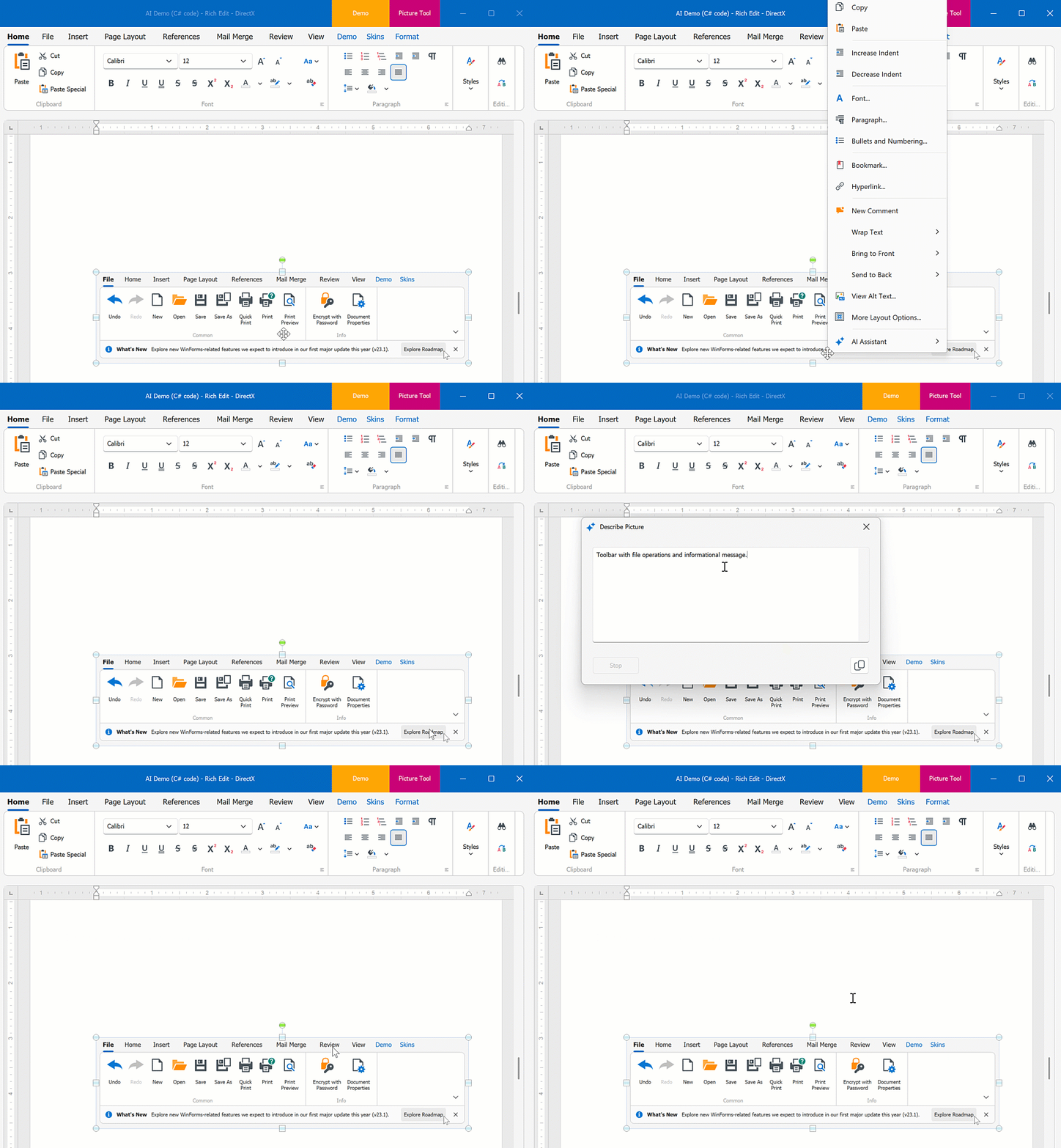
The AI-powered “Generate Image Description” extension generates the description for the image in DevExpress WinForms Spreadsheet and Rich Text Edit controls.
Play the following animation to see how the AI-powered “Generate Image Description” extension in a WinForms Rich Text Editor generates Alt text for an image:
[Run Demo](dxdemo://Win/AI/MainDemo/RichEditAIModule)
See the following help topic for additional information: [Generate Image Description](/WindowsForms/405188/ai-powered-extensions/generate-image-description).
### Prompt to Expression
The AI-powered “Prompt to Expression” extension converts natural language into valid filter and unbound column expressions for data-aware WinForms controls. Instead of writing complex expressions, users describe the desired logic in plain text:
- Sample Filter Expression
- *Display orders expected to arrive within 7 days.*
- Sample Unbound Column Expression
- *Compute total amount.*
The system sends the prompt to the configured AI service, which generates a valid expression for the control. The [Expression Editor](/WindowsForms/6212/common-features/expressions/expression-editor) or [Filter Editor](/WindowsForms/2471/controls-and-libraries/data-grid/visual-elements/view-common-elements/filter-editor) displays and validates the result immediately.

[Run Demo: Prompt to Expression](dxdemo://Win/AI/MainDemo/ExpressionEditorAIModule)
See the following help topic for more information: [Prompt to Expression](/WindowsForms/405608/ai-powered-extensions/prompt-to-expression).
### Smart Autocomplete
The AI-powered “Smart Autocomplete” feature intelligently predicts and suggests words or phrases based on the user’s current input. As you type, the AI model analyzes the context of the text and makes relevant suggestions in real time.
[Run Demo](dxdemo://Win/AI/MainDemo/SmartAutoCompleteModule)
Applies to:
[MemoEdit](/WindowsForms/DevExpress.XtraEditors.MemoEdit)
See the following help topic for additional information: [Smart Autocomplete](/WindowsForms/405208/ai-powered-extensions/smart-auto-complete).
### Smart Paste
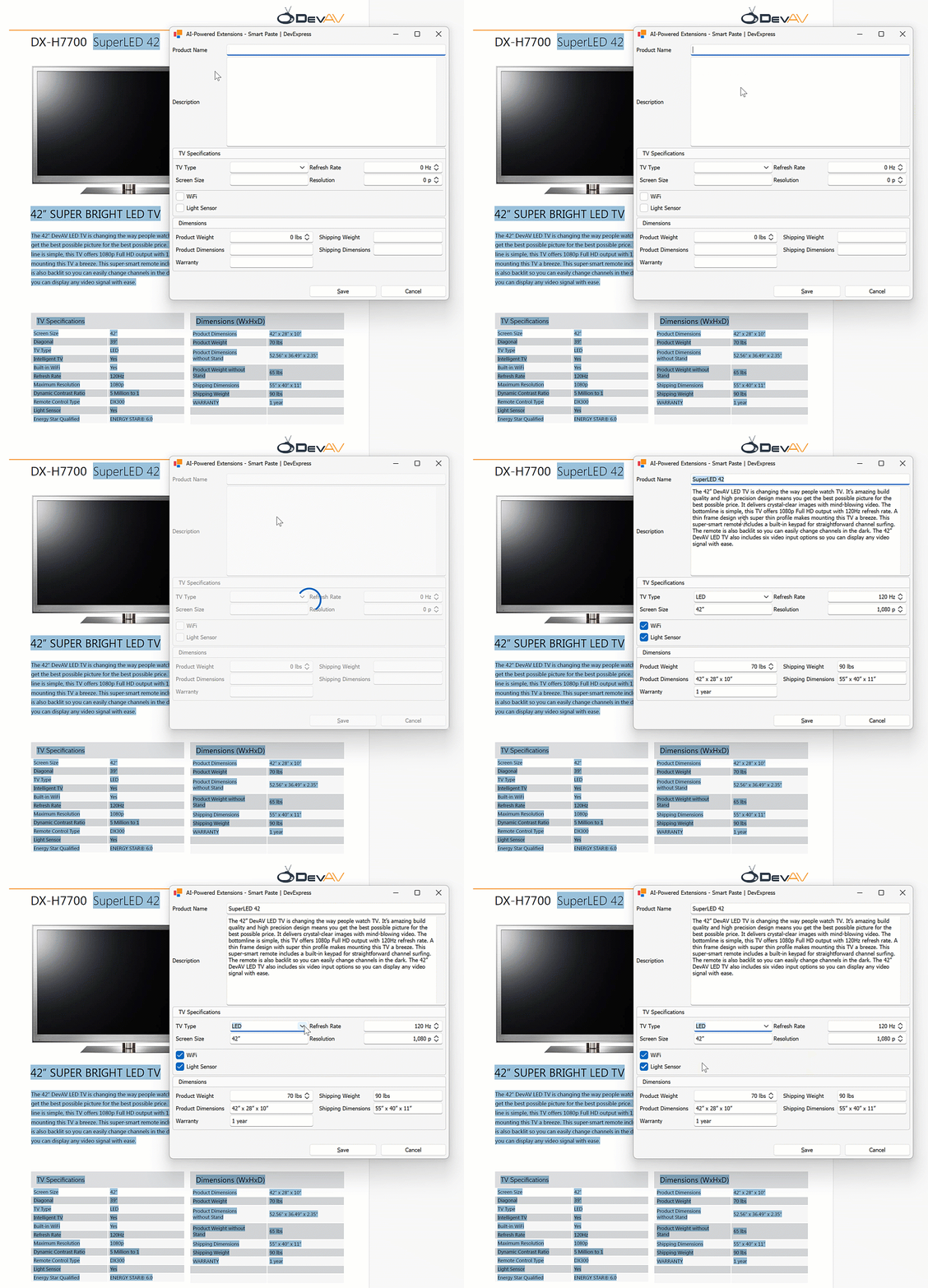
“SmartPaste” is an AI-powered feature that transforms the traditional copy-and-paste process into a smarter, more efficient tool. Designed to improve productivity, SmartPaste analyzes the content you copy and intelligently assigns the right values to the appropriate fields or row cells in the DevExpress Data Grid and LayoutControl-driven forms.
Play the following animation to see how “SmartPaste” works:
[Run Demo](dxdemo://Win/AI/MainDemo/SmartPasteAIModule)
Applies to:
- [Data Grid](/WindowsForms/3455/controls-and-libraries/data-grid)
- [Layout Control](/WindowsForms/3407/controls-and-libraries/form-layout-managers/layout-and-data-layout-controls/layout-control/layout-control)
- [Data Layout Control](/WindowsForms/4921/controls-and-libraries/form-layout-managers/layout-and-data-layout-controls/data-layout-control)
See the following help topic for additional information: [Smart Paste](/WindowsForms/405152/ai-powered-extensions/smart-paste).
### Smart Search
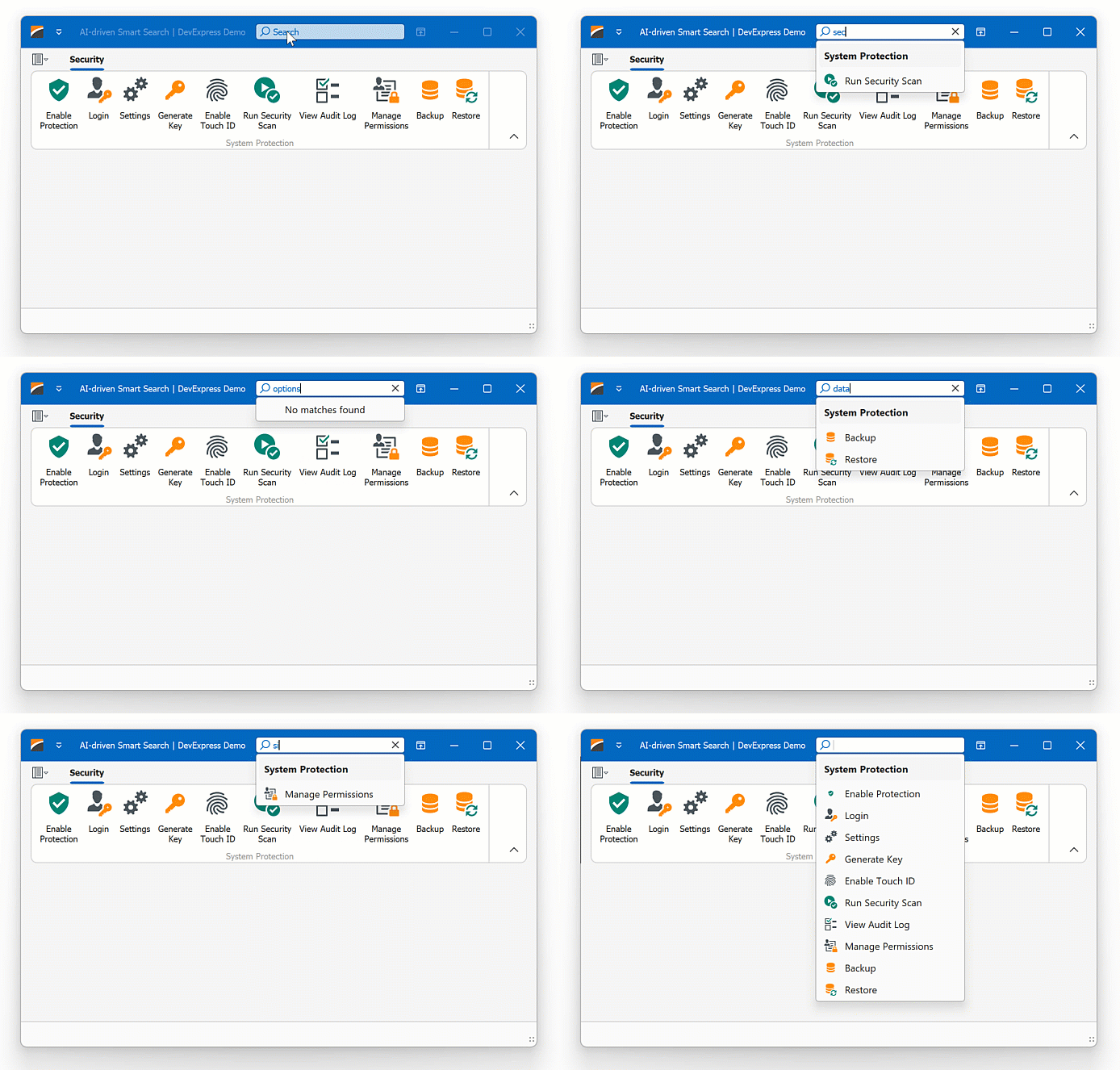
“Smart Search” works alongside the traditional search algorithms to offer a more powerful and user-friendly search experience. It offers results that are more aligned with what the user is seeking, even if the input contains misspellings.
Play the following animation to see how AI-powered smart search works in the DevExpress WinForms Ribbon control:
[Run Demo](dxdemo://Win/AI/MainDemo/SmartSearchAIModule)
Applies to:
- [Ribbon Control](/WindowsForms/2500/controls-and-libraries/ribbon-bars-and-menu/ribbon)
- [Accordion Control](/WindowsForms/114553/controls-and-libraries/navigation-controls/accordion-control)
See the following help topic for additional information: [Smart Search](/WindowsForms/405154/ai-powered-extensions/smart-search).
### Semantic Search
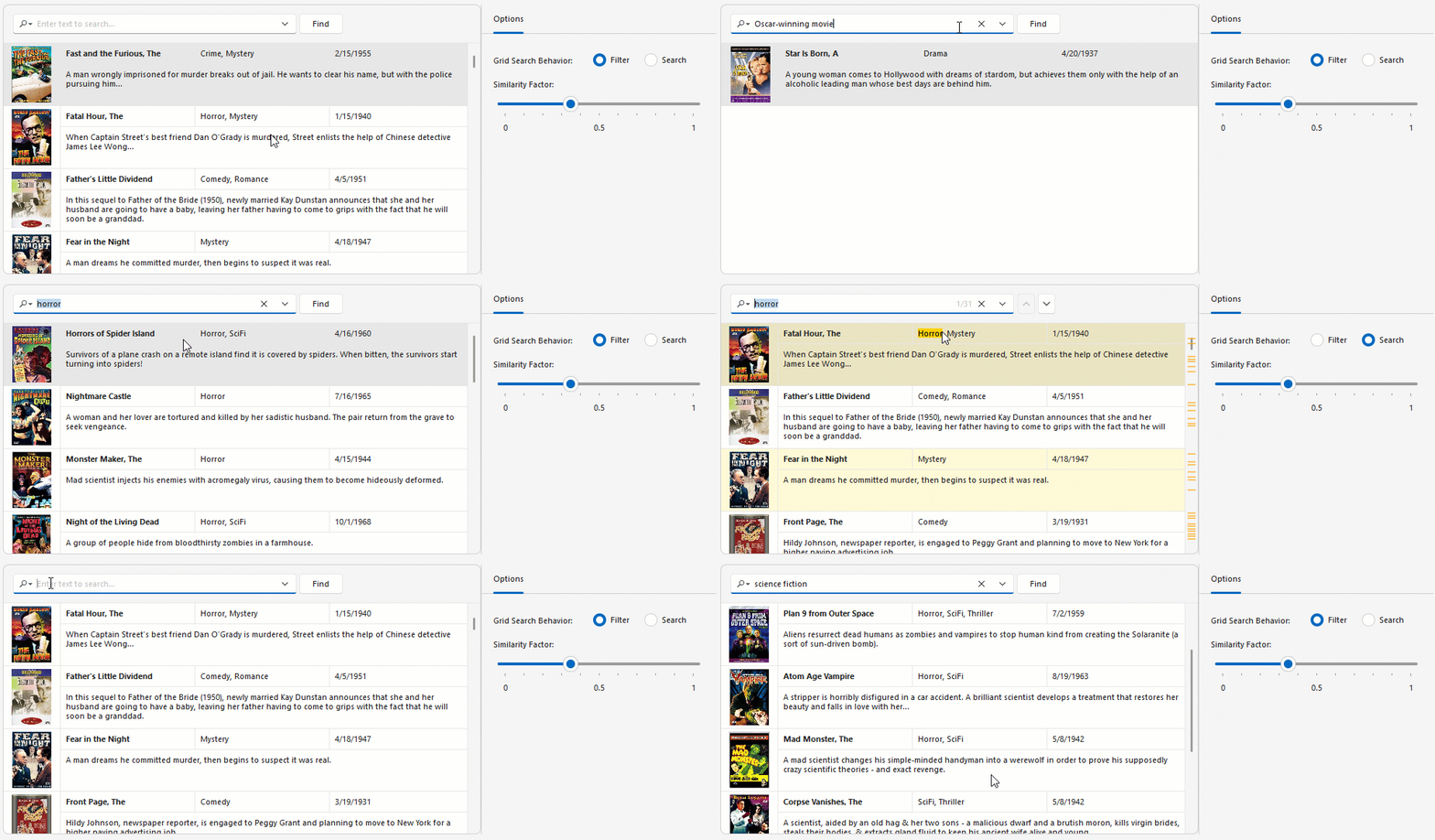
Semantic search enables users to locate relevant data quickly and accurately within large datasets. Unlike standard keyword-based search, semantic search leverages Natural Language Processing (NLP) to analyze search queries beyond exact keyword matching.
Semantic search uses an embedding generator to convert text into numerical vector representations. Vectors are stored in a vector database. When a user enters a search query, the search engine computes similarity scores between the query vector and stored data vectors to return the most relevant results.
[Run Demo: Semantic Search - Grid Control](dxdemo://Win/AI/MainDemo/SemanticSearchModule)
Applies to:
- [Data Grid](/WindowsForms/3455/controls-and-libraries/data-grid)
- [Grid Lookup](/WindowsForms/DevExpress.XtraEditors.GridLookUpEdit)
- [Search Lookup](/WindowsForms/DevExpress.XtraEditors.SearchLookUpEdit)
See the following help topic for additional information: [Semantic Search](/WindowsForms/405400/ai-powered-extensions/semantic-search).
### Custom Extensions
You can create custom extensions based on DevExpress AI-powered extensions. See the following help topic for additional information and examples: [Create Custom AI-powered Extensions](/WindowsForms/405336/ai-powered-extensions/custom-ai-powered-extensions).
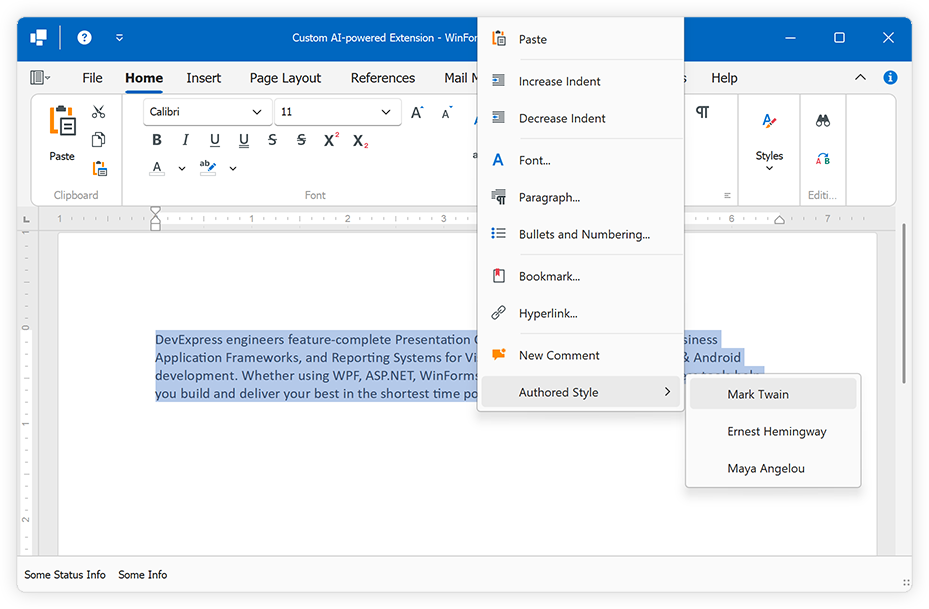
[Run Demo](dxdemo://Win/AI/MainDemo/CodeExamples/Work_with_Extensions.Create_custom_extension)
### Security Considerations (Indirect Prompt Injection)
DevExpress text-based AI-powered extensions and the [document-based Ask AI extension](/OfficeFileAPI/405645/ai-powered-extensions#ask-contextual-questions-about-document-content) process user-provided content (documents, messages, or clipboard data) and pass this content to an LLM for analysis. This workflow introduces a class of attacks (**indirect prompt injection**) where malicious instructions are embedded in valid content. These instructions may attempt to override system behavior, extract sensitive information, or manipulate the model’s output.
DevExpress AI-powered extensions include automatic prompt-injection protection. Protection is enabled by default for all text and document-based AI-powered extensions. The system adds protective instructions to AI requests. The LLM interprets these instructions and determines the final response.
Refer to the following help topic for additional information: [Prompt Injection Protection in AI-powered Extensions](/GeneralInformation/405921/security/prompt-injection-protection-in-ai-extensions).
## AI Chat Control
Note
The AI Chat Control leverages `BlazorWebView` to reuse the DevExpress Blazor AI Chat component ([DxAIChat](/Blazor/DevExpress.AIIntegration.Blazor.Chat.DxAIChat)). To use the WinForms AI Chat Control you must have one of the following active subscriptions: [Universal](https://www.devexpress.com/subscriptions/universal.xml), [DXperience](https://www.devexpress.com/subscriptions/dxperience.xml), [ASP.NET & Blazor](https://www.devexpress.com/buy/net/).
The AI Chat Control ([AIChatControl](/WindowsForms/DevExpress.AIIntegration.WinForms.Chat.AIChatControl)) allows you to incorporate an interactive, Copilot-inspired chat-based UI within your WinForms application. The DevExpress AI Chat Control can only be used in Windows Forms applications that target the .NET 8+ framework.
[Run Demo: AI Chat Control](dxdemo://Win/AI/MainDemo/AIChatPromptSuggestionsModule)

Features include:
- Integrate seamlessly with AI services
- Render Markdown messages
- Copy and regenerate responses
- Manually handle chat messages
- Attach files
- Specify prompt suggestions
- Create an Assistant that chats based on your data
- Manage multiple chat clients or agents
- Save and load chat history
- Response streaming
- Resources
- Tool Calling
- DevExpress Skins
See the following help topic for additional information: [AI Chat Control](/WindowsForms/405218/ai-powered-extensions/ai-chat-control).
## See Also
- [Customize DevExpress AI-powered Extensions](/CoreLibraries/405204/ai-powered-extensions#customize-devexpress-ai-powered-extensions)
- [Error Logging and Handling](/CoreLibraries/405204/ai-powered-extensions#error-logging-and-handling)
- [Track Token Usage](/CoreLibraries/405204/ai-powered-extensions#track-token-usage)