# Field Groups | WinForms Controls | DevExpress Documentation
The [PivotGridControl](/WindowsForms/DevExpress.XtraPivotGrid.PivotGridControl) can display data [hierarchically](/WindowsForms/1796/controls-and-libraries/pivot-grid/fundamentals/hierarchical-value-presentation) at multiple detail levels in a single control. Once a hierarchy is generated, you can join fields in a continuous group to allow users to interact with it as a single field. Users cannot separate such fields when dragging one of them to a different area or hiding it in the customization form.
The image below displays three field groups created in different [Pivot Grid areas](/WindowsForms/1803/controls-and-libraries/pivot-grid/layout/field-location-and-order).
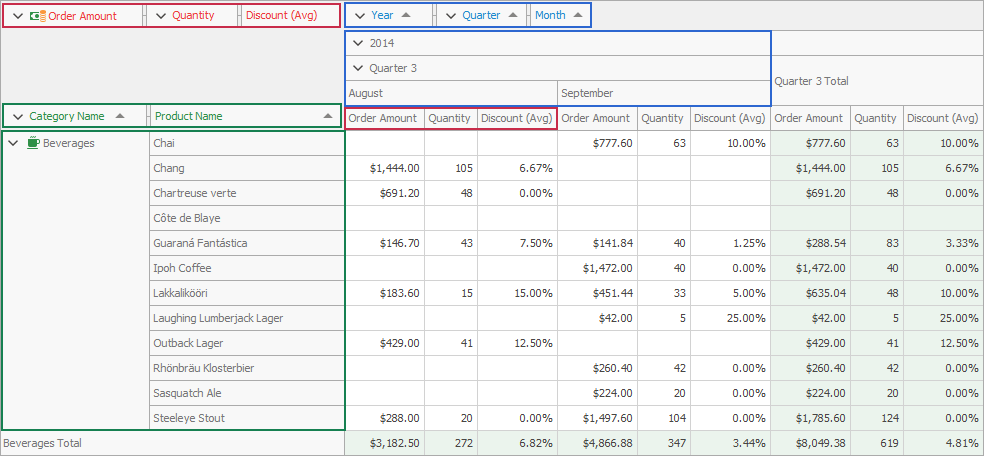
[Run Demo: Groups module in the XtraPivotGrid MainDemo](dxdemo://Win/XtraPivotGrid/MainDemo/Groups)
## Create Field Groups
You can create a field group at design time in the [Groups page](/WindowsForms/1827/controls-and-libraries/pivot-grid/design-time-features/pivotgrid-designer/groups-page) of the PivotGrid Designer.
Follow the steps below to create a field group at runtime:
1. Create a [PivotGridGroup](/CoreLibraries/DevExpress.XtraPivotGrid.PivotGridGroup) descendant and add it to the [PivotGridControl.Groups](/WindowsForms/DevExpress.XtraPivotGrid.PivotGridControl.Groups) collection.
2. Add fields to the created group. To do this, you can use one of the [PivotGridGroupCollection.Add](/CoreLibraries/DevExpress.XtraPivotGrid.PivotGridGroupCollection.Add.overloads) overloads. Use the [PivotGridFieldBase.Name](/CoreLibraries/DevExpress.XtraPivotGrid.PivotGridFieldBase.Name) property to specify data fields to add to the group.
To move a group to a specific area or to a new position within the current area, use the [PivotGridFieldBase.Area](/CoreLibraries/DevExpress.XtraPivotGrid.PivotGridFieldBase.Area) and [PivotGridFieldBase.AreaIndex](/CoreLibraries/DevExpress.XtraPivotGrid.PivotGridFieldBase.AreaIndex) properties of the first field in the group. `AreaIndex` and `Area` of the second and subsequent fields in the group have no effect.
Use the [PivotGridFieldBase.GroupIndex](/CoreLibraries/DevExpress.XtraPivotGrid.PivotGridFieldBase.GroupIndex) property to determine the index of the field group that owns the current field. The fields’ inner group index that determines the place of the field in a field group, is assigned automatically. To change field order in the group, use the [PivotGridFieldBase.InnerGroupIndex](/CoreLibraries/DevExpress.XtraPivotGrid.PivotGridFieldBase.InnerGroupIndex) property.
The following code snippet creates the *Year-Quarter-Month* group:
- C#
- VB.NET
using DevExpress.XtraPivotGrid;
using System.Windows.Forms;
using System.Collections.Generic;

namespace WindowsFormsApp2 {
    public partial class Form1 : Form {
        public Form1() {
            InitializeComponent();
            PivotGridControl pivotGridControl = new PivotGridControl();
            pivotGridControl.OptionsData.DataProcessingEngine = PivotDataProcessingEngine.Optimized;
            // ...
            PivotGridField fieldYear = new PivotGridField();
            fieldYear.Area = PivotArea.ColumnArea;
            fieldYear.Caption = "Year";
            fieldYear.DataBinding = new DataSourceColumnBinding("ShippedDate", PivotGroupInterval.DateYear);
            fieldYear.Name = "fieldYear";

            PivotGridField fieldQuarter = new PivotGridField();
            fieldQuarter.Area = PivotArea.ColumnArea;
            fieldQuarter.Caption = "Quarter";
            fieldQuarter.DataBinding = new DataSourceColumnBinding("ShippedDate", PivotGroupInterval.DateQuarter);
            fieldQuarter.Name = "fieldQuarter";

            PivotGridField fieldMonth = new PivotGridField();
            fieldMonth.Area = PivotArea.ColumnArea;
            fieldMonth.Caption = "Month";
            fieldMonth.DataBinding = new DataSourceColumnBinding("ShippedDate", PivotGroupInterval.DateMonth);
            fieldMonth.Name = "fieldMonth";

            pivotGridControl.Fields.AddRange(new PivotGridField[] {
                fieldYear,
                fieldQuarter,
                fieldMonth
            });
            PivotGridGroup group = new PivotGridGroup();
            group.AddRange(new PivotGridField[] { fieldYear, fieldQuarter, fieldMonth });
            pivotGridControl.Groups.Add(group);
        }
    }
}
Imports DevExpress.XtraPivotGrid
Imports System.Windows.Forms
Imports System.Collections.Generic

Namespace WindowsFormsApp2
    Partial Public Class Form1
        Inherits Form

        Public Sub New()
            InitializeComponent()
            Dim pivotGridControl As New PivotGridControl()
            pivotGridControl.OptionsData.DataProcessingEngine = PivotDataProcessingEngine.Optimized
            ' ...
            Dim fieldYear As New PivotGridField()
            fieldYear.Area = PivotArea.ColumnArea
            fieldYear.Caption = "Year"
            fieldYear.DataBinding = New DataSourceColumnBinding("ShippedDate", PivotGroupInterval.DateYear)
            fieldYear.Name = "fieldYear"

            Dim fieldQuarter As New PivotGridField()
            fieldQuarter.Area = PivotArea.ColumnArea
            fieldQuarter.Caption = "Quarter"
            fieldQuarter.DataBinding = New DataSourceColumnBinding("ShippedDate", PivotGroupInterval.DateQuarter)
            fieldQuarter.Name = "fieldQuarter"

            Dim fieldMonth As New PivotGridField()
            fieldMonth.Area = PivotArea.ColumnArea
            fieldMonth.Caption = "Month"
            fieldMonth.DataBinding = New DataSourceColumnBinding("ShippedDate", PivotGroupInterval.DateMonth)
            fieldMonth.Name = "fieldMonth"

            pivotGridControl.Fields.AddRange(New PivotGridField() { fieldYear, fieldQuarter, fieldMonth })
            Dim group As New PivotGridGroup()
            group.AddRange(New PivotGridField() { fieldYear, fieldQuarter, fieldMonth })
            pivotGridControl.Groups.Add(group)
        End Sub
    End Class
End Namespace
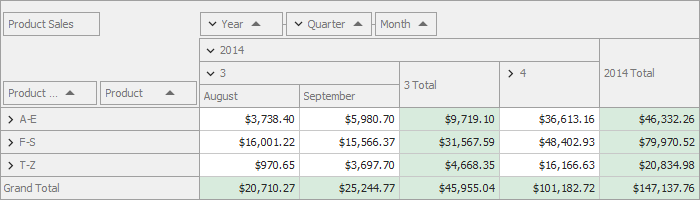
The image below shows the newly created group:
## Obtain Group Values
The expanded field group contains an ordered set of values (from fields) arranged into a group. For example, the image below shows the *2014* parent value that contains the *2014 - Quarter 4*, *2014 - Quarter 4 - October*, and *2014 - Quarter 4 - November*, and *2014 - Quarter 4 - December* child values.
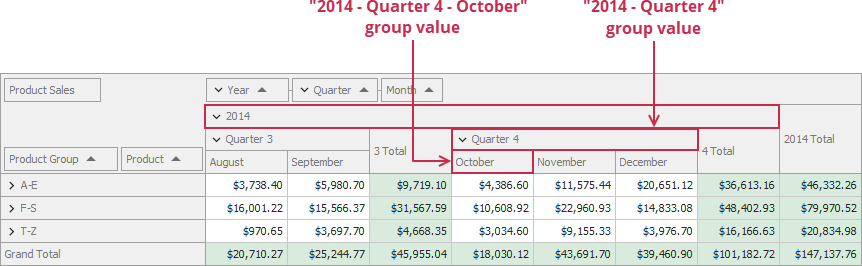
Use the [PivotGridGroup.GetUniqueValues](/CoreLibraries/DevExpress.XtraPivotGrid.PivotGridGroup.GetUniqueValues%28System.Object--%29) method to obtain child values from a particular group value. For example, if you call this method for the *2014 - Quarter 4* group value, you obtains the *October*, *November*, and *December* child values:
- C#
- VB.NET
List<object> uniqueChildValues =
     pivotGridControl1.Groups[0].GetUniqueValues(new object[] {2014, 4});
Dim uniqueChildValues As List(Of Object) = pivotGridControl1.Groups(0).GetUniqueValues(New Object() {2014, 4})
See Also
[Groups Page](/WindowsForms/1827/controls-and-libraries/pivot-grid/design-time-features/pivotgrid-designer/groups-page)